The calendar
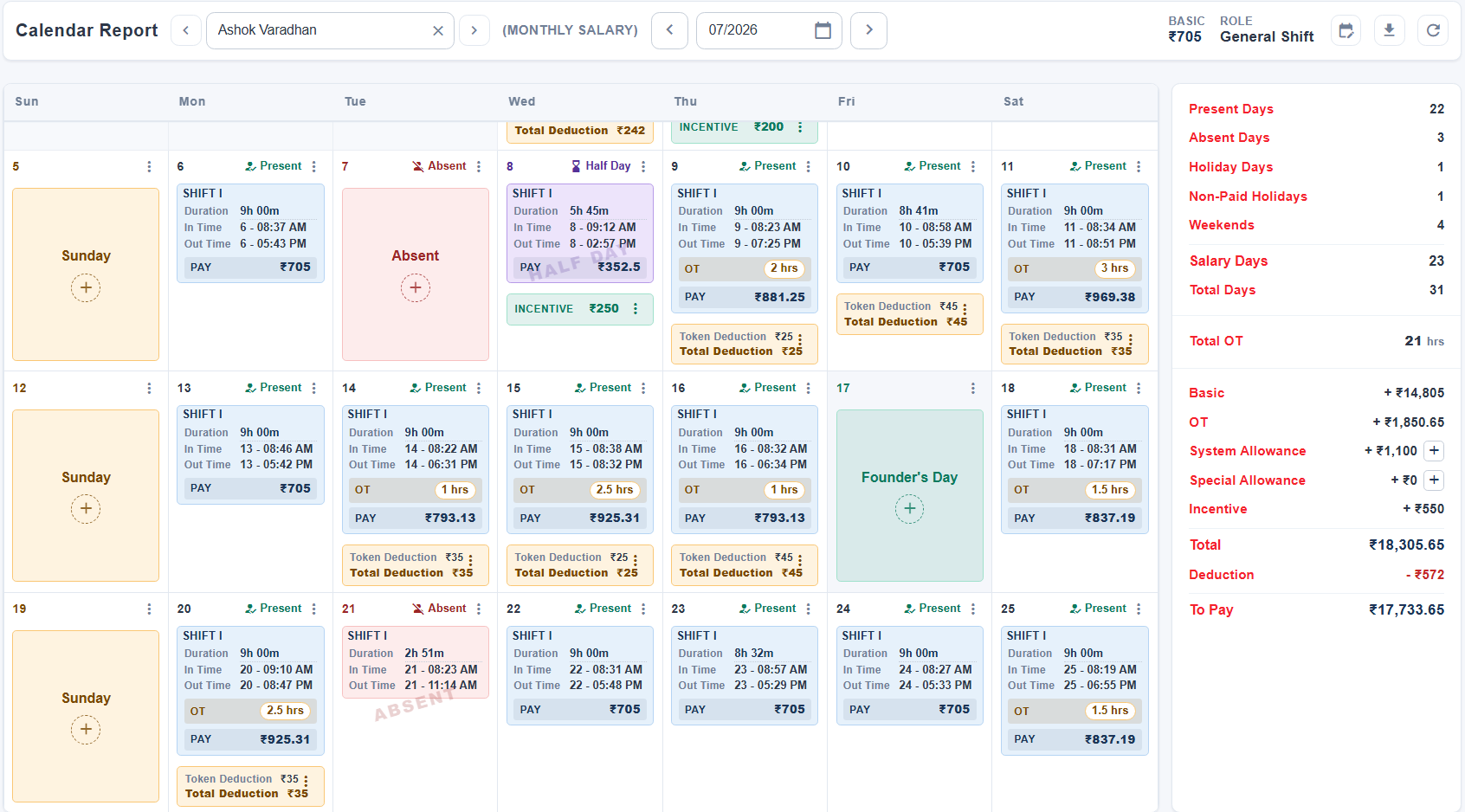
The screen the payroll argument gets settled on. Every day of the month, what the man did, what it was worth, and — where it is wrong — the place to fix it. The summary beside it recalculates as you go.

Built for factory floors that run daily, weekly and monthly wages side by side. Punches arrive from biometric readers, ID-card scans or a supervisor's correction; the system pairs them, works out the day, counts the overtime, applies the loans and deductions, and hands you a salary sheet you can defend line by line.
Nothing is configured in the abstract. Each step produces the data the next one needs — the shift you define is what the pairing measures against, and the day it produces is what the salary sheet counts.
Roles carry the shifts, buffers and OT terms. Employees carry the wage.
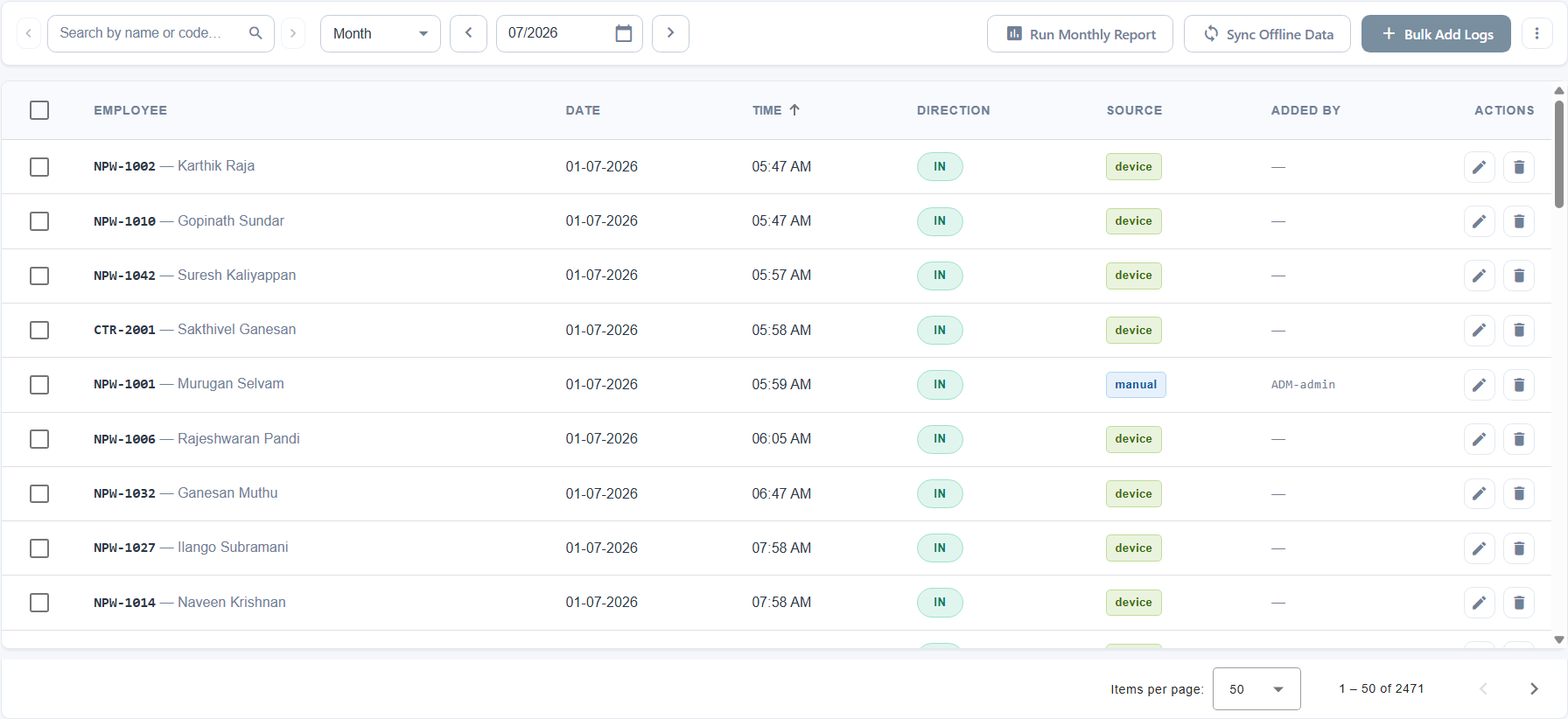
From the reader, from an ID-card scan, or typed in by a supervisor.
IN meets OUT, the active shift is picked, the day gets a status.
Fix a missed punch on the calendar. Every edit is signed and logged.
Allowances, incentives, deductions, token books and loan EMIs.
Salary sheet, slips, bank list — and the audit trail behind them.
A gate reader, a supervisor with a phone, and an admin fixing yesterday all write into the same place, in the same shape. Nothing downstream has to know which one it came from — and everything downstream can tell you if it needs to.
ESSL devices push each punch as it happens, with its direction and an optional overtime marker. Employees are matched on their device code or RFID number, so the reader never needs to know your employee master.
A supervisor signs in on a phone, scans the code printed on an employee's card, and saves an IN or an OUT. Useful where there is no reader — a second gate, a night shift, a site away from the plant.
Somebody forgets to punch out. An admin opens the day on the calendar and types the time in — permission-gated, attributed, and written to the audit trail alongside what it replaced.
An attendance role carries its shifts, its grace buffers and its overtime terms. Assign the role and the employee inherits all of it — and when the terms change, they change in one place for everyone on that role.
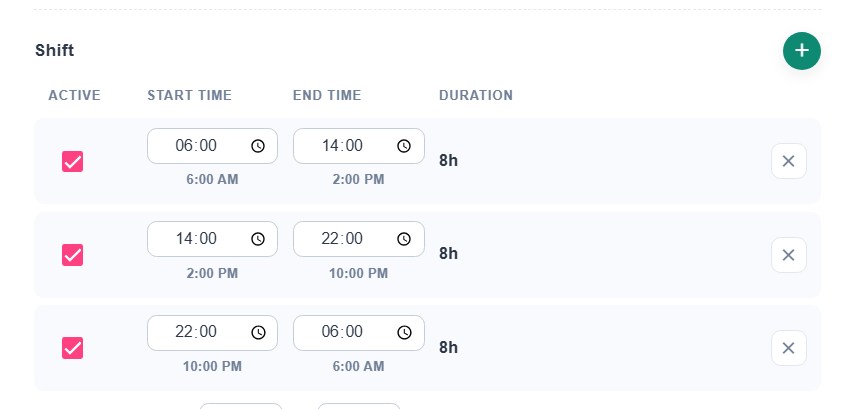
A role can hold several shifts, each with a start, an end, and separate early and late buffers. The system picks the one the punches actually fall inside, rather than asking a supervisor to declare it — so a man who came in for the second shift is paid for the second shift even if nobody told the system he would.
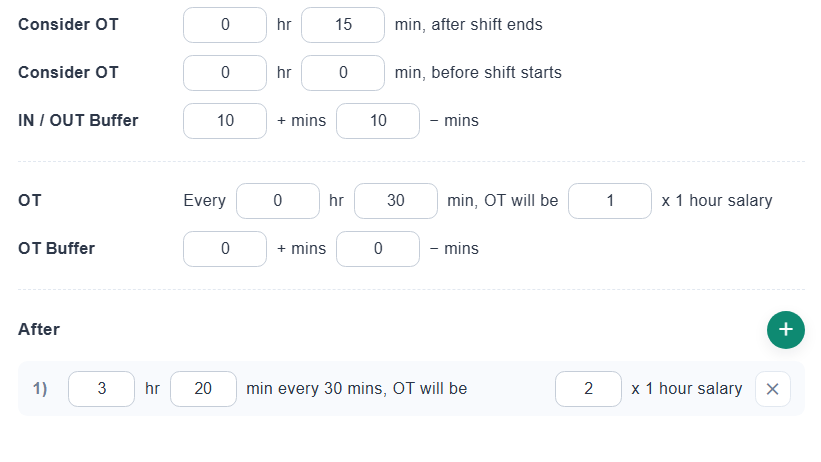
Overtime starts after the expected duration plus whatever slack the role allows, and it is counted in units — typically half an hour — at the role's rate. Cross a threshold and the rate steps up. Work a weekend or a holiday and the whole day can be overtime.
One person in full, everybody at a glance, or the raw pairing underneath both. They read the same records, so a correction made on the calendar shows up in the other two without anything being re-run.
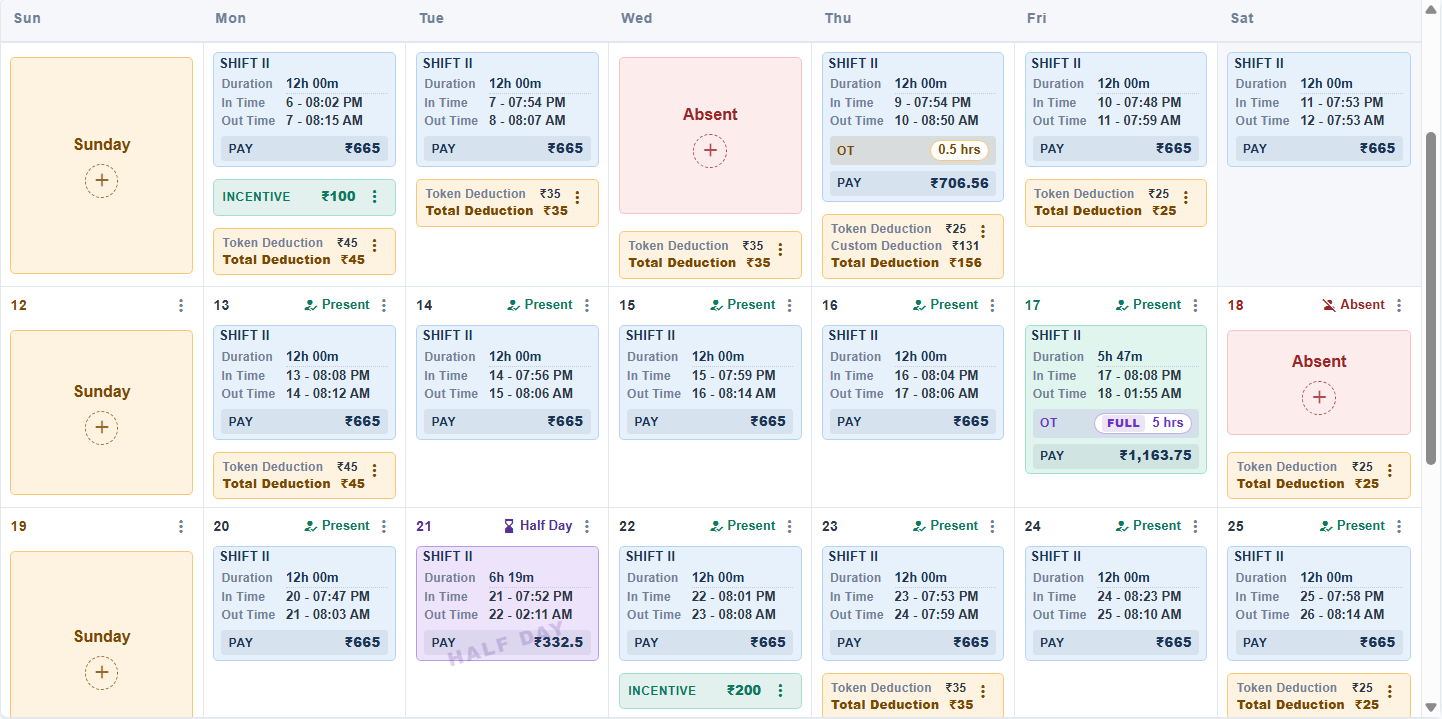
The screen the payroll argument gets settled on. Every day of the month, what the man did, what it was worth, and — where it is wrong — the place to fix it. The summary beside it recalculates as you go.
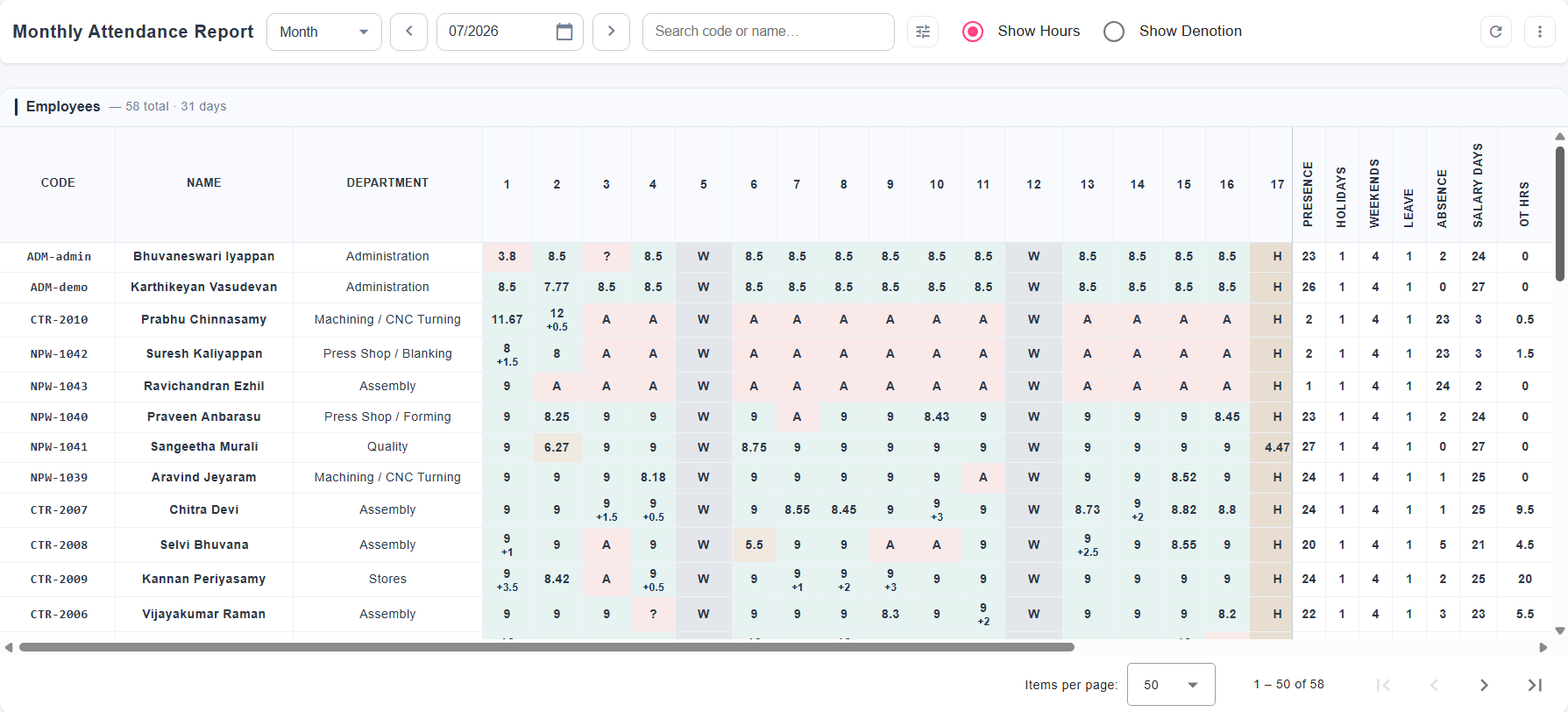
The whole plant as one grid: a row per employee, a column per day. Show the hours, or switch to the status letters and read the shape of the month instead. The totals on the right are the same ones the salary sheet starts from.
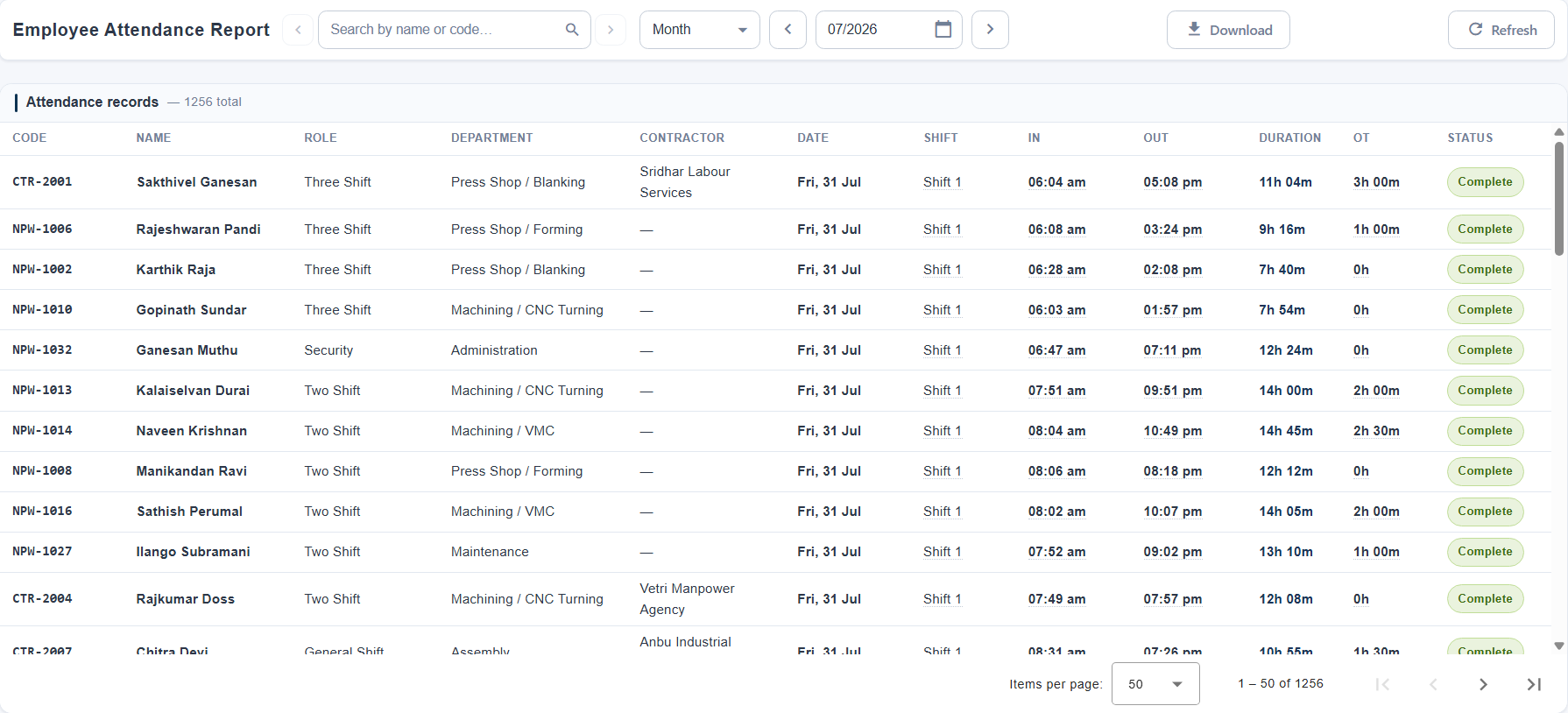
What the pairing actually produced — one row per shift, with the punches either side of it, the duration, the overtime and whether the pair was complete. This is what you open when a figure above needs explaining.
A month grid of thirty-one cells does not survive a 375-pixel screen, so on a phone the calendar is rebuilt rather than reflowed: the answer pinned at the top, the month as a map you can fold away, and the days as an agenda you scroll. Fully editable — the same corrections, the same permissions, the same audit trail.
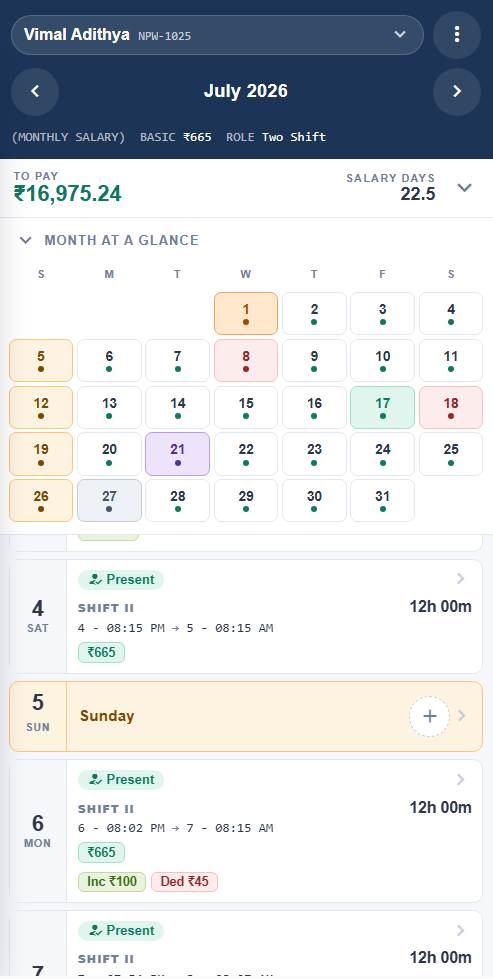
The month as a map Employee, month, total — then the grid, foldable to a one-line recap.
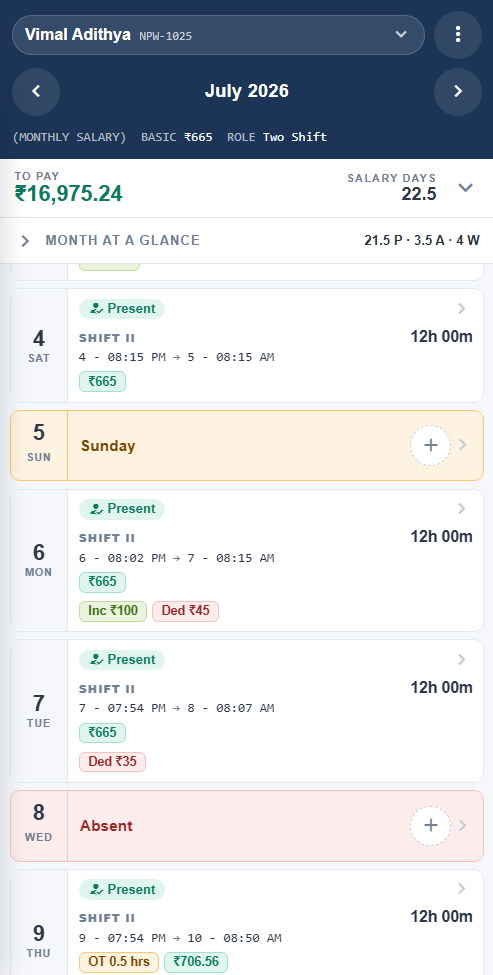
Every day, sized by what happened A worked day gets a card. A Sunday gets one line.
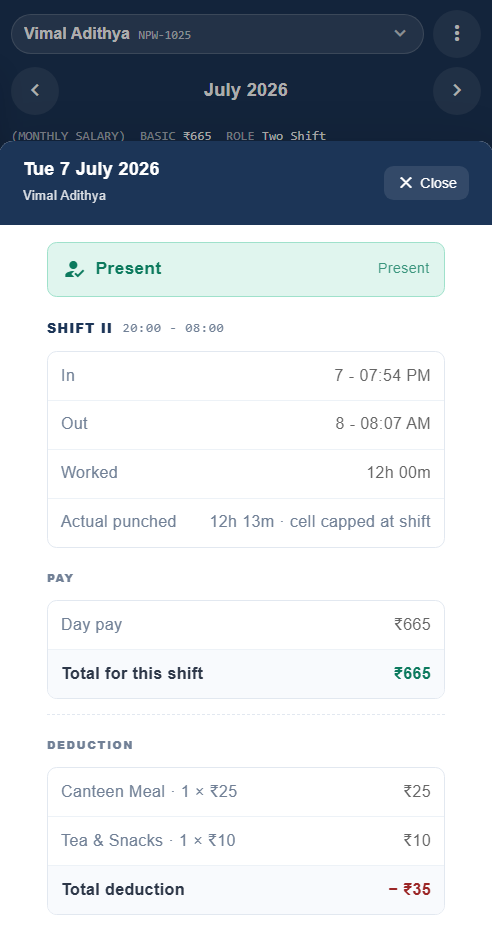
One day, opened Everything the desktop shows on hover — plus the day’s actions, as a bottom sheet.
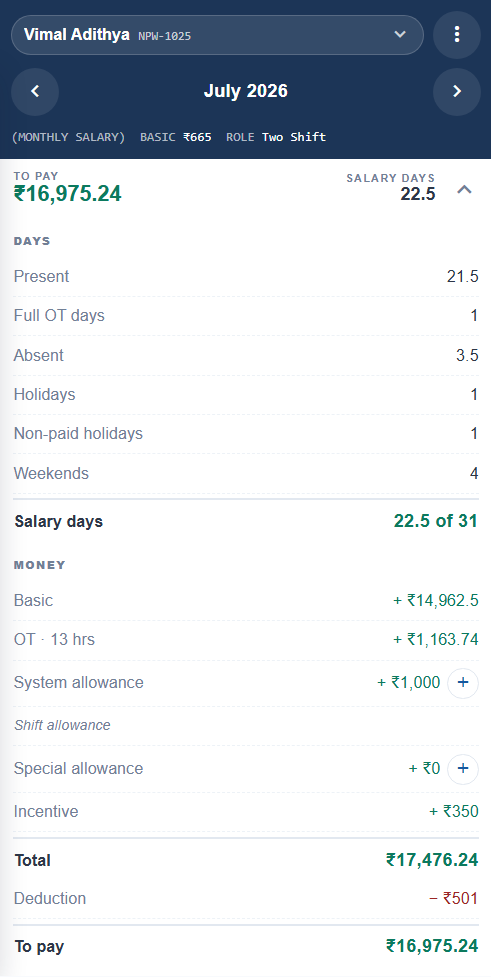
The number, unfolded Tap the pay bar and the whole month’s arithmetic opens beneath it.
The employee chip is the picker — tap it to search by name or code, or step to the next man on the list. Month arrows sit beside it.
One figure earns permanent space on a phone, and it is the month total. Tap the bar and the whole breakdown unfolds beneath it.
The grid stays, shrunk to dots, as a way to jump. Fold it away and it leaves a one-line recap of the month behind.
All thirty-one days in order. Quiet ones are a single line so the scroll stays short; the ones that matter get a card.
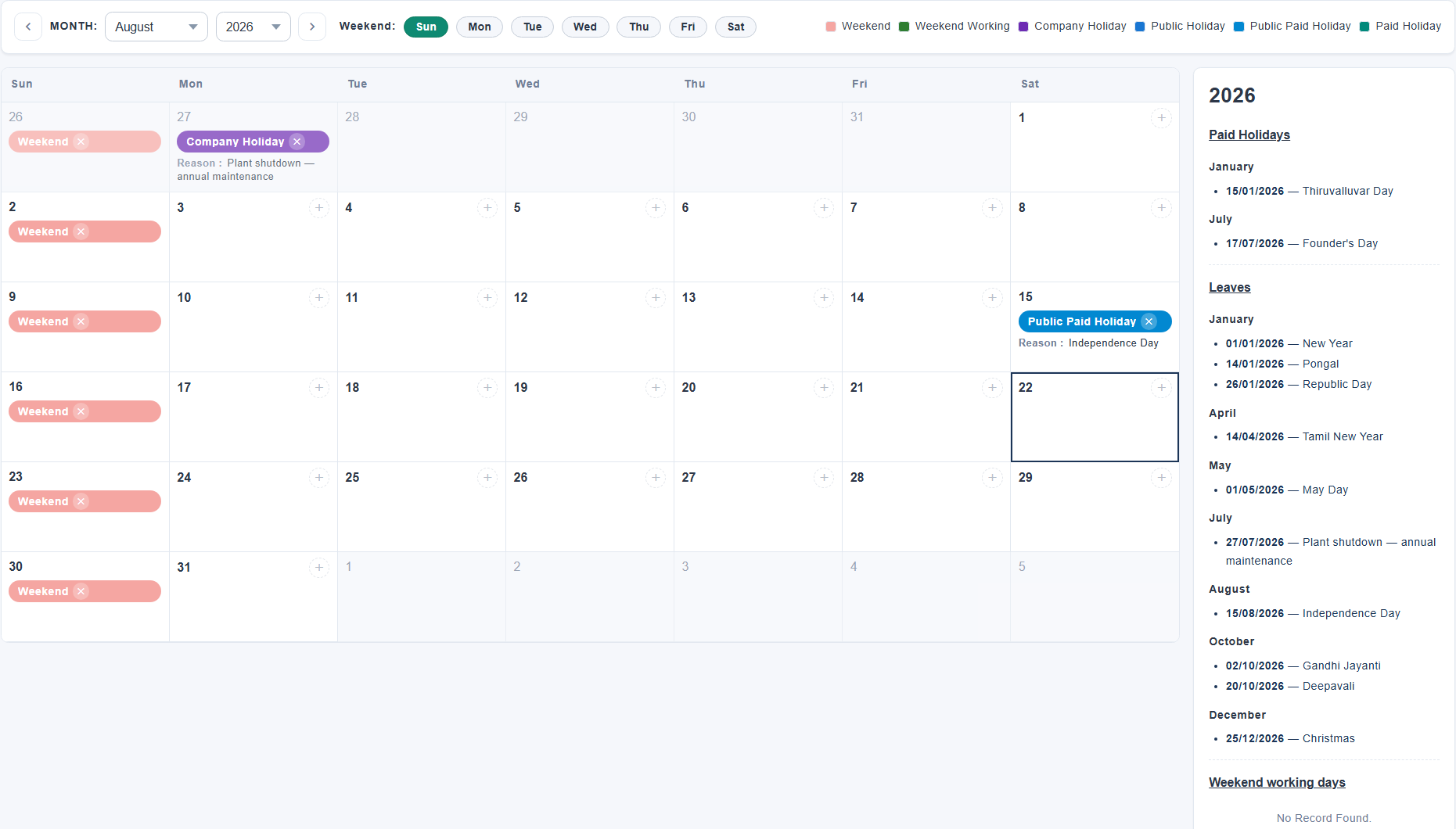
Weekends and holidays are not a footnote to attendance — they decide whether a day is paid, whether working it earns overtime, and whether an incentive still qualifies. So they are declared for the year, in one calendar, and everything else reads from it.
Daily, weekly and monthly men sit in the same plant and often on the same line. Each is paid by its own arithmetic, and the salary sheet puts them in one table anyway.
pay = rate × salary days
Straight count. The day statuses on the calendar are what "salary days" means.
pay = (rate ÷ working days) × salary days
working days = days in month − weekends − unpaid holidays
The divisor comes from the leave calendar, so a month with an extra holiday pays correctly without anyone adjusting a figure.
pay = week start → week end, per the company week calendar
Weeks are computed on their own boundaries, which is why a weekly month can start in the previous one.
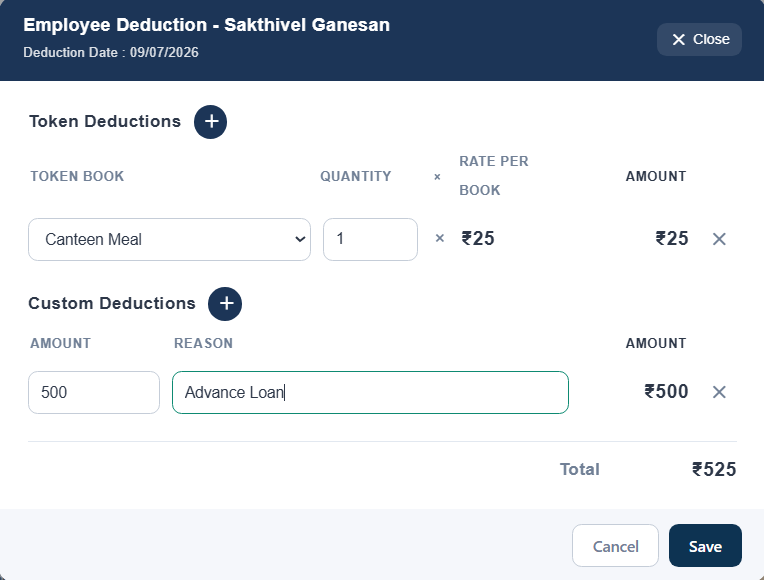
Between hours worked and money paid sits a queue of small adjustments — a canteen book, an advance, a Sunday bonus, a fine. Each has a home, a date and a reason, and each shows up on the day or the month it belongs to.
Canteen and facility scrip. Quantity taken on a day, priced at the rate in force on that date — so last quarter's meals stay at last quarter's price.
An amount, a tenure and an EMI schedule. Instalments come off the month's salary, mark themselves paid as their dates pass, and close the loan when the last one clears.
Rule-driven on weekly and monthly thresholds, or entered by hand against a reason code — with quick amounts your supervisors configure themselves.
Recurring, one-off or per-day, each effective-dated and resolved by the date it is being applied to. Added on the calendar, visible in the month total.
Effective-dated rates for the first stretch, the second stretch and overtime, kept as one chained master rather than three settings that can drift apart.
Deducted from overtime first and only then from the working day — the order matters, and it is the order the shop floor already expects.
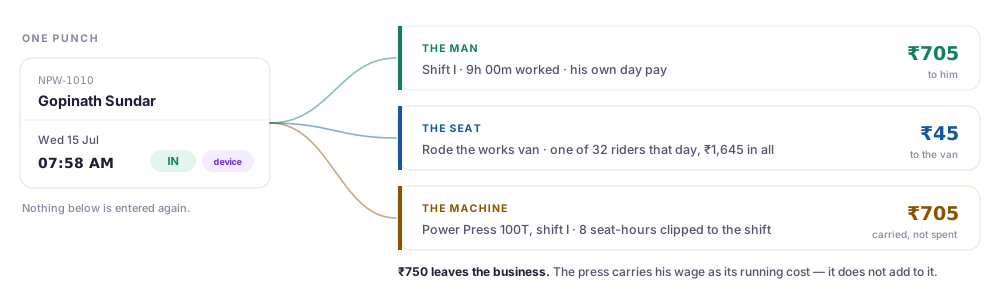
The same punches that pay a man also tell you what he cost to bring in and what he cost to run a machine for a shift. Both are derived from data you are already keeping — there is nothing extra to enter.
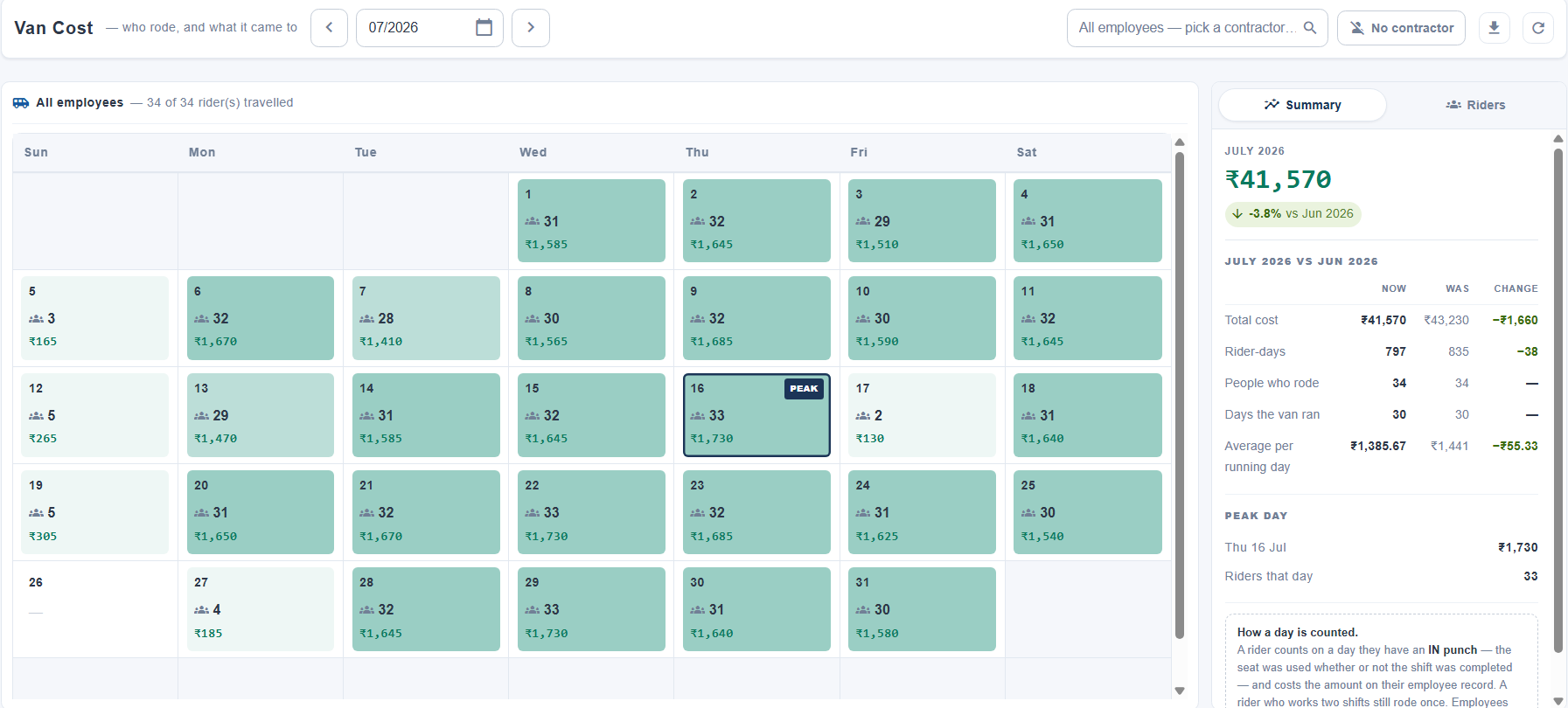
Works transport, as a month calendar. Each day carries how many riders turned up and what their seats cost, with the month set against the one before it. Click a day and the rail lists exactly who rode.
Assign men to machines and the cost of running each one falls out of the attendance you already have. Seat-hours are clipped to the shift, so a machine is never charged for time nobody was standing at it.
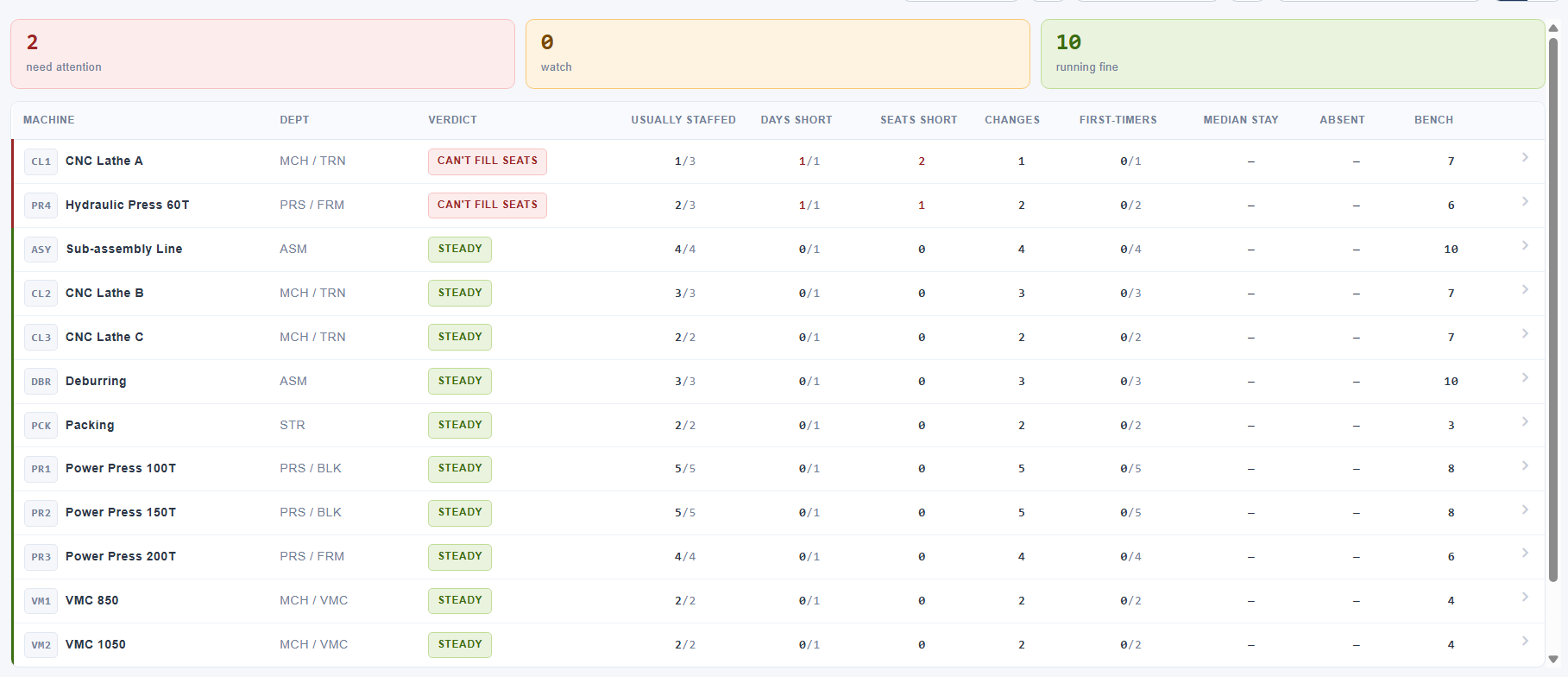
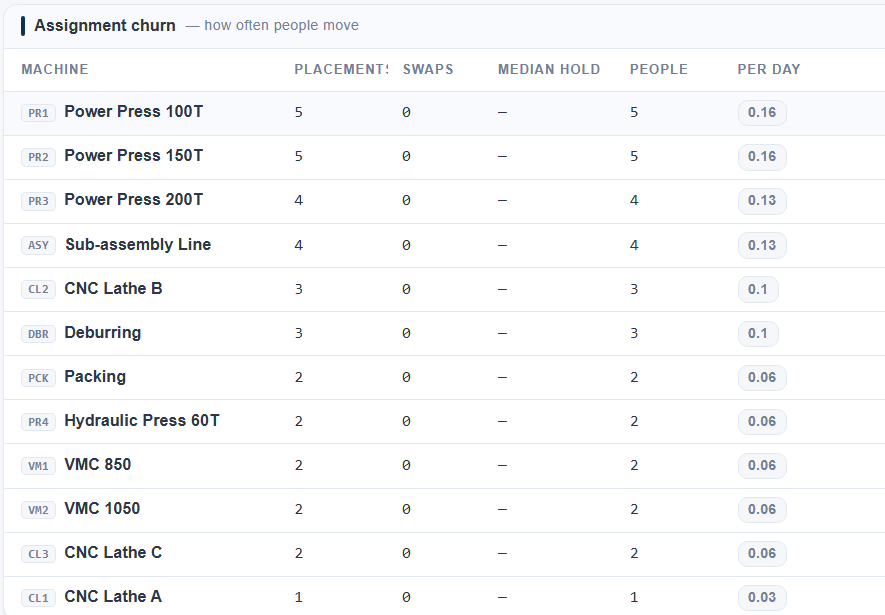
A verdict per machine, not a number to interpret. Two here cannot fill their seats; the other ten are steady. The columns behind the verdict are the evidence for it.
Placements, swaps and how long a person typically holds a seat. A machine that churns is a machine nobody stays on — which the cost figure alone will never tell you.
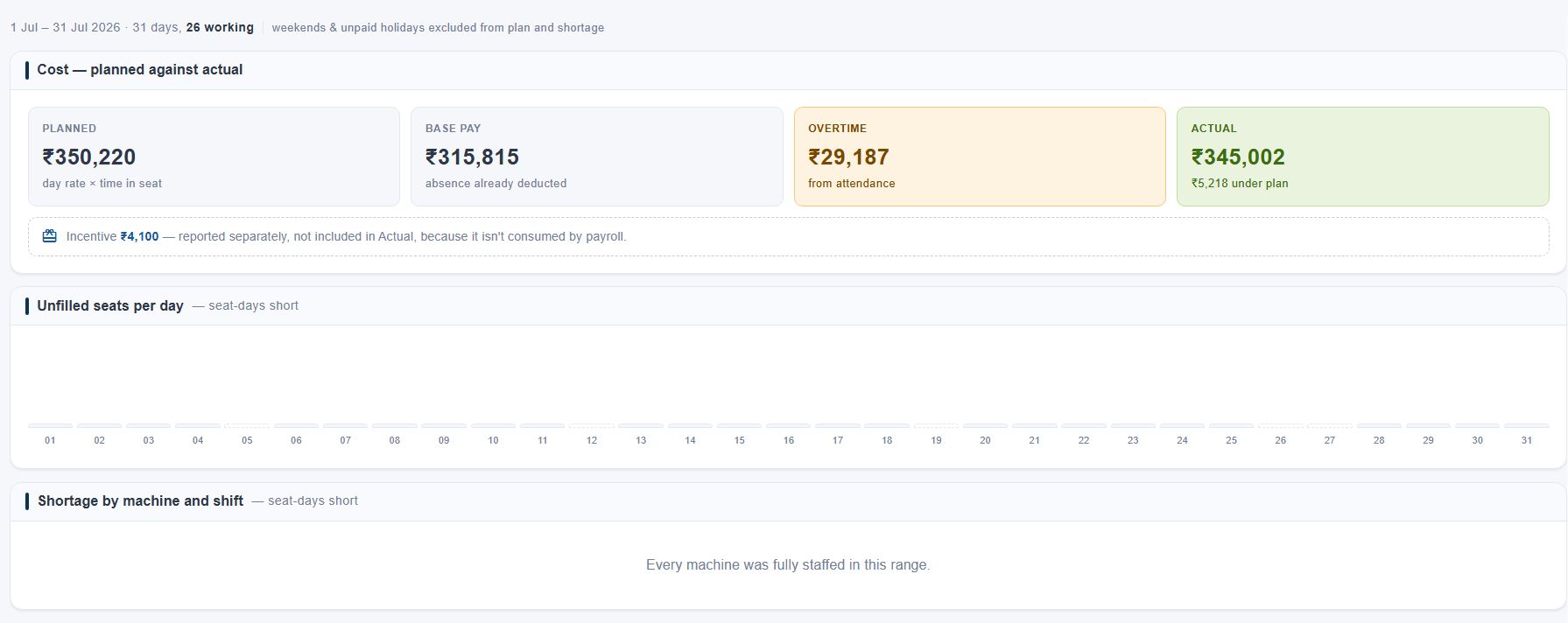
What the seats were meant to cost, what they did cost, and the gap. Overtime is broken out because it is the part that moves; incentive is kept outside Actual because payroll does not consume it.
Not a list of everyone who arrived after the hour — a list of everyone who arrived after the hour their role allows. The grace buffer is part of the rule, so this report and the calendar never disagree about who was late.
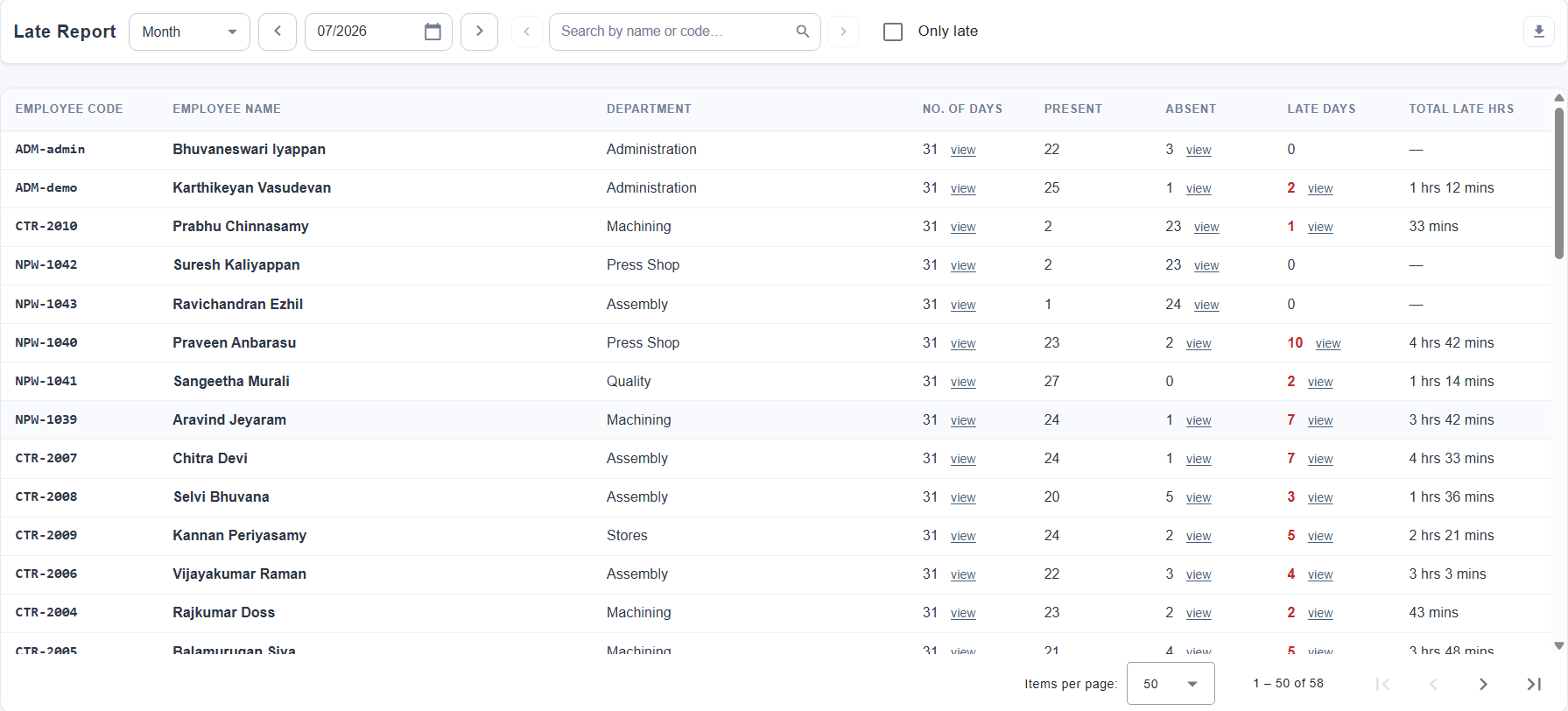
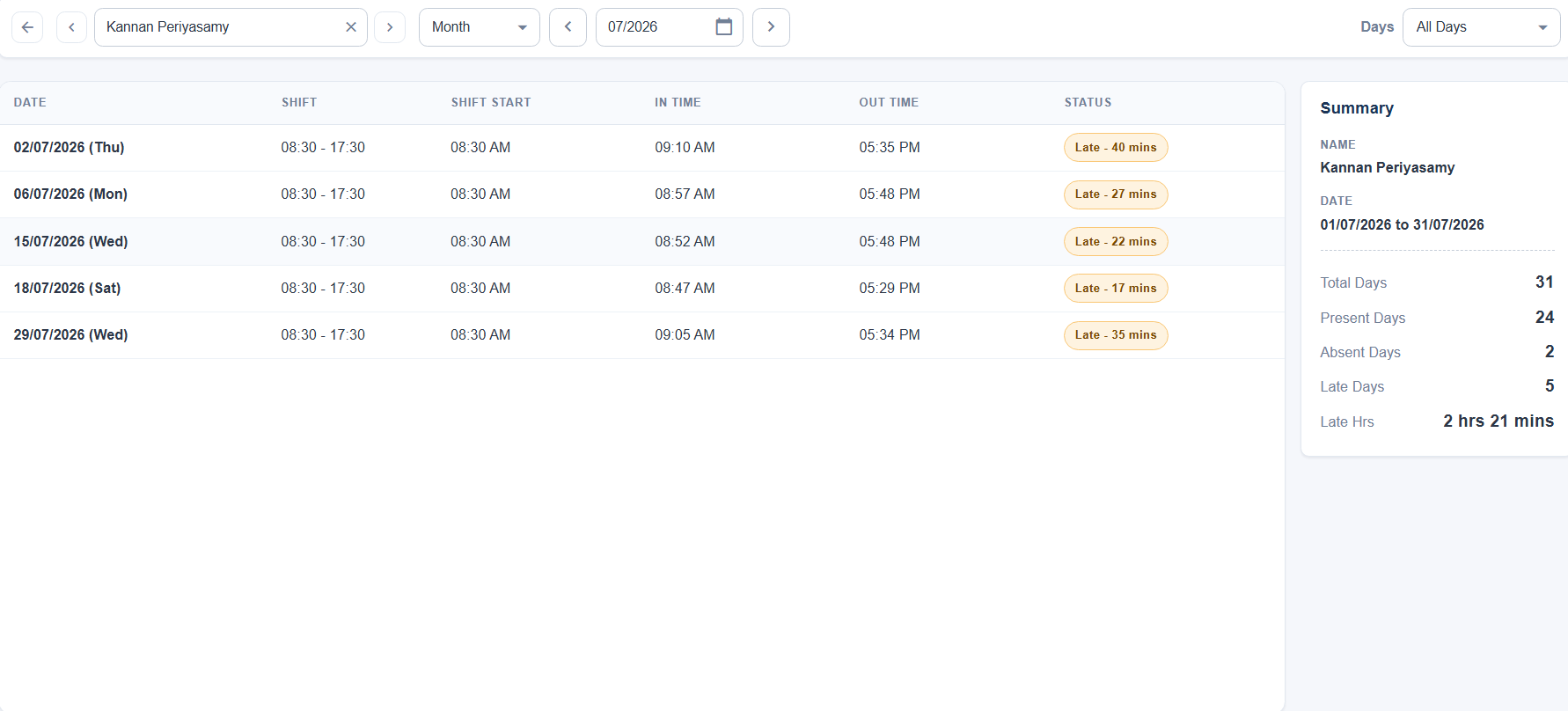
Every employee for the period, with the days they worked, the days they were late and the time it came to. Tick Only late and the people with nothing to answer for drop out of the list.
Every late day with its evidence: the shift they were on, when it started, when they actually arrived, and the gap between the two — so the figure in the list is auditable rather than asserted.
Who is in today, who has quietly stopped coming, who is late often enough to matter, and who changed that punch last Tuesday. Each has a screen, and each reads the same data the salary sheet does.
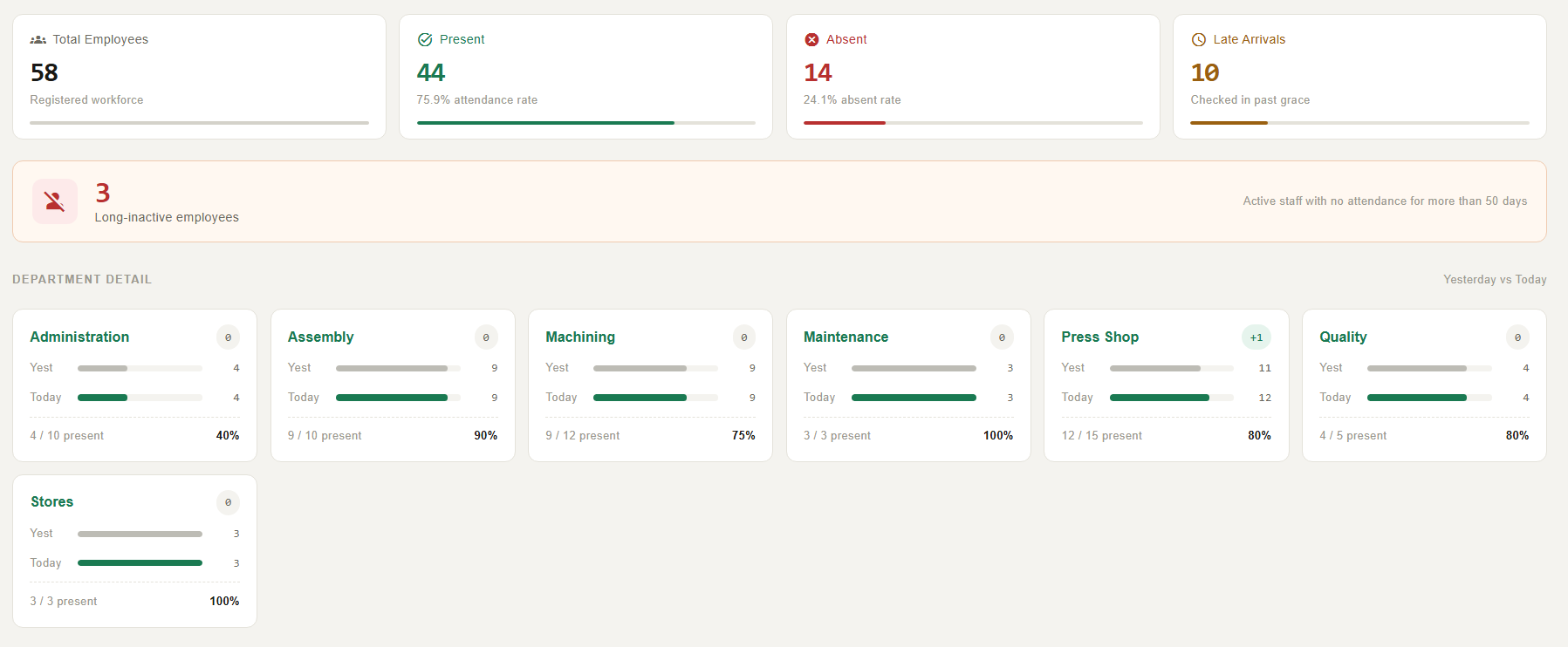
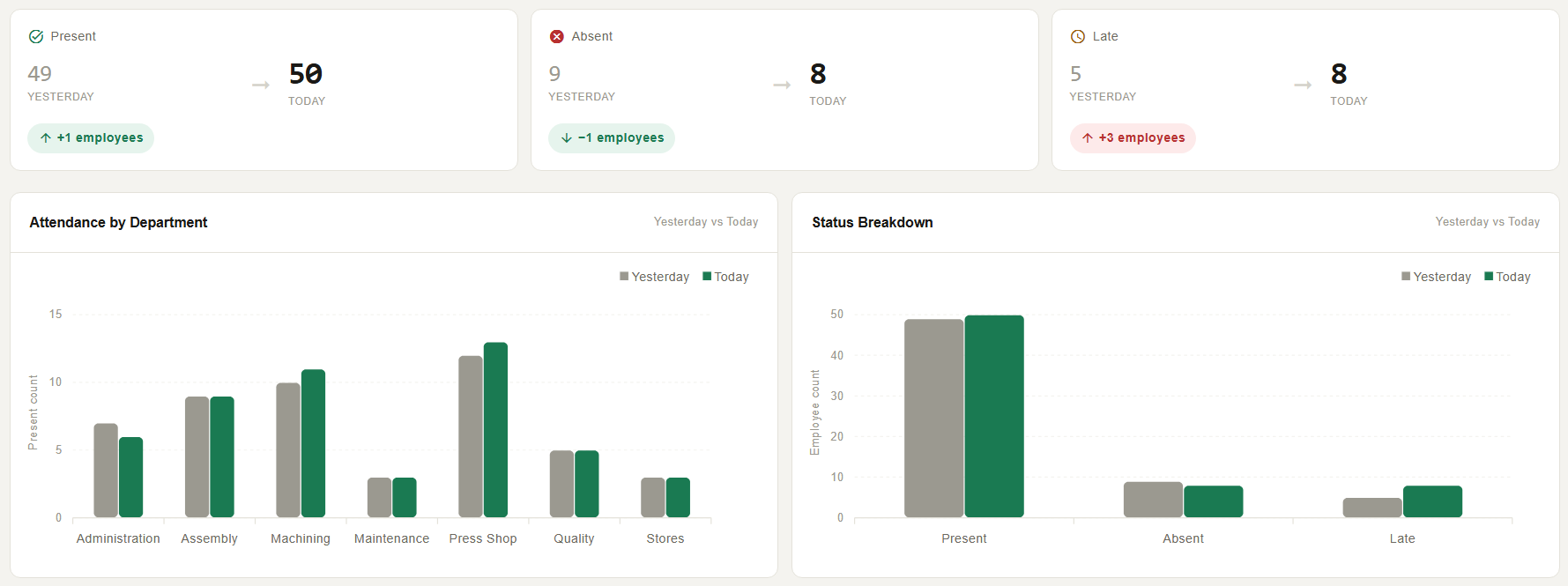
Head counts for the day with the rate beside each, then the same split by department — yesterday against today, so a number that moved is visible without doing the subtraction.
The same figures as a comparison rather than a snapshot. Present barely moved here; late jumped by three, which is the number worth asking about.
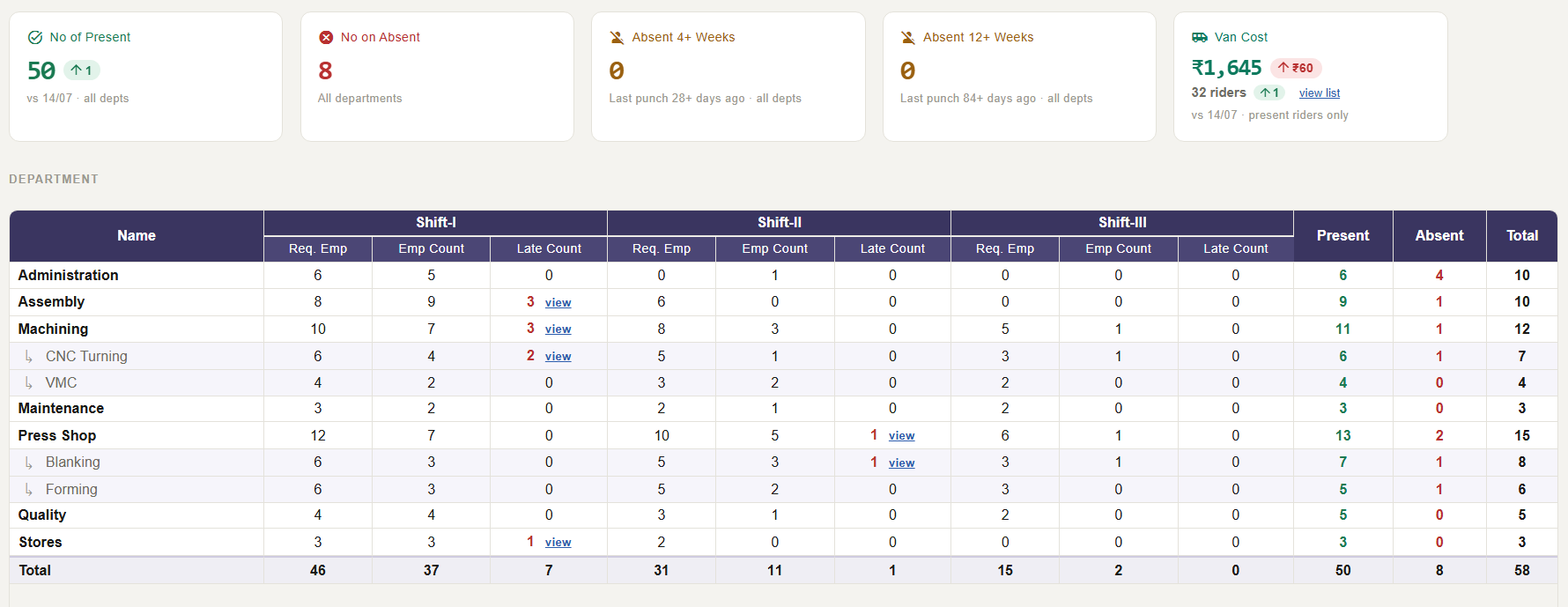
Required head count beside actual, per shift and per department — so a shift that is short is a number you can see rather than one you work out. The late counts link straight to the names.
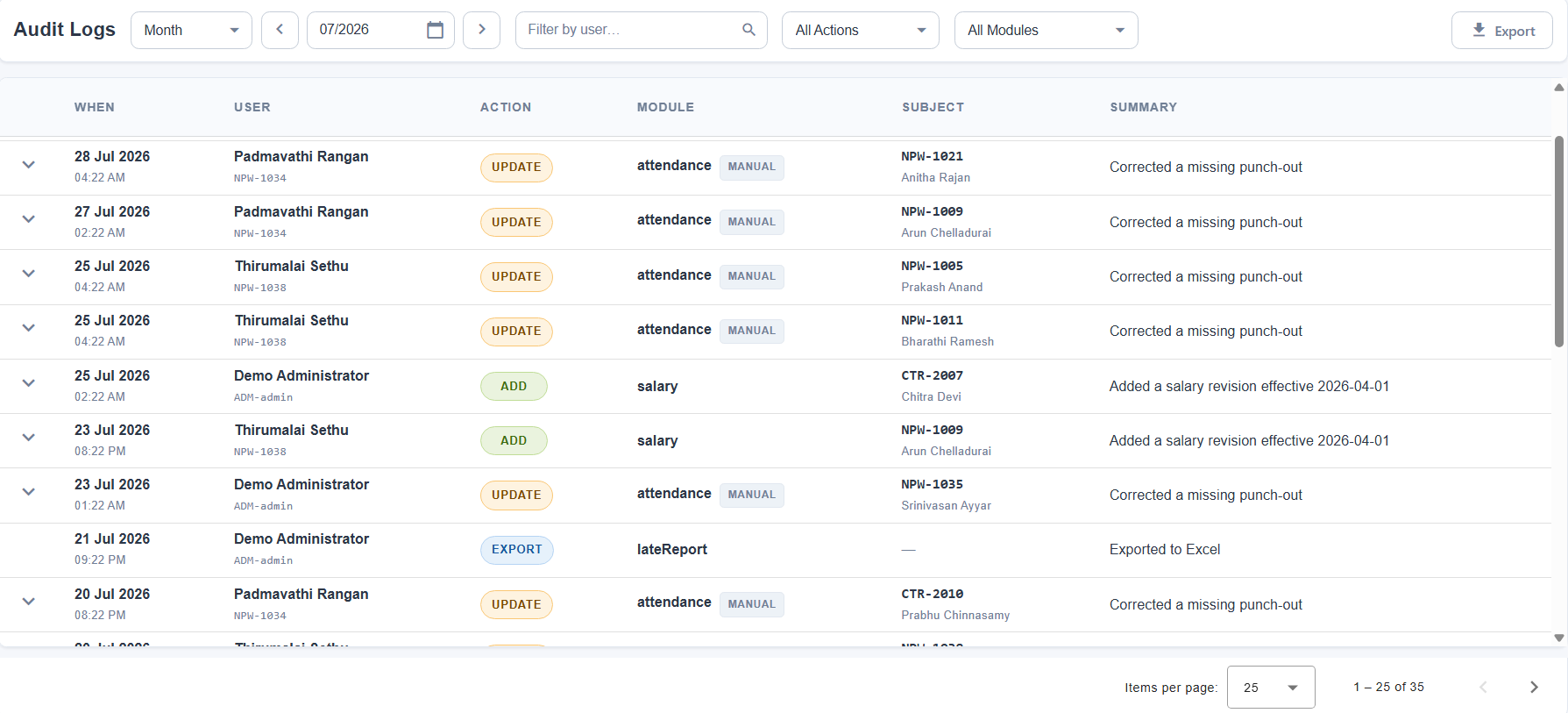
Every attendance edit, master change and export, with the actor, the timestamp and what the value was before. Device pushes are excluded — those are not decisions anyone made.
| Wage types | Daily, weekly and monthly, side by side in one plant and one salary sheet. Rates are effective-dated. |
|---|---|
| Attendance sources | ESSL biometric readers, QR scan of the printed ID card, and manual entry — all writing one log, paired by one rule. |
| Pairing | First IN of the day, matched to the last OUT inside 24 hours. Shifts may cross midnight. |
| Shifts | Defined per attendance role, with early and late grace buffers, a next-day flag, and automatic selection of the shift the punches fall inside. |
| Day status | Ten states — present, part day, half day, partial, absent, holiday, paid holiday, unpaid holiday, weekend, weekend worked. |
| Overtime | Counted in role-defined units at a role-defined rate, escalating past a threshold. Whole-day OT for weekend and holiday working. Hideable per permission. |
| Leave calendar | Declared per year in six day types, with the weekend days configurable. Drives pay, overtime eligibility and incentive qualification. |
| Deductions | Token books priced at the rate in force on the day, custom one-off amounts, punishment minutes, and loan EMIs. |
| Loans | Amount, tenure and an EMI schedule. Instalments deducted monthly, auto-marked as their dates pass, loan closed on the last one. |
| Incentives | Rule-driven on weekly and monthly thresholds, plus manual daily entry against configurable reason codes and quick amounts. |
| Cost views | Van cost by day and by rider; machine and man cost per machine, derived from assignments and attendance rather than stored. |
| Reports | Employee, monthly, salary, late, incentive and audit. Excel throughout; salary slips and employee cards as PDF. |
| Access control | Per-role permissions per screen, split into view, add, edit, delete and export. |
| Mobile | The attendance calendar is rebuilt for handsets — fully editable, with a collapsible mini-month, a day agenda and bottom-sheet dialogs. |
| Deployment | Browser-based and multi-tenant. Runs on the plant network or hosted; the scanning app runs on ordinary Android phones. |
Send us one month of punches, your shift timings and a handful of wage rates. We will load them, run the month, and walk you through the salary sheet it produces against the one you actually paid.
Typically a 30-minute session. No installation required.