Skip to content
Acceedo
Melting

Every heat charged to plan, alloyed to spec — right first time.

Plan the heats, and the app works out a charge that hits the chemistry — with the fewest additions, or at the lowest cost. Then it keeps up as the heat is made: the crane's loads, the alloy bins' scales, the furnace panel and the spectrometer land on the heat as they happen, and every heat comes out costed.

2 charge plansFewest additions · lowest cost
LiveCrane, bins, panels and lab
Every heat costedCharge mix, alloys, total
Desktop · tablet · TVThe same heats, live
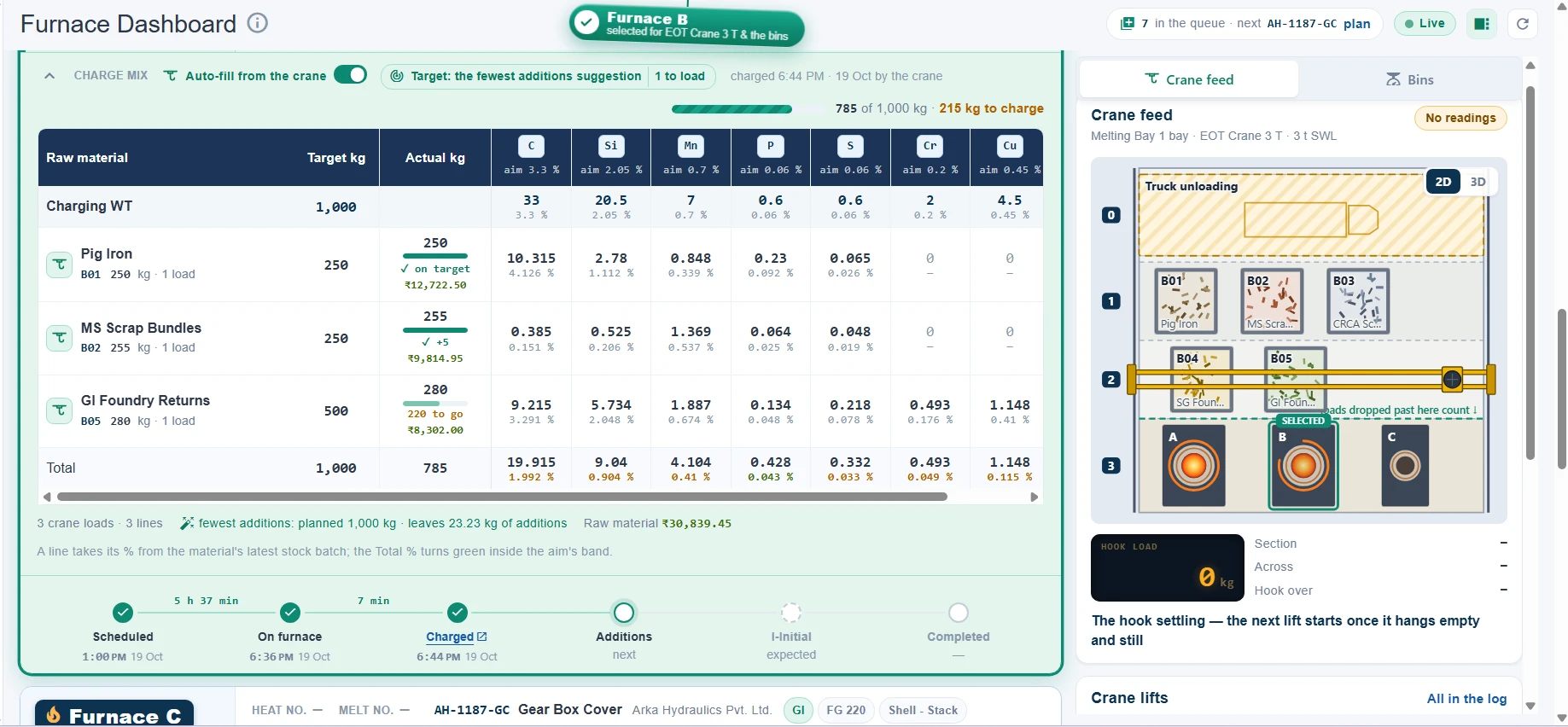
The Furnace Dashboard: Furnace B selected for EOT Crane 3 T and the bins, its charge mix filling from the crane against the fewest-additions suggestion — Pig Iron 250 of 250 kg, MS Scrap Bundles 255 of 250 kg, GI Foundry Returns 280 of 500 kg with 220 kg to go: 785 of 1,000 kg in 3 crane loads, each element's kg and % against its aim, and the heat's steps from Scheduled to Charged. Beside it the crane feed: the bay from above with Furnace B selected, and the hook's load.
How it works

One heat, from the plan to the pour

A heat is planned against a drawing's chemistry, charged by the crane, melted, sampled, alloyed and completed — and the app keeps up with each step as it happens, not at the end of the shift.

Plan

Heats queued against a drawing's chemistry bands and charge rules.

Charge plan

Two suggestions worked out in the background: fewest additions, lowest cost.

Charge

The crane's loads land on the charge mix by themselves; stock drawn oldest batch first.

Melt

The furnace panel's kW, kWh and times live on the card — it can start and close the heat.

Lab

The spectrometer's results arrive by heat and stage, with the kg each element still needs.

Alloy & complete

The bins' scales weigh the addition; the heat closes costed, and its next one moves on.

Planning

The queue, the drawing and its chemistry — in one place

Every planning is one heat of one drawing. The drawing carries its chemistry — an aim per element with its band — and the charge rules a charge of it is made of.

The planning board

Heats in progress on one side, planned and not started on the other, in one drag-and-drop order across the days. A heat can queue as a furnace's next: the crane feeds it the moment the heat before it is completed.

  • Find a drawing three ways — by grade, by customer or by drawing no.
  • Late flags on a schedule or target day that has passed.
  • A charge mix before the furnace — entered on the board, charged the moment a furnace takes the heat (optional).
  • CSV export of the board as it stands.
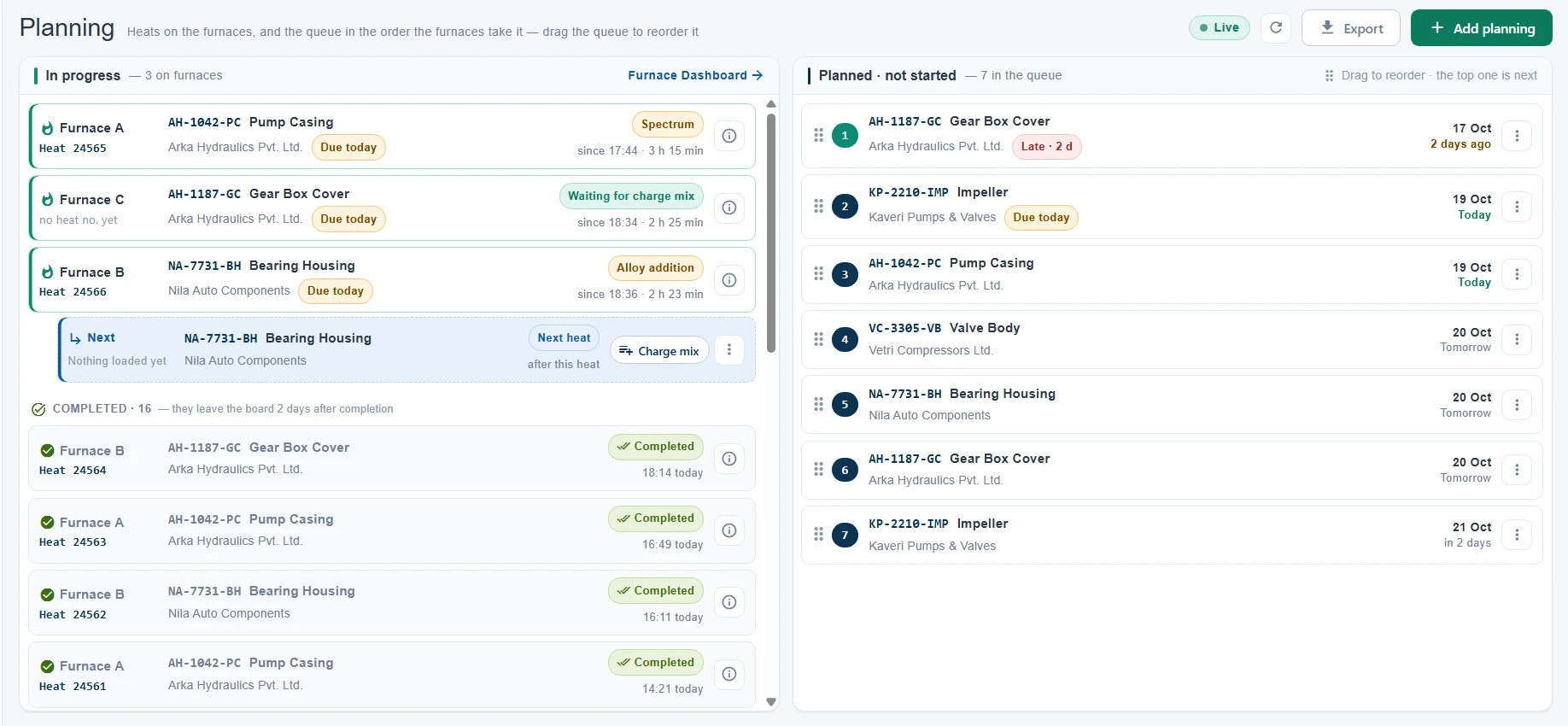
Planning: in progress — Furnace A at its lab result (heat 24565), Furnace C waiting for its charge mix, Furnace B at its alloy addition (heat 24566) with its next heat, NA-7731-BH Bearing Housing, queued behind it — and the heats completed today; planned and not started — 7 in the queue in the order the furnaces take them, the first, AH-1187-GC Gear Box Cover, 2 days late.

Chemistry and charge rules, set once

A drawing's aim holds each element's target with its minus and plus band. Its charge rules say which raw materials and cored wire go in — a must or optional, each within a min–max % of the charge — and a grade's rules are inherited by every drawing that has none of its own.

  • Import a chemistry workbook — one sheet per iron type, previewed before it is saved, safe to run again.
  • SGI, GI and CGI — each iron type sets its own chemistry columns.
  • The rules tried on a furnace — the dialog shows the kg each rule comes to on the furnace you pick.
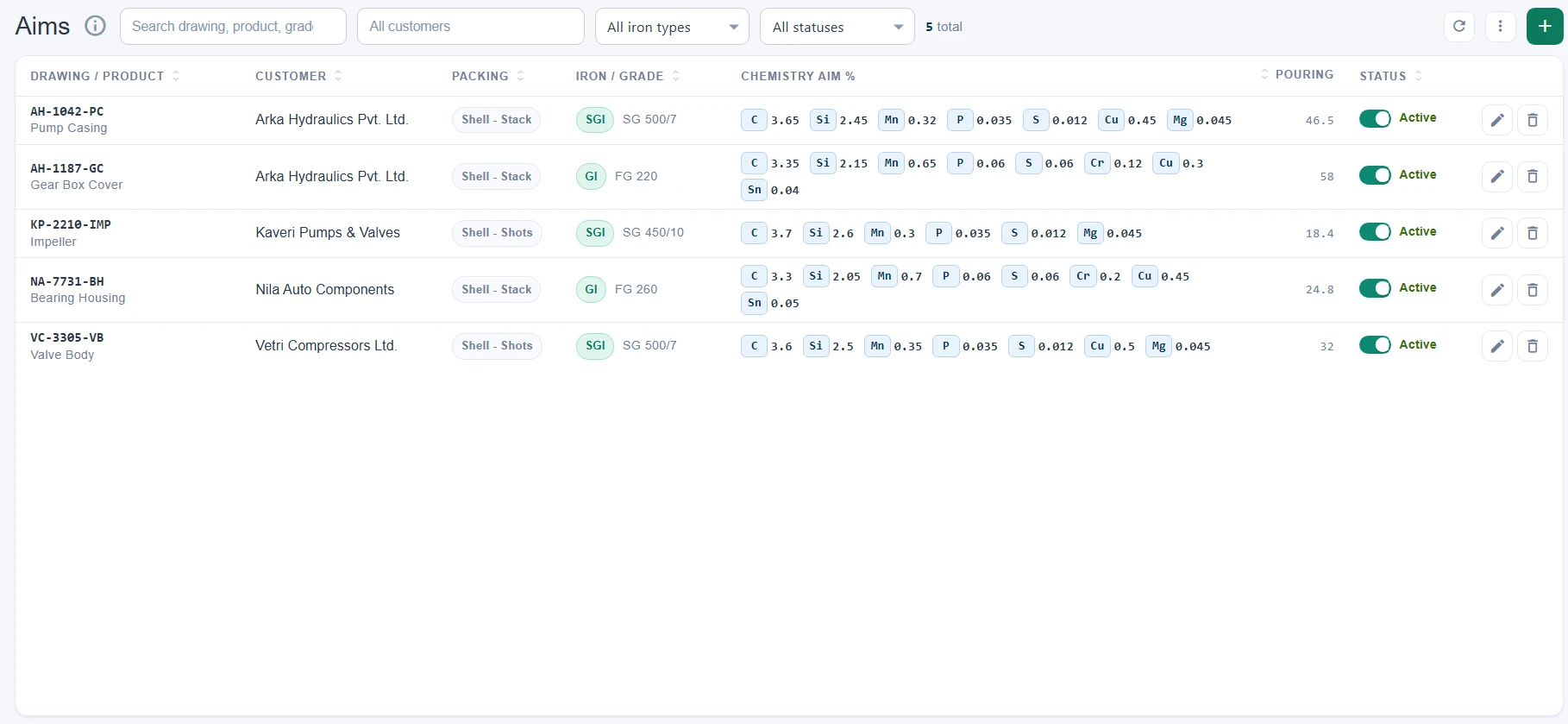
Masters → Aims: five drawings for four customers, each with its packing, iron type and grade and its chemistry aim — AH-1042-PC Pump Casing (SGI, SG 500/7) at C 3.65, Si 2.45, Mn 0.32, P 0.035, S 0.012, Cu 0.45 and Mg 0.045 %, AH-1187-GC Gear Box Cover (GI, FG 220) with Cr and Sn as well — and each drawing's pouring weight.
Charge plan

Two charge plans for every heat, before it is charged

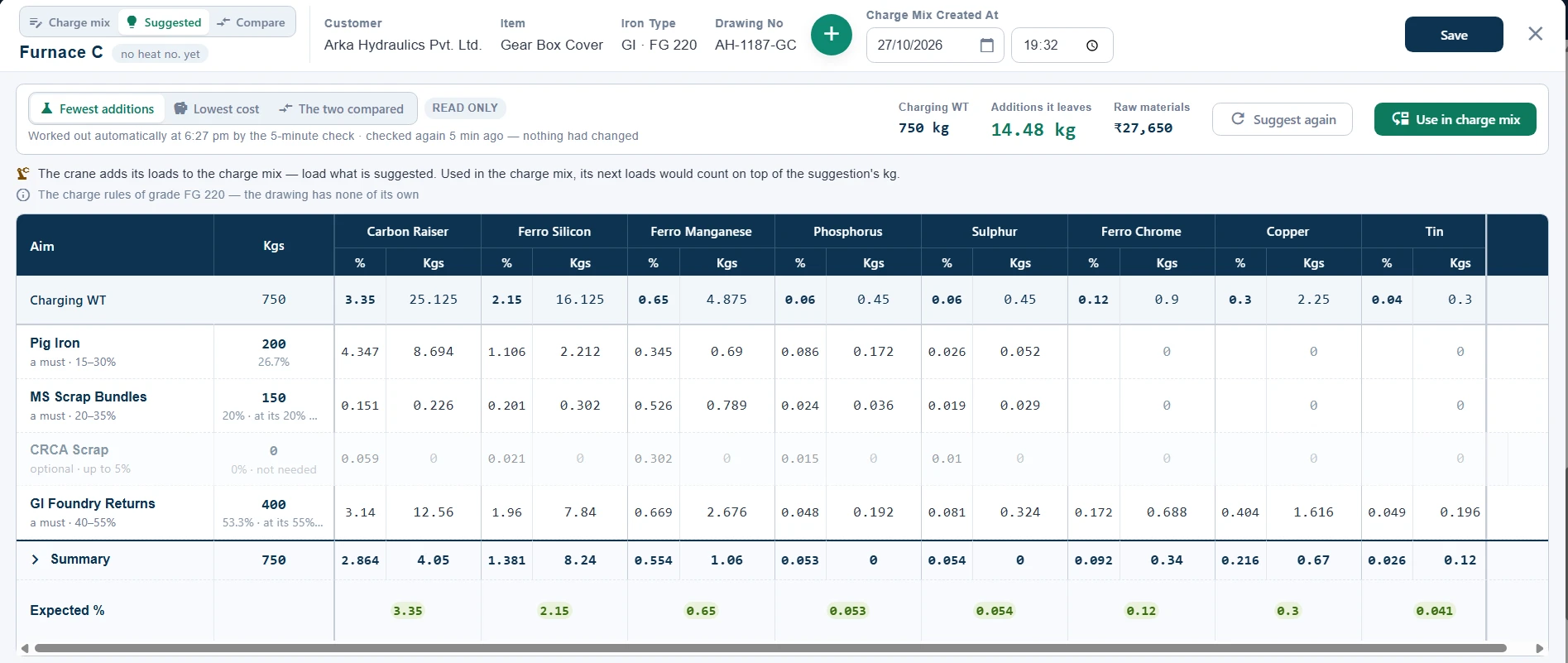
From the moment a heat is planned, the app works out how to charge it — twice: once for the fewest additions, once for the lowest cost — and checks again every five minutes until it is charged, as stock and prices move.

On chemistry first

Every element as close to its band as the charge rules allow.

Then the fewest additions — or the lowest cost

The least alloy to add afterwards, or the lowest spend at the current batch prices; the other one breaks a tie.

Within what you have

The stock on hand, each material's charge step — a crane load, a bag — and whole metres of cored wire.

  • Linear programming, not rules of thumb — the same order every heat: chemistry, then additions, then cost.
  • Checked again every 5 minutes until the heat is charged.
  • Priced from the latest received batch — the lowest-cost plan follows your stock.
  • Nothing changes behind your back — a suggestion is used only when someone presses Use in charge mix.
Charging by crane

The crane's loads, onto the charge mix by themselves

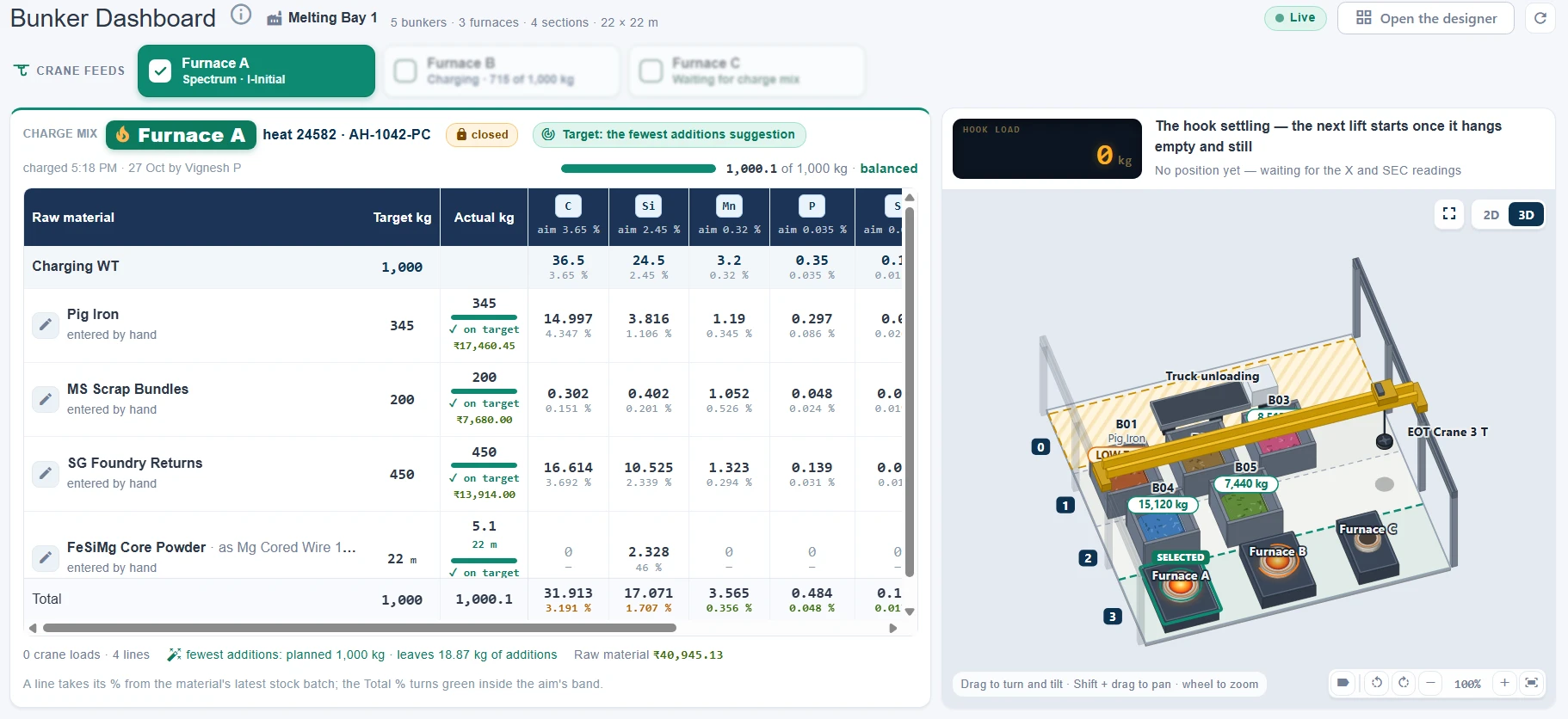
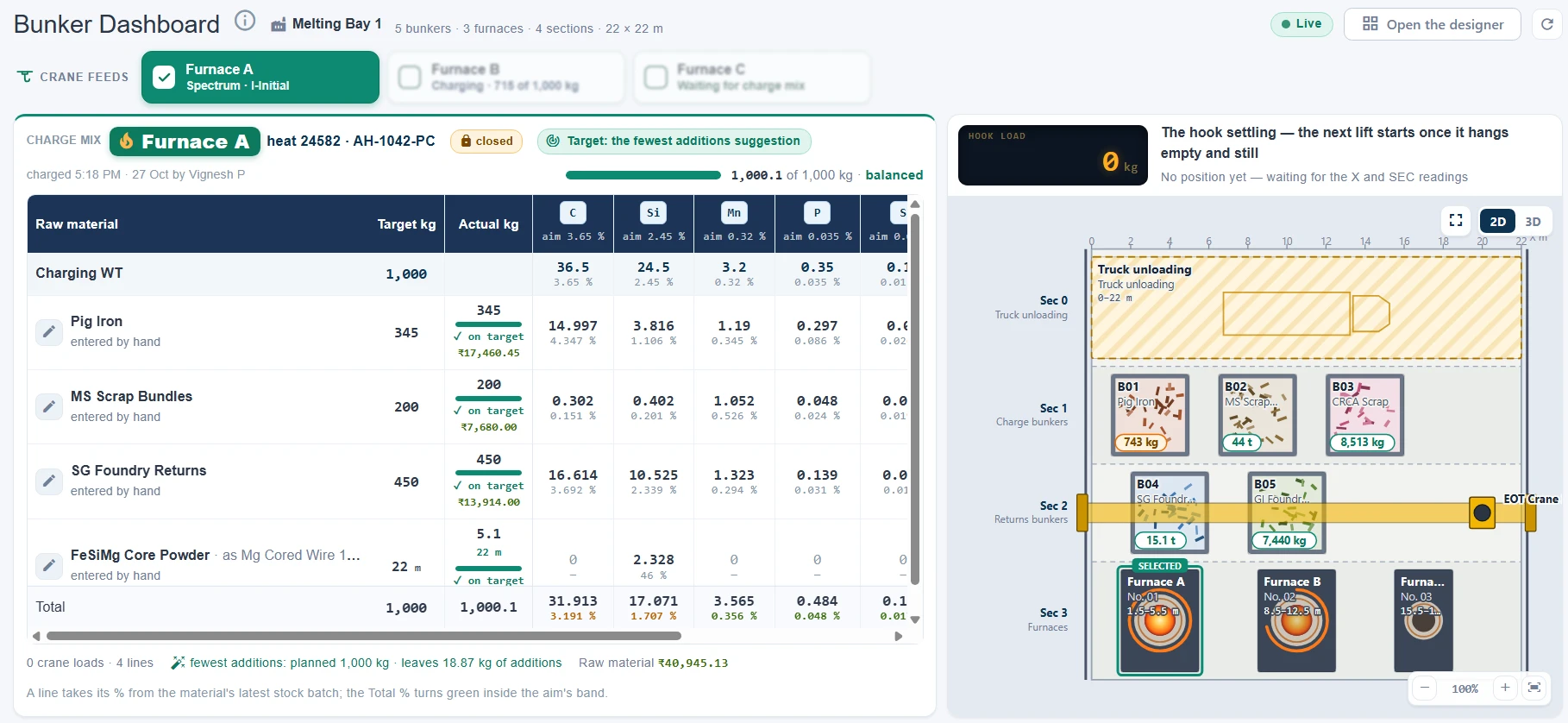
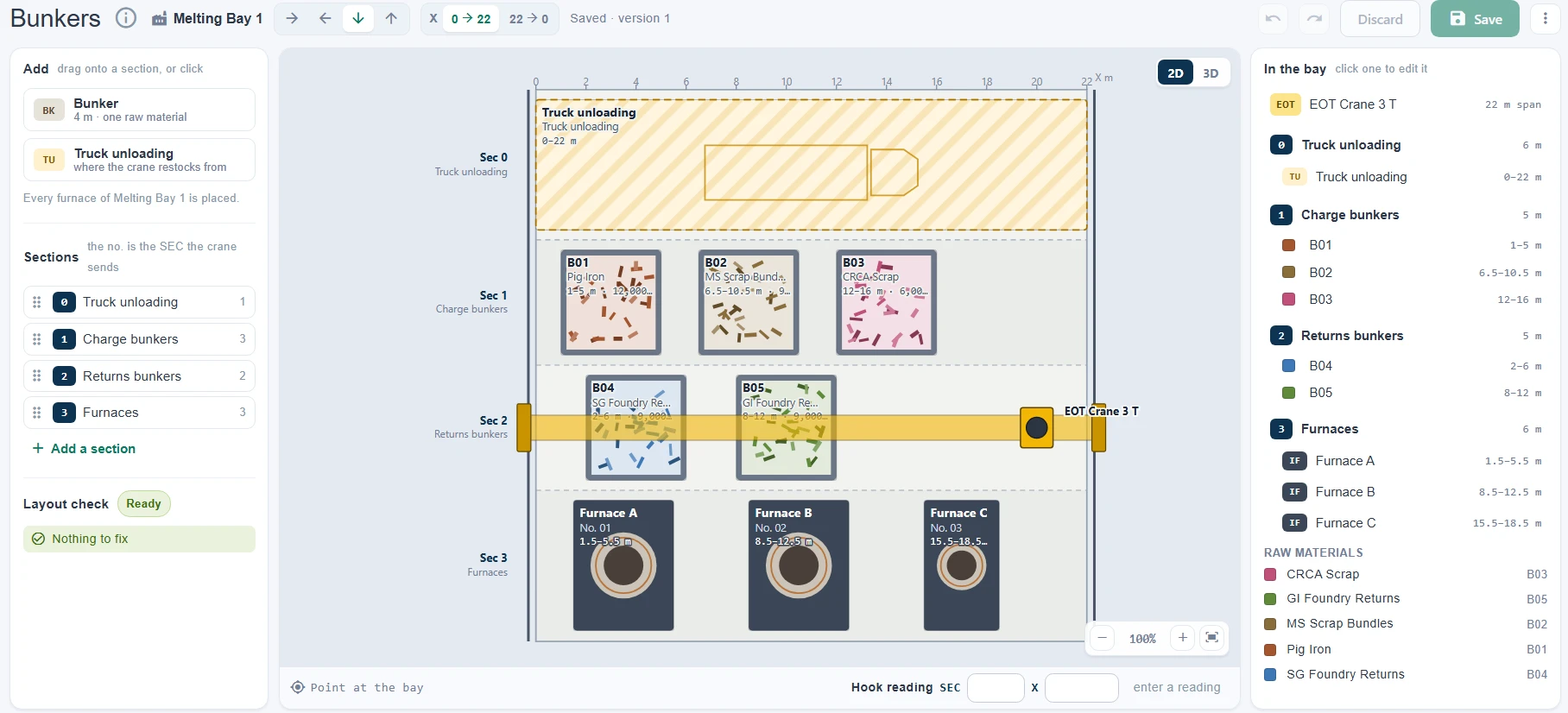
A UWB tag on the crane and the crane's PLC report over MQTT. The app reads each lift against the bay's layout — which bunker it came from, what it settled at on the hook, whether it was let go over the furnace — and puts it on that heat's charge mix as it lands.

  • Bounce and swing filtered out — a lift weighs what it settles at.
  • Returns come off again, and a load the app refuses is logged with its reason.
  • One furnace selected for the crane — the one taking its charge.
  • The crane's feed kept 30 days — its operations, the raw MQTT and a feed graph.
  • Bunkered materials locked to the crane — their lines filled by its loads alone (optional).
  • 2D and 3D on every view of the bay.
Furnace Dashboard

Every furnace on one screen, as it melts

One row per furnace: what it is melting and how far it has got — its panel's readings live, its charge mix, its lab results and the kg each element still needs.

The furnace row

The nameplate, the lining and the ladle's life (amber from 90 %), the panel's readings — kilowatt, kilowatt-hour, kilogram, on, off and hold time — and the heat's timeline. Under it, each element's aim %, lab %, required kg and actual kg, with the formula a tap away.

  • Crane feed and Bins tabs beside it, switching by themselves to what is happening.
  • Started, Melting since, Stopped — the panel's state on the card, read over Modbus.
  • The panel closes the heat: its kWh and on time back to zero complete it, and the next heat moves on (optional).
  • Close read and base metal asked at completion — the next heat opens with them (optional).
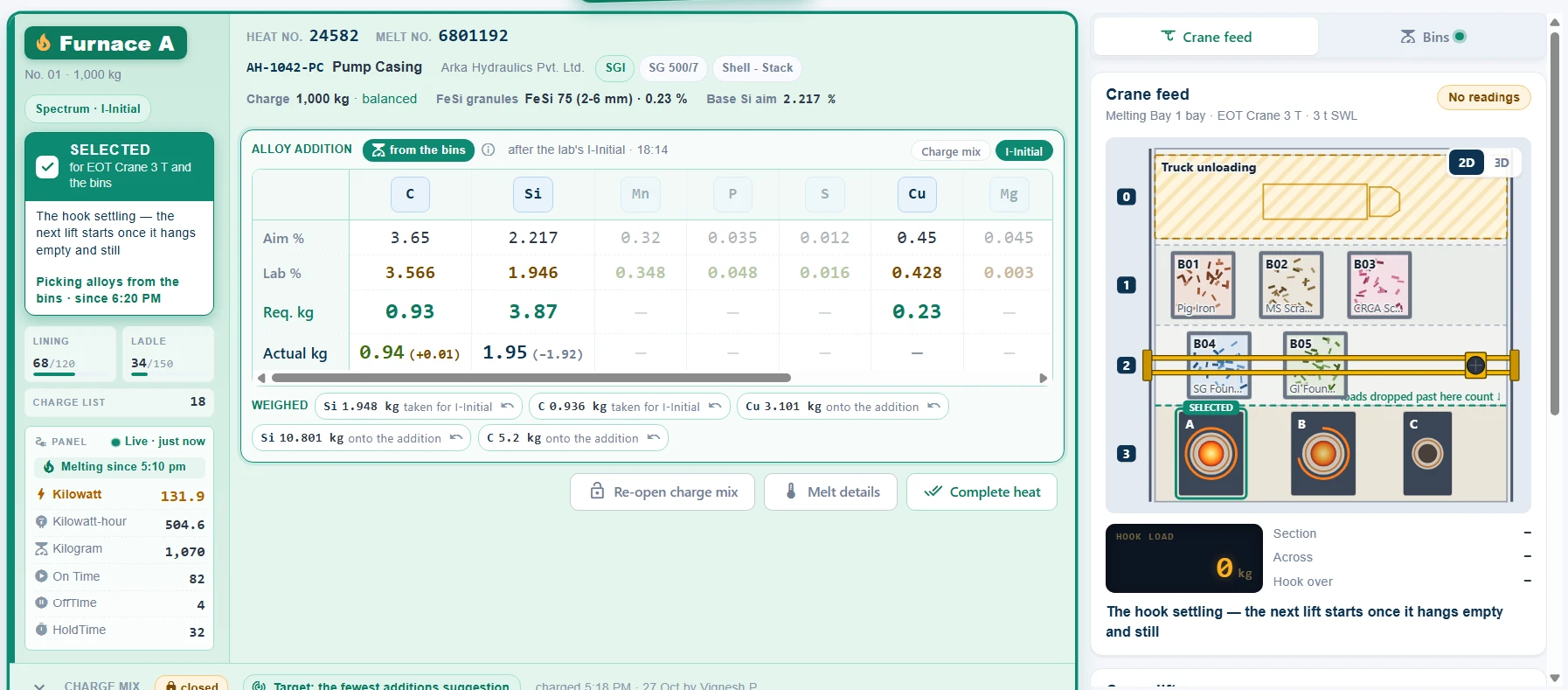
Furnace A's row on the Furnace Dashboard: selected for EOT Crane 3 T and the bins; lining 68 of 120, ladle 34 of 150, charge list 18; the panel live — 131.9 kW, 504.6 kWh, 1,070 kg, On Time 82, OffTime 4, HoldTime 32, melting since 5:10 pm. Heat 24582, AH-1042-PC Pump Casing in SG 500/7, at its alloy addition after the lab's I-Initial: C 3.566 % against 3.65, 0.93 kg required and 0.94 added; Si 1.946 % against a base Si aim of 2.217, 3.87 kg required and 1.95 added so far; Cu 0.428 % against 0.45, 0.23 kg — with every weigh-up the bins recorded. The crane feed beside it.

On a tablet, and over 24 hours

The same dashboard on a tablet by the furnace. Furnace Readings draws each panel's last 24 hours — a point a minute, the heats on the furnace shaded.

  • A panel polled every 1–60 seconds — any register, set up on the screen.
  • The minutes kept, a sample a minute with the heat that was running.
Lab & alloys

From the spectrometer to the bins — the correction, weighed

The lab's results arrive on their own, filed by heat and stage. The app works out what each element still needs, and the bins' scales weigh what goes in.

Lab results, by heat and stage

Results come in from the spectrometer through the lab's desktop app — I-Initial, II-Initial, I-Final — and a late final still reaches the completed heat.

  • Required kg = (target − lab %) × charging weight ÷ the element's pickup.
  • Silicon to the base aim, carbon with its pickup after the spectrum.
  • Elements outside the aim shown too, where you ask for them.

The bins weigh the addition

Each bin's load cell reports on the PLC's feed. Weigh up from empty and press Done — or simply pick from the bins, and the drop in each one's weight is the addition.

  • Before the result, a weigh-up goes onto the charge mix's addition; after it, against that stage.
  • The addition locked to the bins — typed only while their feed is silent (optional).
  • Bin Pick Audit — alloy that left a bin with nothing recorded, picked over the need, typed and not weighed.
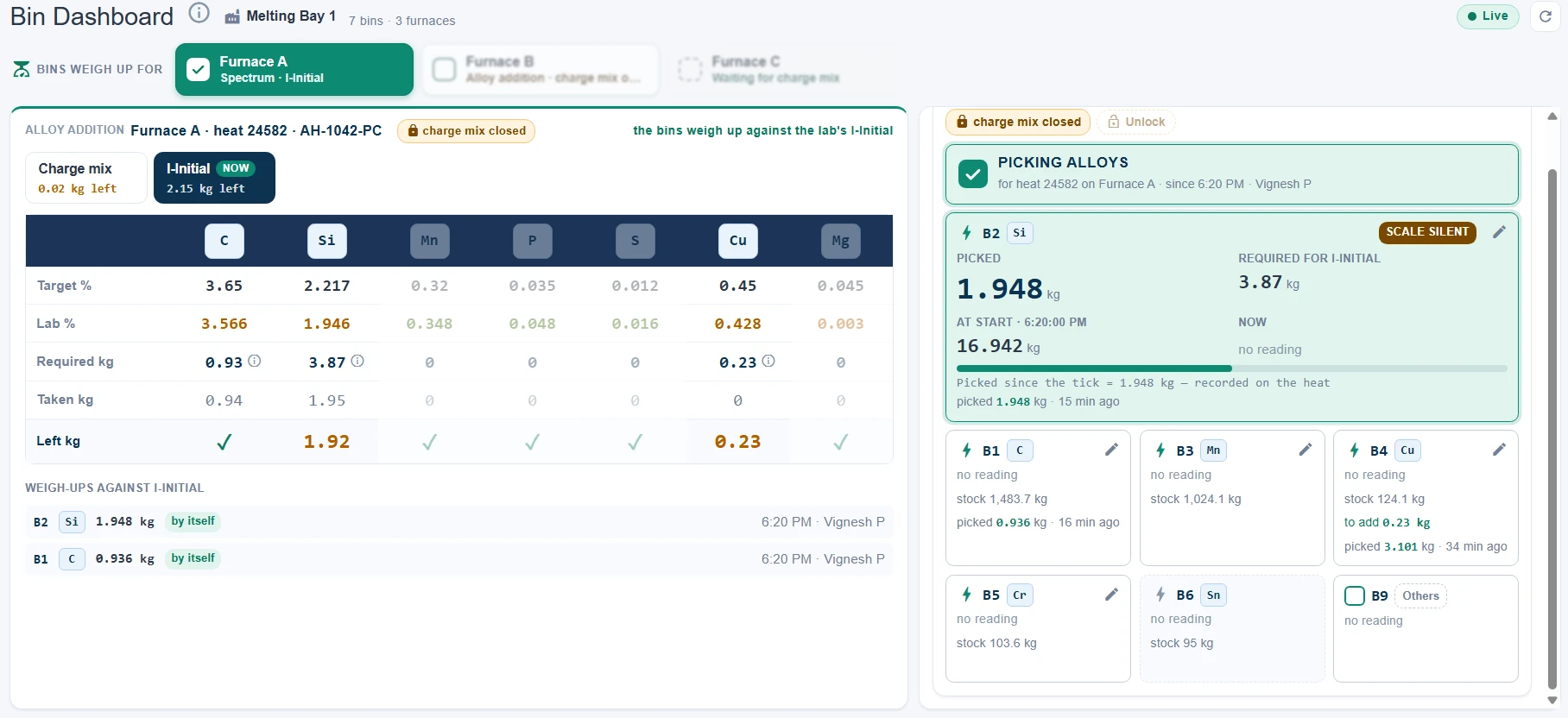
The Bin Dashboard on Melting Bay 1: Furnace A ticked for the bins and heat 24582's alloy addition by stage — the charge mix with 0.02 kg left, I-Initial now with 2.15 kg left: C 3.566 % against 3.65, 0.93 kg required and 0.94 taken; Si 1.946 % against 2.217, 3.87 kg required, 1.95 taken and 1.92 left; Cu 0.23 kg left — and the weigh-ups recorded by themselves, B2 Si 1.948 kg and B1 C 0.936 kg. Beside it the bay's seven bins, picking alloys for that heat.
On the floor

A TV over the furnaces, a tablet beside them

The Furnace TV is an Android TV app — or any browser — that shows a location's furnaces live. Set up once, it finds its way back after a power cut.

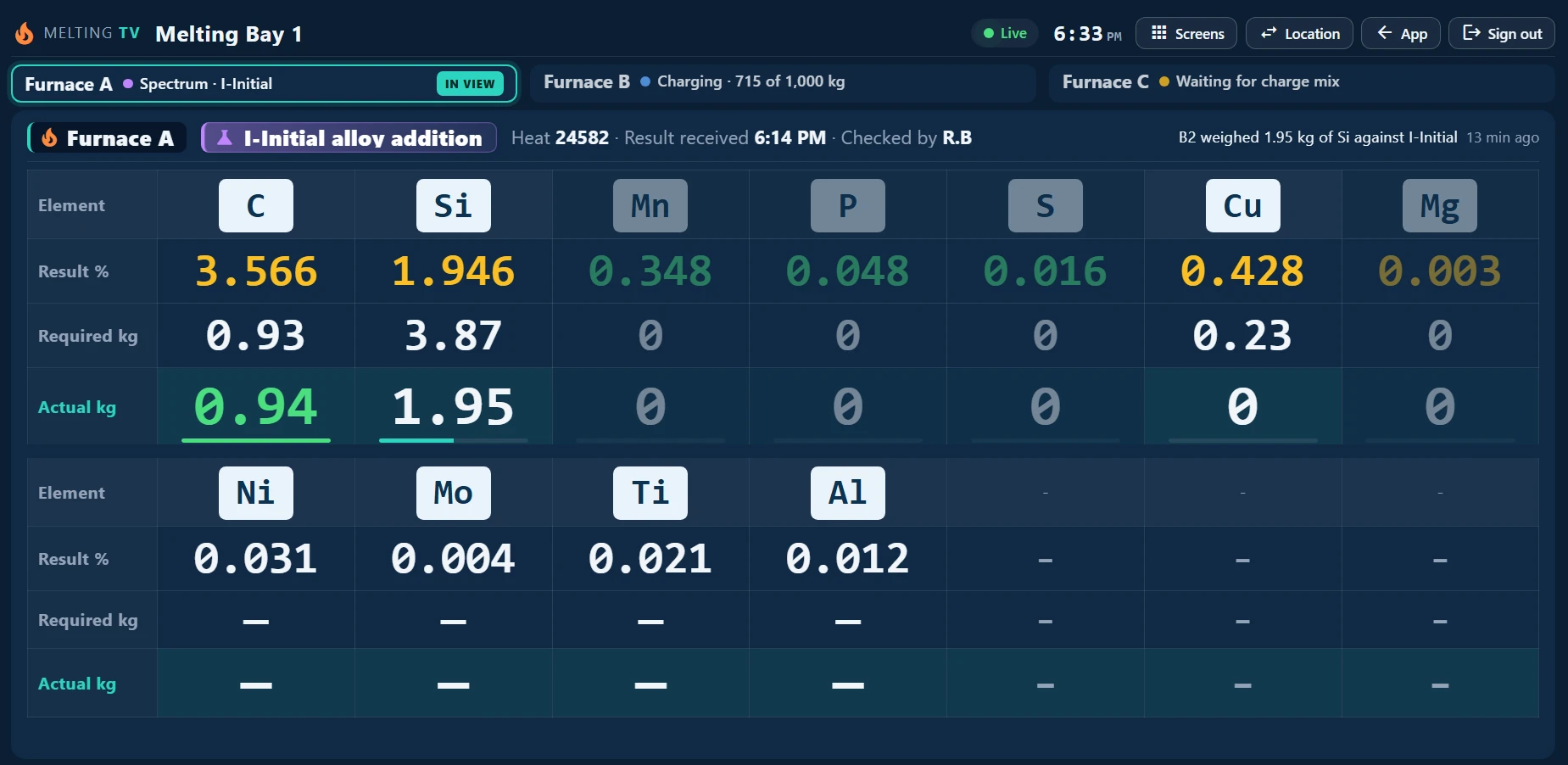
The Furnace TV on Melting Bay 1: Furnace A in view at its I-Initial alloy addition — heat 24582, the result received 6:14 PM, checked by R.B. C 3.566 % with 0.93 kg required and 0.94 kg added, Si 1.946 % with 3.87 kg required and 1.95 kg added so far, Cu 0.428 % with 0.23 kg required; Mn, P, S and Mg in their bands; Ni, Mo, Ti and Al reported too. Furnace B charging, 715 of 1,000 kg; Furnace C waiting for its charge mix.
The latest result, largeThe furnace updated last is in the spotlight, marked NEW for 12 seconds — up to 14 elements in type you can read across the bay.
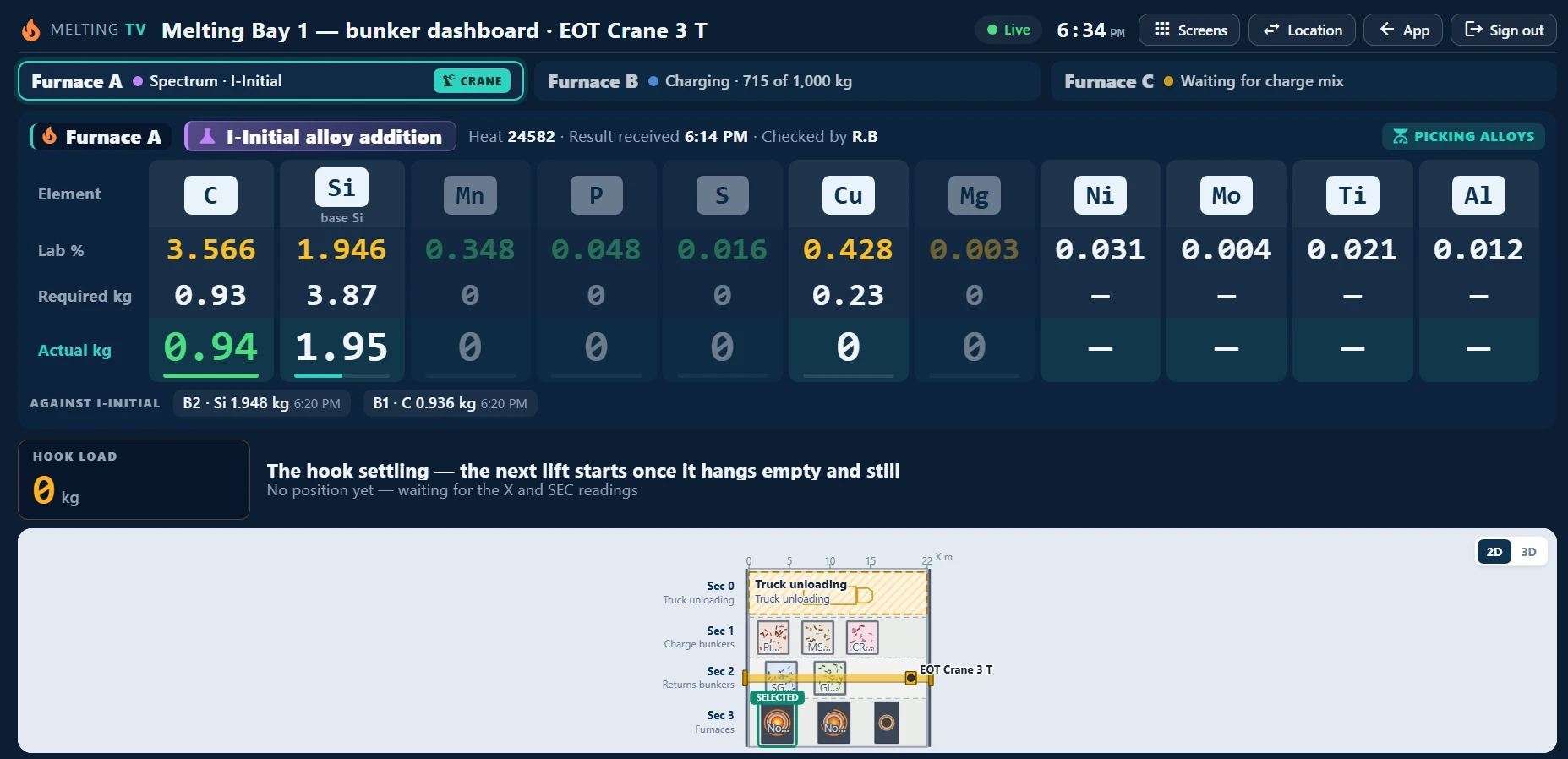
The Furnace TV's bunker dashboard for Melting Bay 1 and EOT Crane 3 T: Furnace A's I-Initial alloy addition in one row of eleven elements — C 0.93 kg required and 0.94 added, Si 3.87 kg required and 1.95 added, Cu 0.23 kg — with Picking alloys on, the weigh-ups against I-Initial, the hook's load and the bay from above, Furnace A selected.
The bay on the wallWith the crane on, the TV adds the bunker dashboard and suggested against actual.

Asks for its server once

Then it reopens its location by itself, five seconds after the power comes back.

Read only

Nothing to press and nothing to break on the shop floor.

Every screen live

Pushed the moment something changes — nothing waits for a refresh.

Stock

The stock the heats draw from — priced by batch

Elements, raw materials and cored wire are kept as the batches you received. A heat draws the oldest first, and an item is priced by its latest received batch — so every heat's cost is the cost of what it used.

Batches, from your ERP's GRNs

GRNs come in from your ERP — raw materials and elements, each GRN line a batch — beside the batches you receive by hand.

  • First in, first out — and a save is refused when the stock is short.
  • A min level per item, flagged on the stock tabs and mailed — the moment a heat takes it low, and in a daily list.
  • Checked every 15 minutes — the stock figures recalculated against what was drawn.
  • Old data marked — what a batch has left written off, never drawn again.
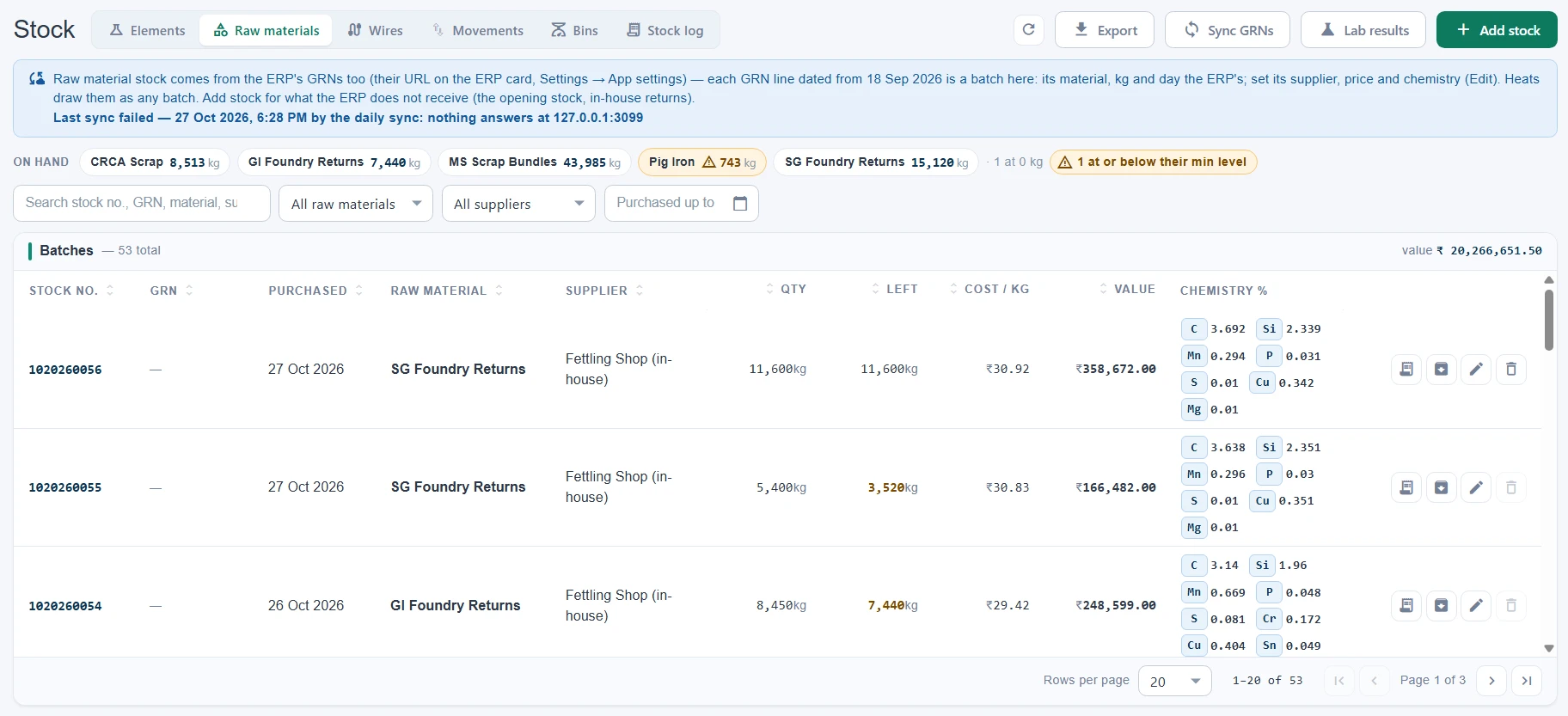
Stock → Raw materials: on hand CRCA Scrap 8,513 kg, GI Foundry Returns 7,440 kg, MS Scrap Bundles 43,985 kg, Pig Iron 743 kg flagged at or below its min level, SG Foundry Returns 15,120 kg; 53 batches with stock no., GRN, purchase day, kg received and left, price a kg, value and each batch's chemistry — ₹2,02,66,651 in stock — with Sync GRNs and Lab results.

A month of raw material, day by day

Opening, received, used by the heats and closing — in kg and at the batches' own prices, read again as the stock moves.

  • Received batch by batch, a GRN line each.
  • Used by the heats, at what each batch cost.
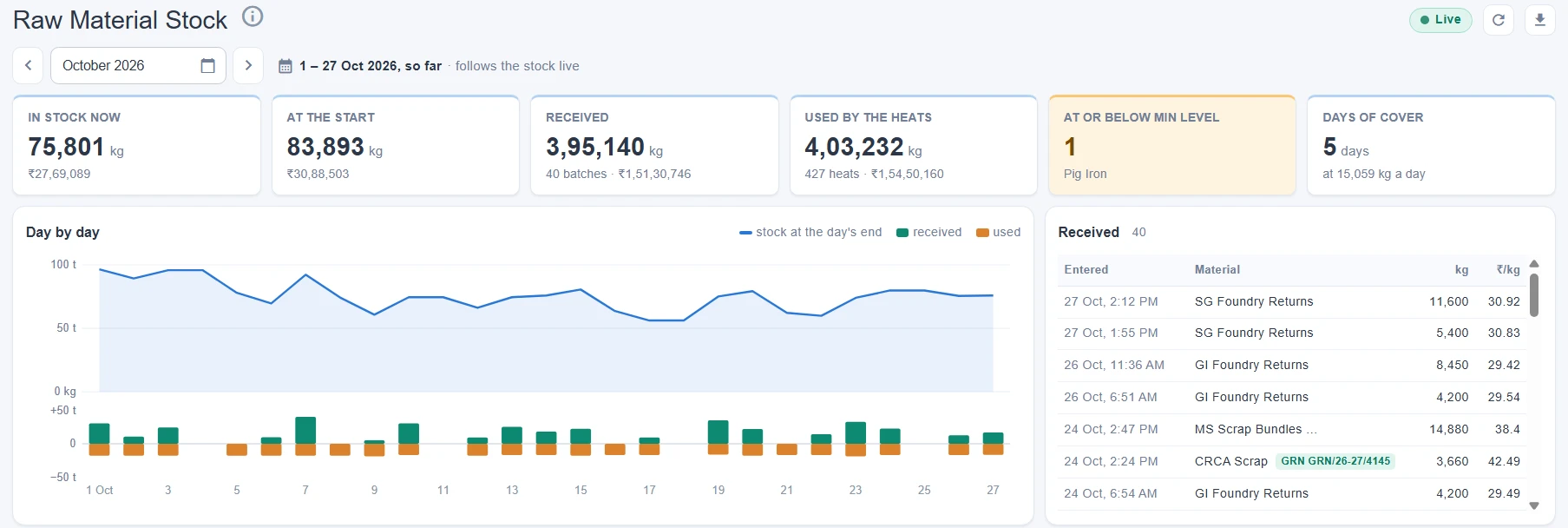
Dashboards → Raw Material Stock for October, 1 to 27 Oct so far: 75,801 kg in stock now (₹27,69,089) against 83,893 kg at the start, 3,95,140 kg received in 40 batches, 4,03,232 kg used by 427 heats, Pig Iron at or below its min level and 5 days of cover at 15,059 kg a day; the stock at each day's end above the received and used bars, and the month's receipts.
Dashboards

How the melt shop is really doing

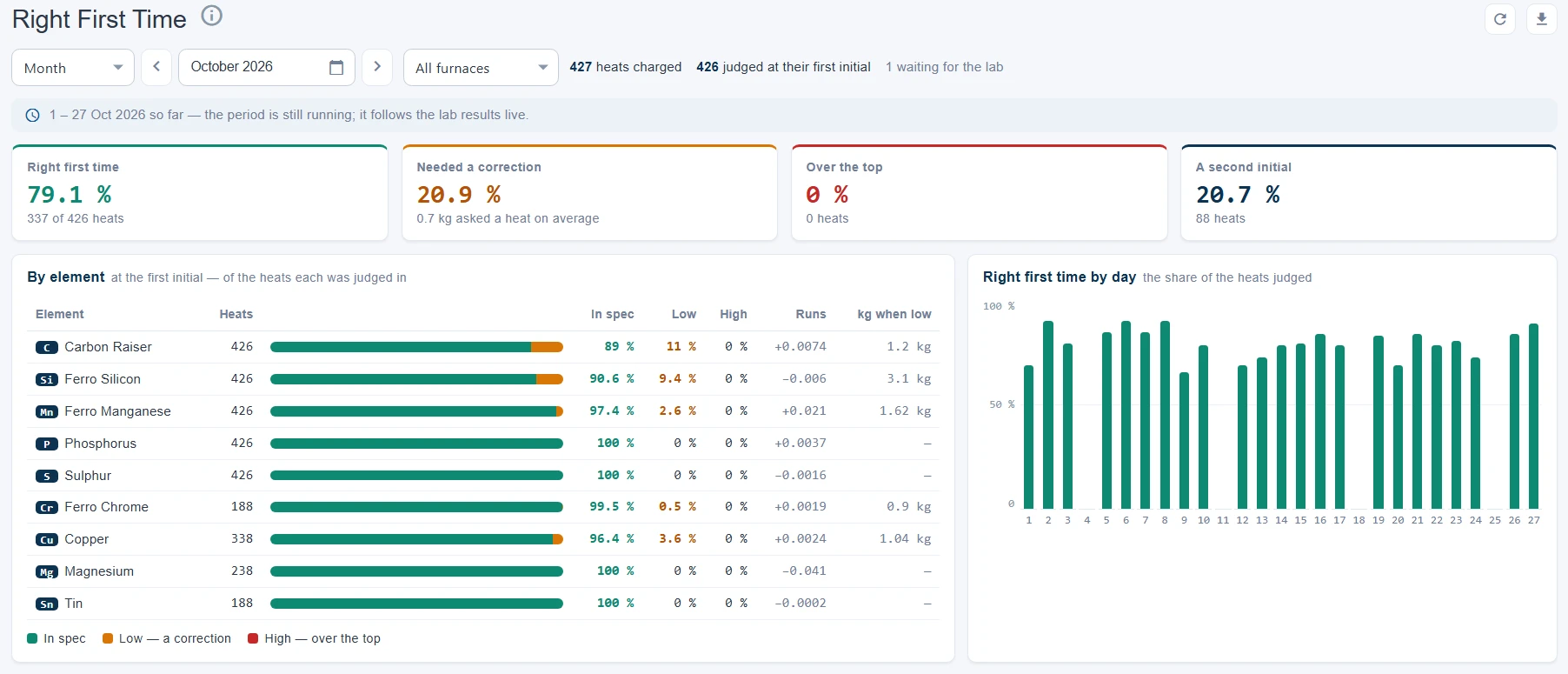
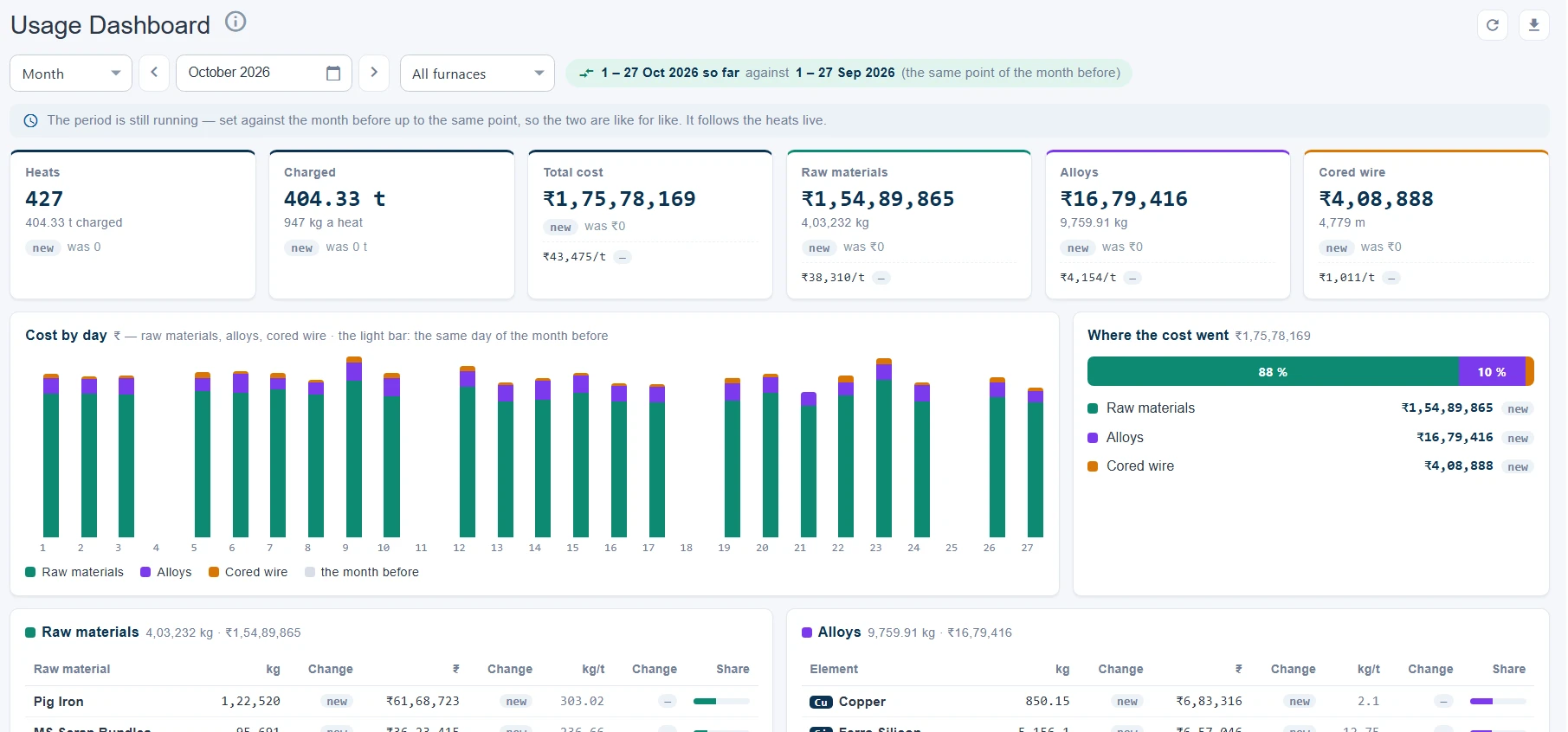
Built from the heats themselves — their charge, their lab results, their alloys — not from a form somebody fills in at the end of the shift.

Reports

Every heat, costed — and on paper

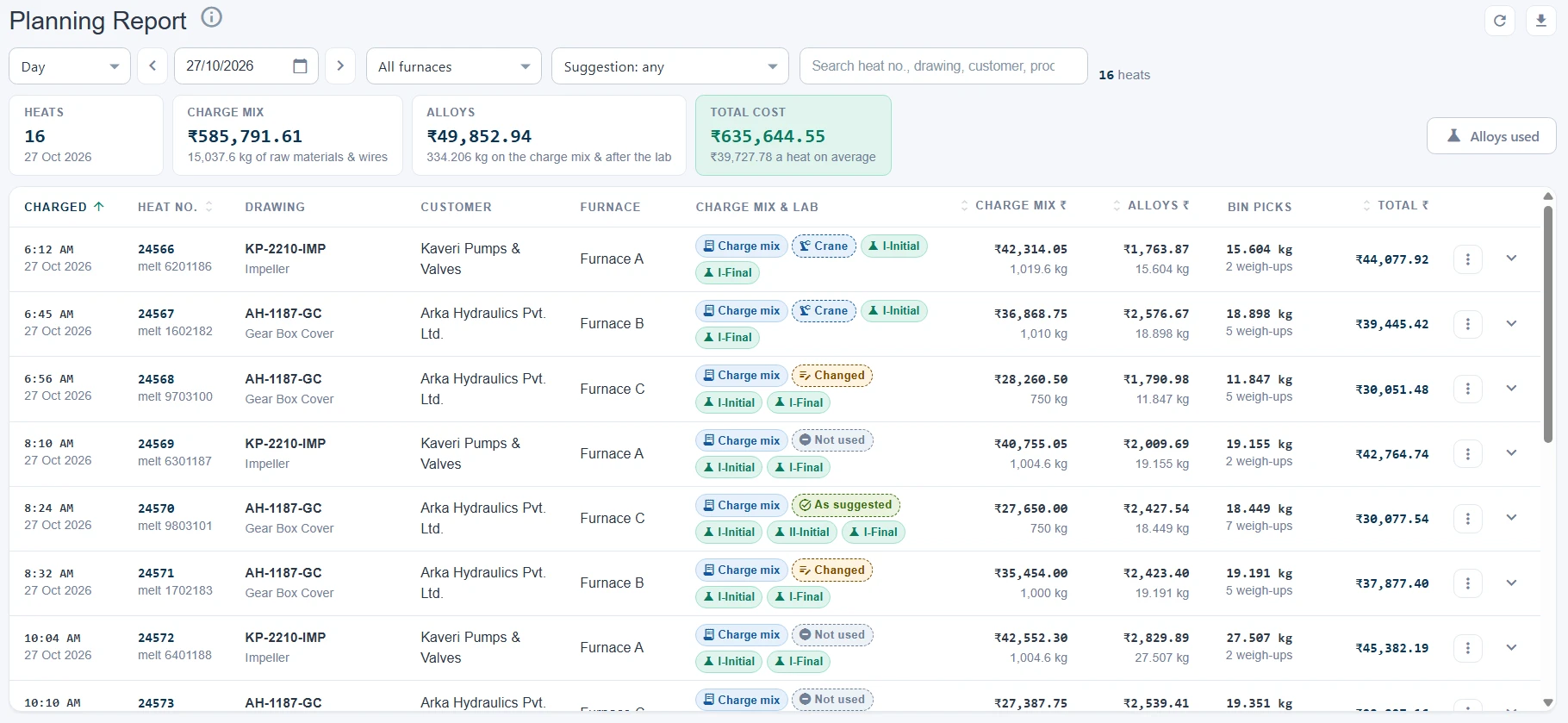
The Planning Report lists the completed heats with their charge mix, alloys and total cost, and prints each heat's charge list and lab results as PDFs.

The Planning Report

Completed heats by charge time — each with its steps, charge mix, lab results and cost — with the totals and the alloys used. Filter by how the suggestion was used; export to Excel.

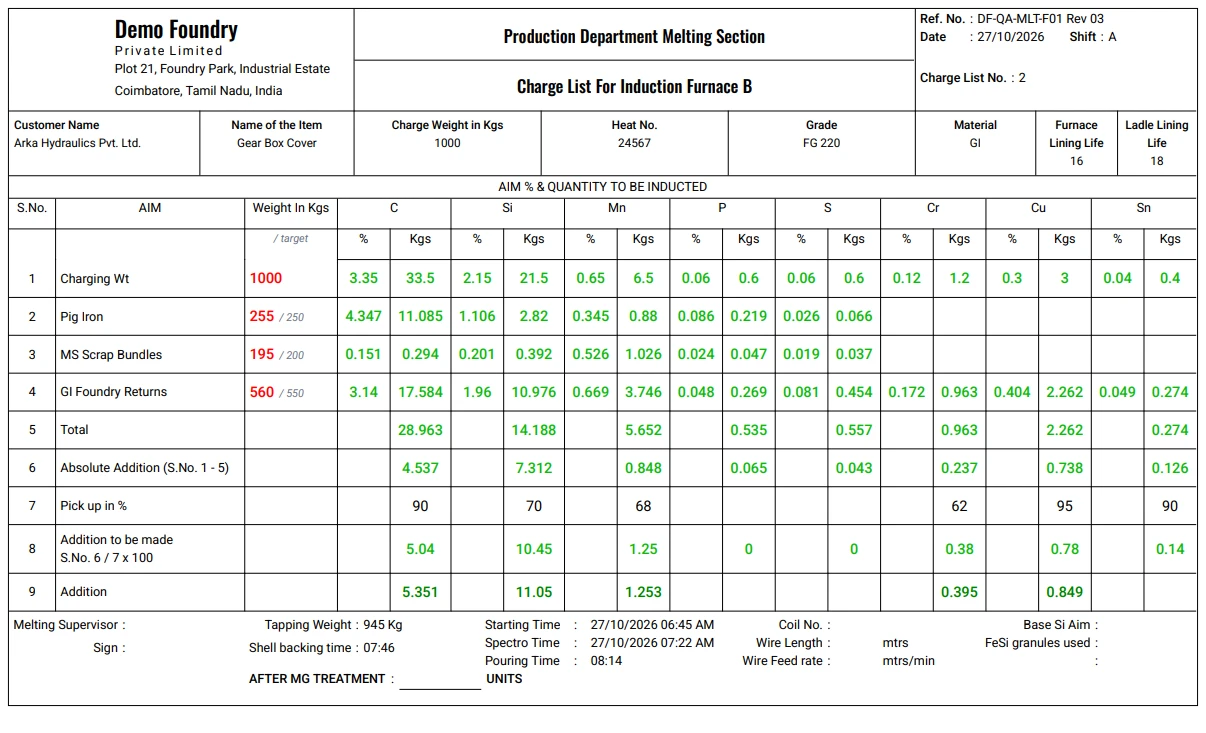
  • Download report PDF — the heat's two-page charge list.
  • Download lab results PDF — the heat's in-process inspection record.
  • Under your letterhead — the company and the forms' Ref. Nos. from Settings → Company.
Reports → Planning Report for 27 Oct 2026: 16 heats — charge mix ₹585,791.61 (15,037.6 kg of raw materials & wires), alloys ₹49,852.94 (334.206 kg on the charge mix & after the lab), total ₹635,644.55, ₹39,727.78 a heat on average. Each heat by charge time with its furnace, chips for its charge mix and lab results and how it used its suggestion — the crane's, changed, not used, as suggested — then its charge mix ₹, alloys ₹, bin picks and total: heat 24566 on Furnace A, ₹42,314.05 + ₹1,763.87 = ₹44,077.92.
Download report PDF — the charge list for heat 24567 on Induction Furnace B, 27 Oct 2026, shift A, charge list no. 2, under the Demo Foundry letterhead: Gear Box Cover (FG 220, GI) for Arka Hydraulics, 1,000 kg — Pig Iron 255 kg against the suggestion's 250, MS Scrap Bundles 195 against 200, GI Foundry Returns 560 against 550; per element the % and kg each brings, the absolute addition, the pickup, the addition to be made and the addition made (C 5.351 kg, Si 11.05 kg).

The charge list

The heat's charge mix, additions and lab, on your plant's form.

Bin Pick Audit

Alloy out of the bins against what the heats needed — what went unrecorded, in kg and ₹.

Your plant's format? We'll build it.

The charge list and the inspection record follow your own paper forms — show us yours. Talk to us about your format →

Alerts

Told when it matters — by mail

The app mails the people you pick when a heat completes, when stock runs low and when a board on the floor goes quiet — through your own mail server.

Three mails, sent by themselves

Picked per mail on Settings → App settings, sent through Gmail, Zoho Mail or your own mail server.

  • Heat mail — each completed heat: fully automatic, partly or manual, its charge mix and the boards' health while it ran.
  • Low stock — the moment a heat takes an item to its min level, and a daily list at the first shift's start.
  • No signal — a crane or bin board silent for an hour: its last 24 hours drawn, repeated less and less often until it is back, and a mail when it is. Snoozed from the bell.
At a glance

The short version

Furnaces & baysInduction furnaces in locations (bays); lining, ladle life, melt no. and heat no. kept per furnace.
PlanningHeats against drawings: element bands, charge rules by drawing or grade, one queue, a furnace's next heat.
Charge planTwo suggestions per heat — fewest additions, lowest cost — by linear programming within stock, charge steps and whole metres of wire; checked every 5 minutes.
CraneUWB position and the crane PLC over MQTT; lifts read against the bay's layout; auto-fill onto the charge mix; 2D and 3D bay views.
Alloy binsLoad cells on the PLC feed; weighed up from empty or picked from; the addition lockable to the bins; Bin Pick Audit.
Furnace panelsModbus TCP: kW, kWh, kg, on, off and hold time, polled every 1–60 s; the panel can start and complete heats.
LabSpectrometer results through the lab's desktop app and an IoT board, by heat no. and stage; required kg per element.
StockElements, raw materials and cored wire as batches; first in, first out; priced by the latest received batch; min levels mailed.
ERPGrades, raw materials, products and GRNs pulled over REST — on demand and every night.
DashboardsRight First Time, Usage, Suggestion, Shift Summary, Bin Weights, Raw Material Stock, Furnace Readings.
ReportsPlanning Report with costs; charge list and lab results PDFs; Bin Pick Audit; Excel exports.
Floor screensThe Furnace TV as an Android TV app or in any browser; tablet layouts.
AlertsHeat mail, low stock mail and the no signal alert, through your own SMTP account.
Access controlRoles with view, add, edit, delete and export per screen.
DeploymentA server on your plant network; every screen in a browser; the database backed up from the screen.

See a heat charged, melted and alloyed — live

We will walk you through a heat on a demo bay — the charge plan, the crane's loads landing, the lab result and the bins' correction — and then look at how your melt shop would run on it.

Runs on a server on your plant network. Every screen in a browser.