Skip to content
Acceedo
Heat Treatment

Every furnace, every step, every degree — on record.

Your furnace controllers report every few seconds. The server answers each one with the recipe to run, logs the four thermocouples, draws the trend live on every screen in the plant, warns the quench crew before a soak ends, and prints the job card the moment the batch completes — on one PC on your own network.

30-day trial · 64-bit Windows 10 or 11 · 180 MB

Every 8 sEach controller poll answered
Any flowSteps and setpoints are data
3 reportsChart, job card, HT record
Desktop · phone · appThe same furnaces, live
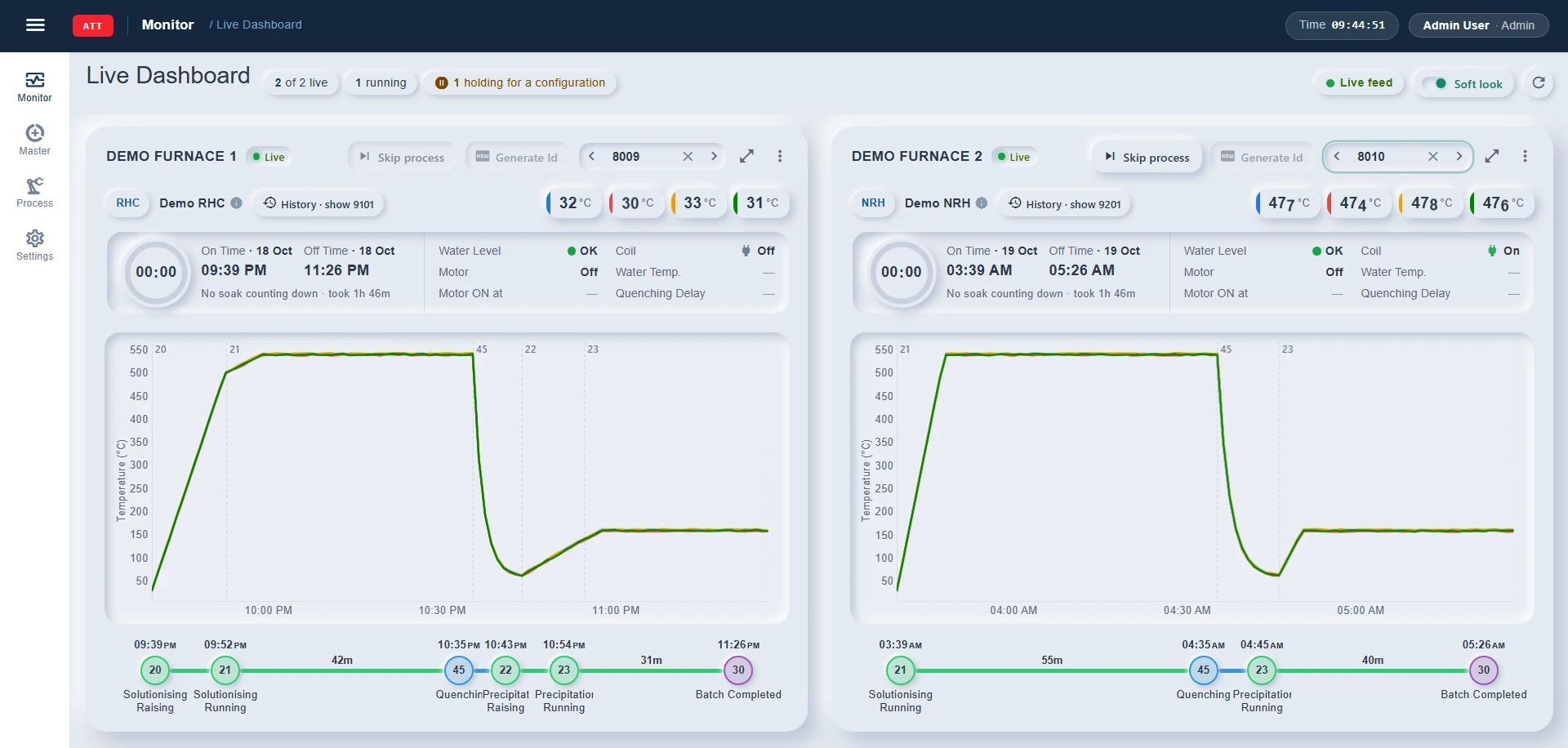
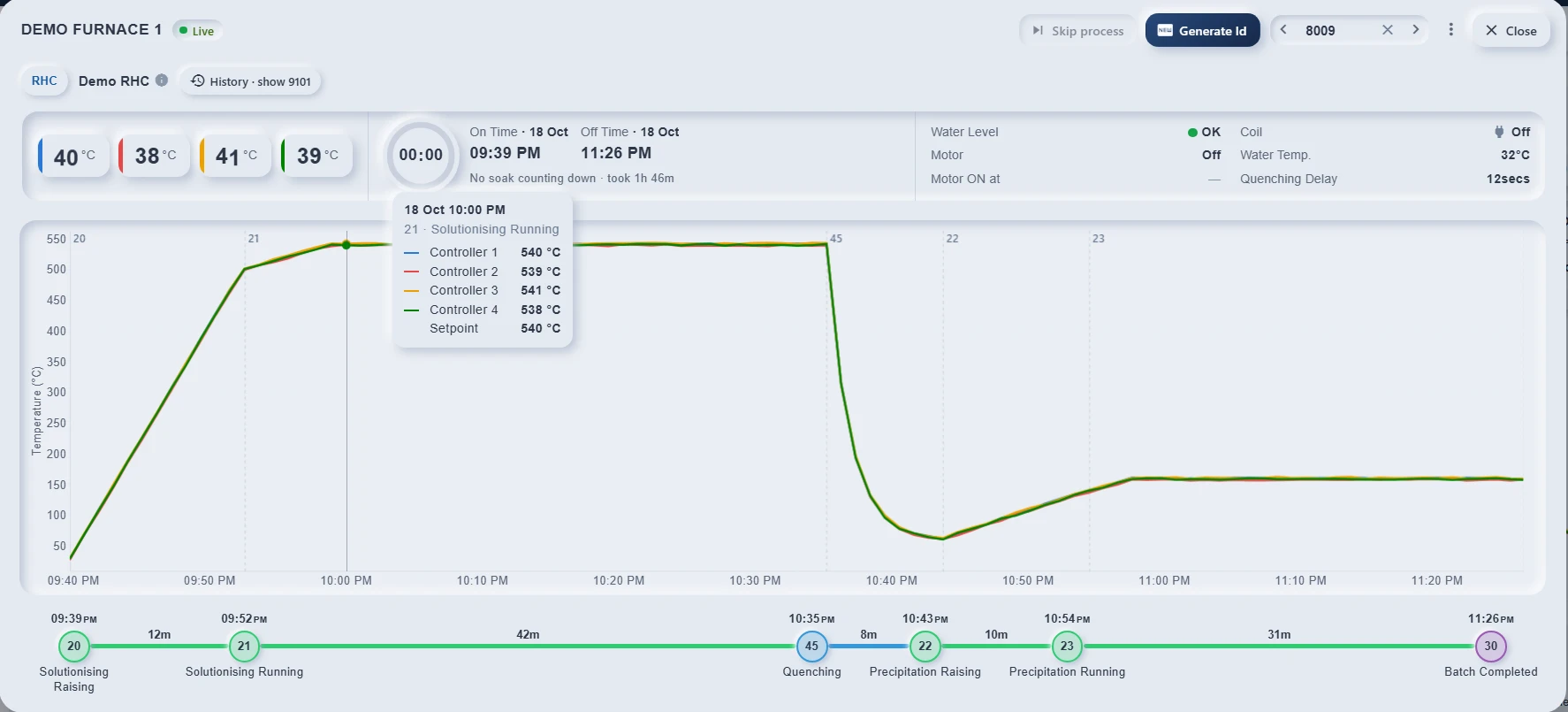
The Live Dashboard: 2 of 2 furnaces live, 1 running, 1 holding for a configuration. Both cards show a completed batch picked from history — 8009 on Demo furnace 1 (RHC: a raise, the 540 °C soak, the quench, the 160 °C soak) and 8010 on Demo furnace 2 (NRH: the 540 °C soak, the quench, the 160 °C soak) — each with its temperatures, On and Off times, water, coil and motor, the trend with a marker at every step change, and the step flow with durations.
How it works

Six steps, in the order a batch actually runs

Nobody types a batch in. The furnace's own controller reports it, and everything after — the recipe it is sent, the readings it logs, the record it prints — follows from that one batch id.

Define the recipe

A flow of steps, and a temperature and time for each step that needs one.

The board reports

A new batch id arrives from the controller; the server holds it until it has a recipe.

Set the configuration

From the desk or a phone. The board takes the setpoints on its next poll and starts.

It runs, logged

Every poll answered and kept; one sample a minute and every step change for the charts.

Watch it live

Every screen redraws as it runs. The quench crew is told before the soak ends.

Print the record

Temperature chart, job card with the load, and the HT record — as PDF.

Recipes & flows

Your process, as data — not as a code change

Plants disagree about the order of the steps and even about the code for quenching. Here the steps are a master, the flow is a list of them, and the recipe is a temperature and a time for each step that needs one. A new plant is configuration, never a fork.

20Solutionising raisingto 500 °C · 1 h → 21Solutionising running540 °C · 4 h soak → 45Quenchingcoil off, motor on → 22Precipitation raisingto 140 °C · 30 min → 23Precipitation running160 °C · 3 h soak → 30Batch completedrecord printed

Every step is a status, with what it needs

A step is a status the board reports, kept in one master: the code it arrives as, its colour in the flow strip, which board timer counts its soak, and switches for whether it takes a temperature and time, logs trend samples, or ends the batch.

  • Colours, timers and logging per status — the dashboard, the chart and the reports all read the same master.
  • A status in use cannot be deleted, only retired, so no batch ever points at nothing.
  • Step alerts are set here too — warn N minutes before a step ends, or when it finishes.
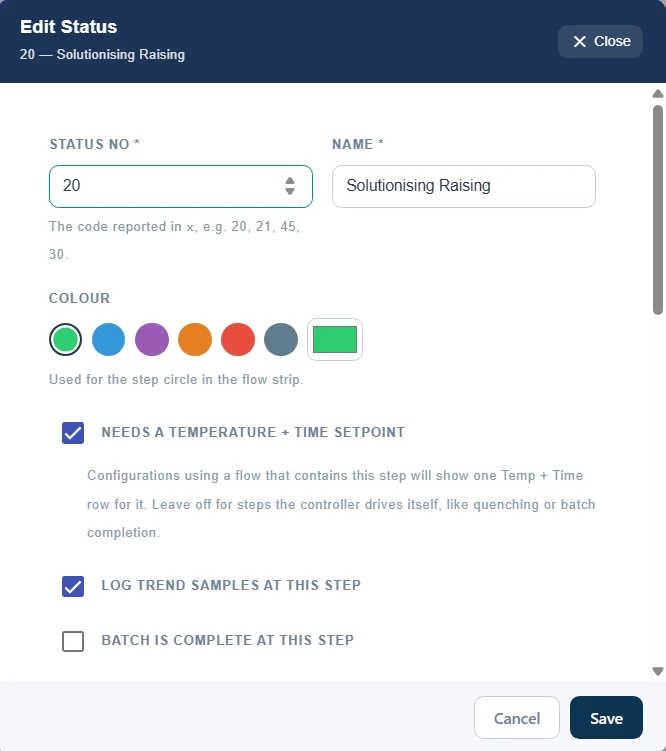
Master → Process Status, editing 20 — Solutionising Raising: the status number the board reports in x, its name, a green colour for the flow strip, and three switches — Needs a temperature + time setpoint and Log trend samples at this step both on, Batch is complete at this step off.
One status in the master — the code the board reports, its colour, and the switches that decide its setpoint, its trend samples and whether it ends the batch.

A flow is a list you drag into order

A process type puts statuses in the order the furnace runs them. Drag the rows into place; each step shows what it needs, and the dialog counts the temperature-and-time pairs its recipes will ask for. The RHC and NRH flows ship ready; a plant's own is another list.

  • A status is used once per flow, so no step can run twice by mistake.
  • The bit code goes to the board in the reply frame, so the controller knows which flow it is running.
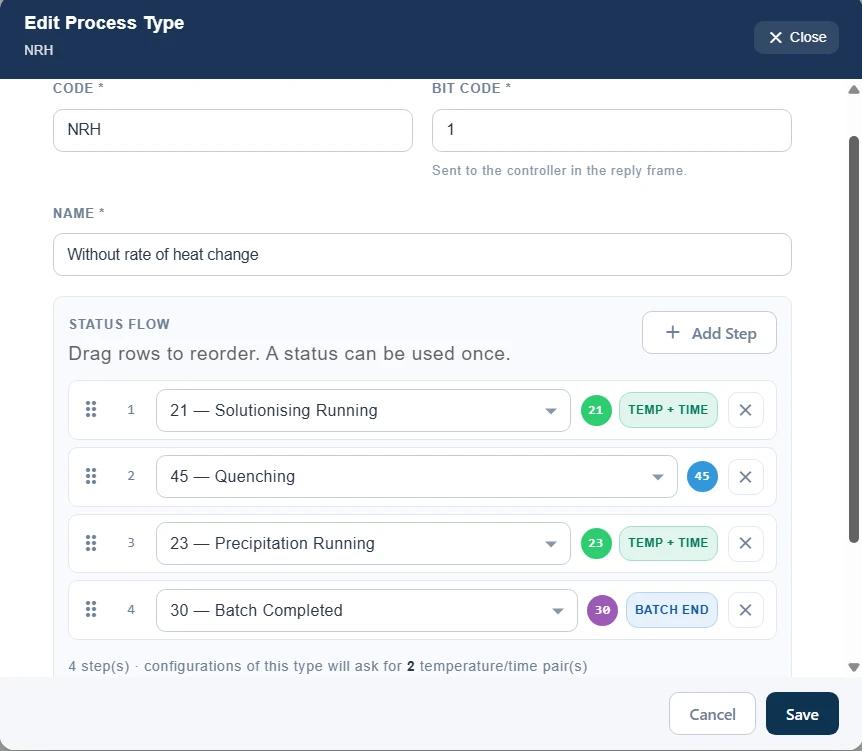
Master → Process Types, editing NRH — Without rate of heat change, bit code 1: its status flow as a drag-to-reorder list of four steps — 21 Solutionising Running and 23 Precipitation Running each tagged Temp + Time, 45 Quenching, and 30 Batch Completed tagged Batch end — and the note that configurations of this type ask for 2 temperature/time pairs.
The NRH flow — four steps in the order the furnace runs them, so its recipes ask for two temperature-and-time pairs.

The recipe asks only for what the flow needs

Whether a step takes a setpoint is a switch on its status. Pick the process type and the configuration grows one temperature-and-time row for each step that has it — four for RHC, two for NRH. Times are hours and minutes, and the board receives them in its own format.

  • A recipe per client when you need one — the client's id and name live on the configuration.
  • Hours and minutes on screen, the board's own time format on the wire.
  • Retire a recipe, keep the history — batches keep the setpoints they ran with.
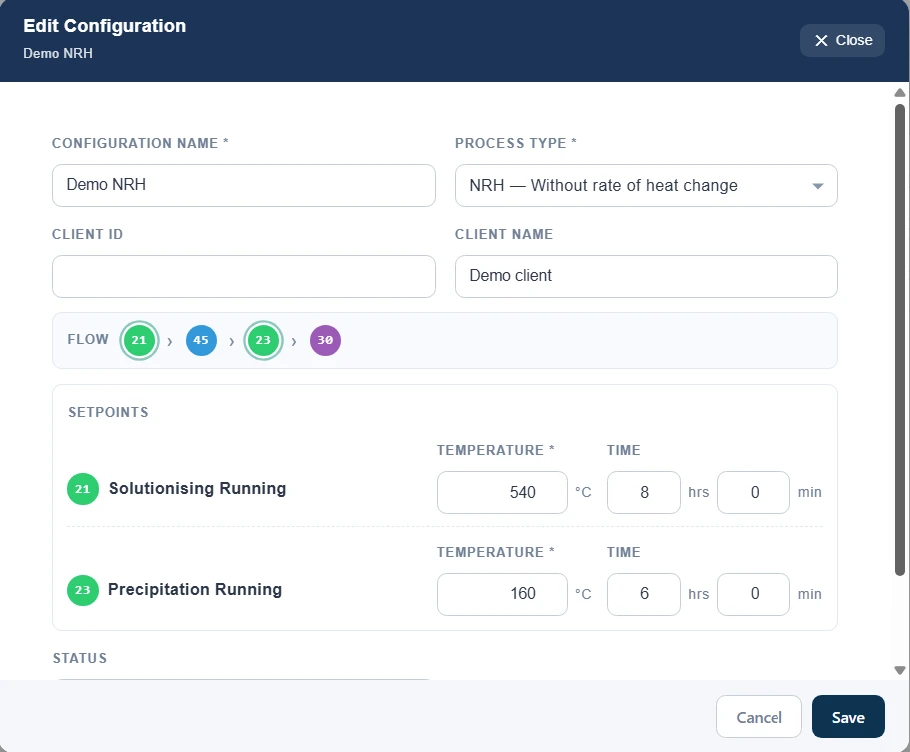
Master → Configurations, editing Demo NRH for Demo client: process type NRH — Without rate of heat change, its flow 21 › 45 › 23 › 30, and one setpoint row for each step that needs one — 21 Solutionising Running at 540 °C for 8 h 0 min, and 23 Precipitation Running at 160 °C for 6 h 0 min.
A recipe for the NRH flow — one temperature and time for each of its two soaking steps, and the client it is for.
Set against the board

The board reports a batch — and waits for its recipe

Nobody types a batch in. When a furnace's controller reports a new batch id, the server answers with a hold until someone assigns a recipe — from the desk or from a phone. The board takes the setpoints on its next poll and starts.

Every screen says the board is holding

A newly reported batch takes its furnace's card over on its own, on the dashboard and on a phone, with the one button that releases it. The other furnaces carry on as they were.

  • Holding · needs configuration — the card names the batch and what it is waiting for.
  • No trip to another screen — Set configuration is on the card itself.
  • Nothing starts by accident — until a recipe is assigned, every reply the board gets is a hold.
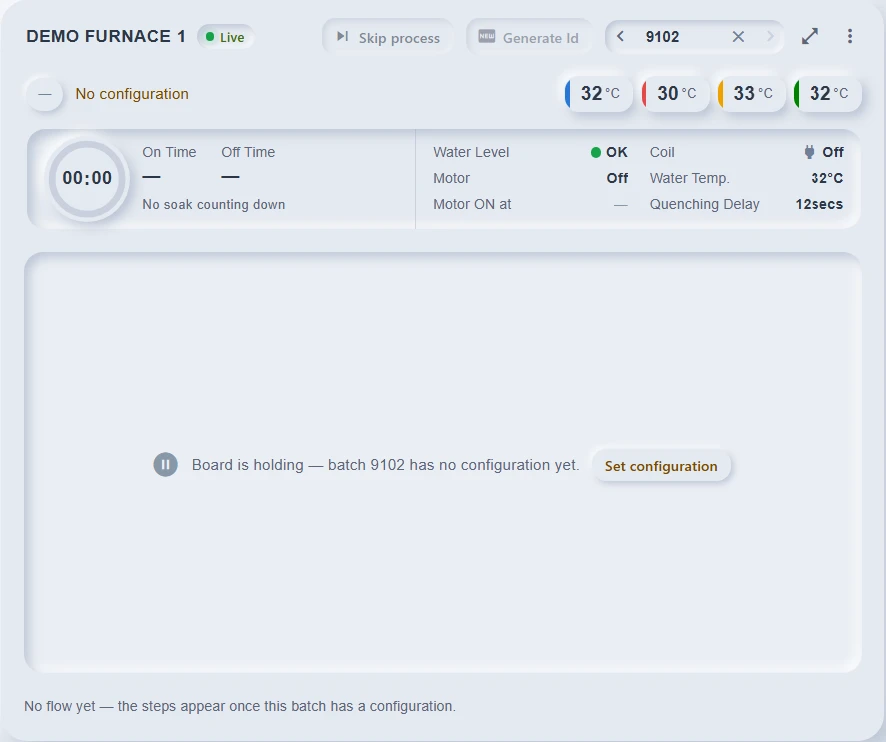
Demo furnace 1's card on the dashboard, holding batch 9102: No configuration, four thermocouples at 30–33 °C, no On time yet, and across the chart the message Board is holding — batch 9102 has no configuration yet, with a Set configuration button; no flow until a recipe is set.
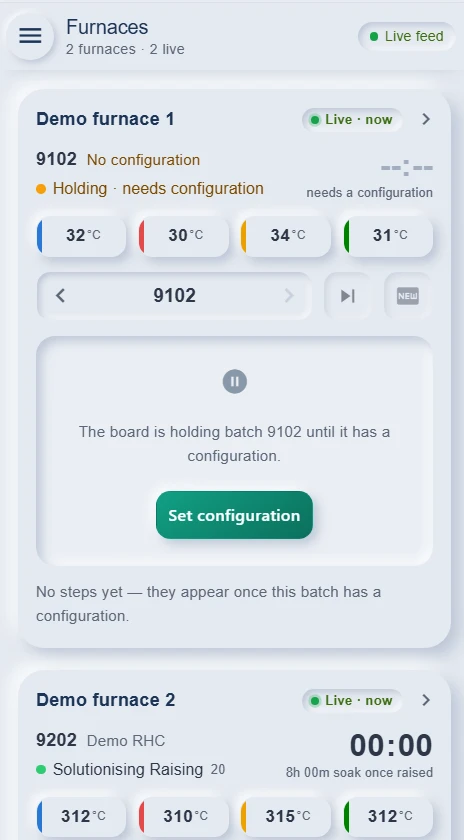
The phone's Furnaces list, 2 furnaces and 2 live: Demo furnace 1 on batch 9102 — No configuration, Holding · needs configuration, four thermocouples at 30–34 °C, and the card's message that the board is holding batch 9102 until it has a configuration, with a Set configuration button — above Demo furnace 2 running batch 9202 on Demo RHC, Solutionising Raising at 310–315 °C with its 8 h soak to start once raised.

Assign the recipe — the board starts on its next poll

Pick a configuration and check its flow and setpoints before they go. They are copied onto the batch as it is assigned, so a later edit of the recipe can never change what this batch runs.

  • Only active recipes are offered, each with the steps and setpoints it would send.
  • From a phone too — the same list, and one tap to set it beside the furnace.
  • Who assigned it is recorded, and printed as the operator on the job card.
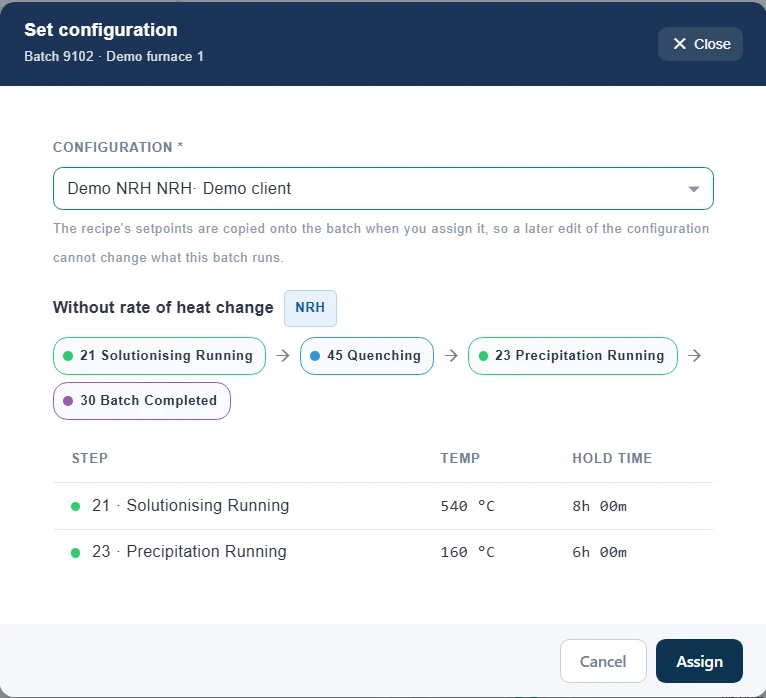
The Set configuration dialog for batch 9102 on Demo furnace 1: Demo NRH for Demo client picked, the note that the recipe's setpoints are copied onto the batch when it is assigned, its flow 21 Solutionising Running → 45 Quenching → 23 Precipitation Running → 30 Batch Completed, and the setpoints it will send — 540 °C for 8 h and 160 °C for 6 h — with Cancel and Assign.
Assigning a recipe to batch 9102 — its flow and setpoints shown before they go to the board.
Furnace boards

Speaks the controller's language — byte for byte

The boards already in your furnaces poll a server and read back one comma-separated frame. Heat Treatment answers them exactly as they expect, so nothing on the shop floor is rewired — and a board that publishes over MQTT is just as welcome.

The board polls, the server answers

Every poll carries the batch id, the thermocouples, the timers, the coil, the water and the step. The reply is the frame the board reads: hold, start with these setpoints, or carry on. It always answers — an error is still a safe hold frame, never a stalled board.

The frame layout is data

Two dialects of the same board send 6 fields and 16. A controller profile lists the fields in order, with width and padding, and a live sample frame beside it — so a new board dialect is a profile, not a programmer.

Or over MQTT

A furnace can report through the plant's broker instead — readings every second, the command published back retained. Same rules, same logs; a furnace answers one way only, so two boards can never write the same batch.

Every exchange, kept verbatim

The raw log holds each poll as the board sent it and the frame it was answered with. When somebody asks why the furnace did what it did at 03:14, the answer is a row, not a guess.

  • Quench recognised from the coil — a raising step reported with the coil off is recorded as quenching, and the rows before it are corrected once.
  • Readings out of range are dropped — a disconnected thermocouple reading 0 or a rail value never reaches a chart.
  • One to many thermocouples per furnace, each named; readings are stored by controller, not in four fixed columns.
  • Operator handshakes the board understands — Generate Id when a batch completes, Skip while one runs, sent until the board acts.
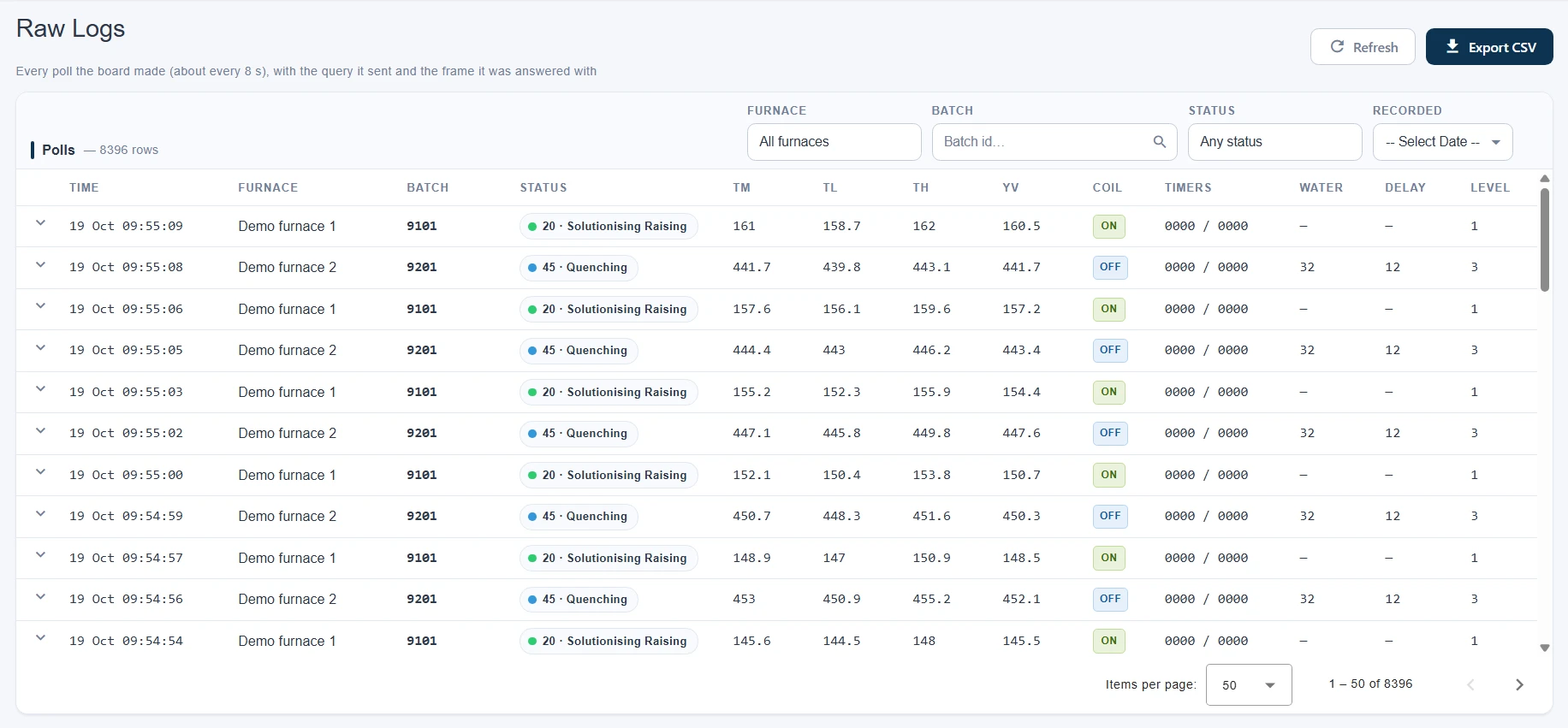
Process → Raw Logs: 8,396 polls, newest first, interleaving Demo furnace 1 on batch 9101 at 20 · Solutionising Raising with the coil on, climbing from 146 to 161 °C, and Demo furnace 2 on batch 9201 at 45 · Quenching with the coil off, falling from 453 to 442 °C with the water at 32 and the delay at 12 — TM, TL, TH and YV on every row, and Export CSV at the top.
Every poll from both furnaces, about every 8 s, as the board sent it — open a row for the query and the frame it was answered with.
Live dashboard

Every furnace on one screen, as it happens

Each furnace is a card laid out the way the furnace is read: what is in it and under which recipe, how long the soak has left, the water and the coil, the trend so far and the steps still to come. Every poll lands on every open screen within the second.

  • Live within the second — a push per poll over one socket; no screen refreshes on a timer.
  • The soak timer as a ring, counting the board's own timer down, with the soak it is raising into named while it climbs.
  • Water, coil, motor and quench delay, with the moment the quench motor first ran stamped on the card.
  • Step flow with real durations — the recipe's time while a step runs, the time it actually took once it is done.
  • Generate Id and Skip, gated as the board needs — offered only when the board can act on them, and confirmed before they go.
  • Reports from the card — the chart, job card and HT record for whichever batch it shows.
  • Any past batch, a click away — previous and next walk the furnace's batches while its temperatures stay live.
  • A soft and a classic look, remembered per browser.
  • Liveness judged by the server's clock, so a PC with the wrong time can neither fake a live furnace nor hide one.
Reports

The compliance record, printed the moment it is needed

Three A4 sheets, rendered on the server from the same samples the dashboard drew — under your company's name and logo, downloaded from the furnace card or the batch list.

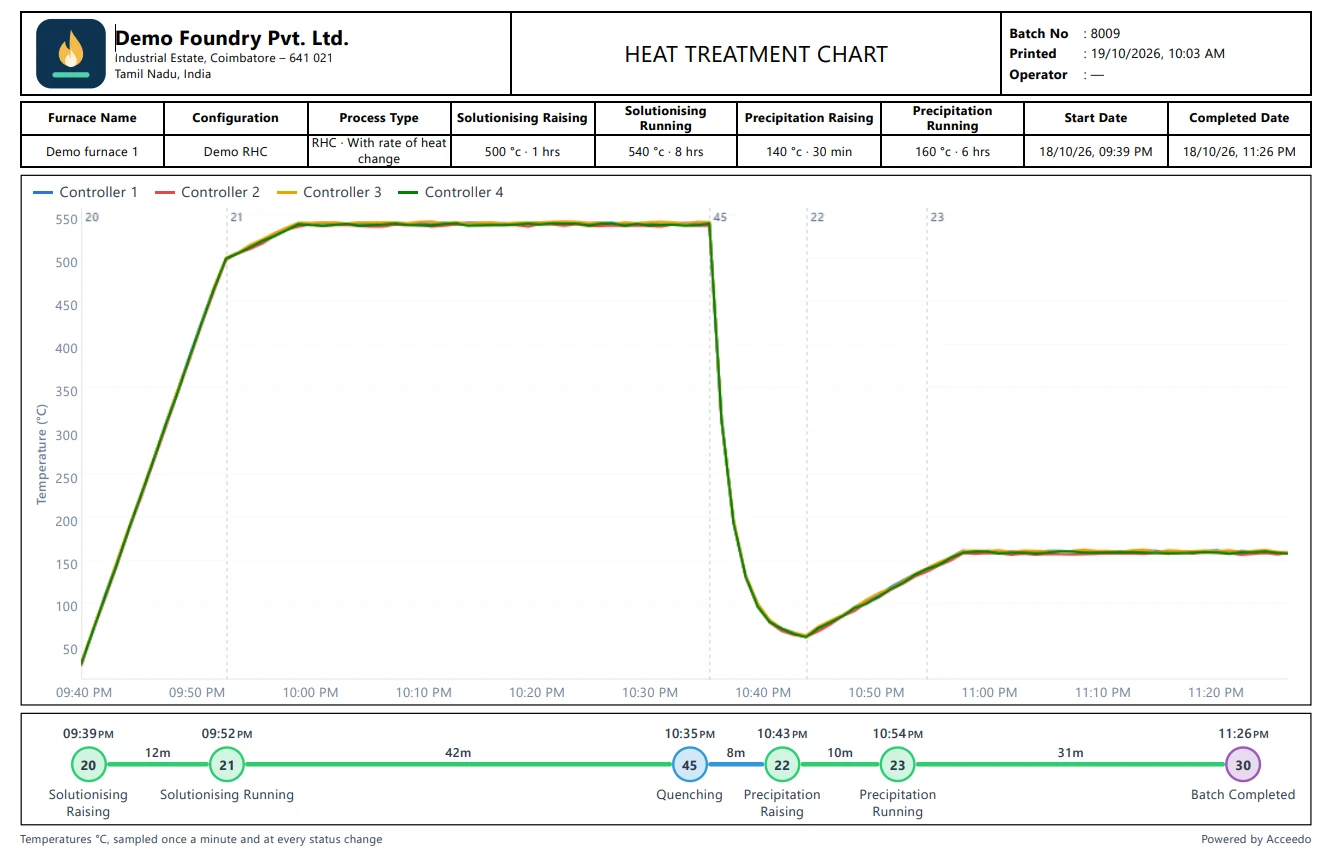
The temperature chart PDF for batch 8009 under Demo Foundry Pvt. Ltd.'s name and logo: Demo furnace 1, Demo RHC and its four setpoints — 500 °C for 1 h, 540 °C for 8 h, 140 °C for 30 min, 160 °C for 6 h — started 09:39 PM and completed 11:26 PM, four controllers' trend with a marker at each step change, and the step flow: 12, 42, 8, 10 and 31 minutes.

Temperature chart

The recipe, the whole trend with a marker at every step change, and the flow with each step's duration.

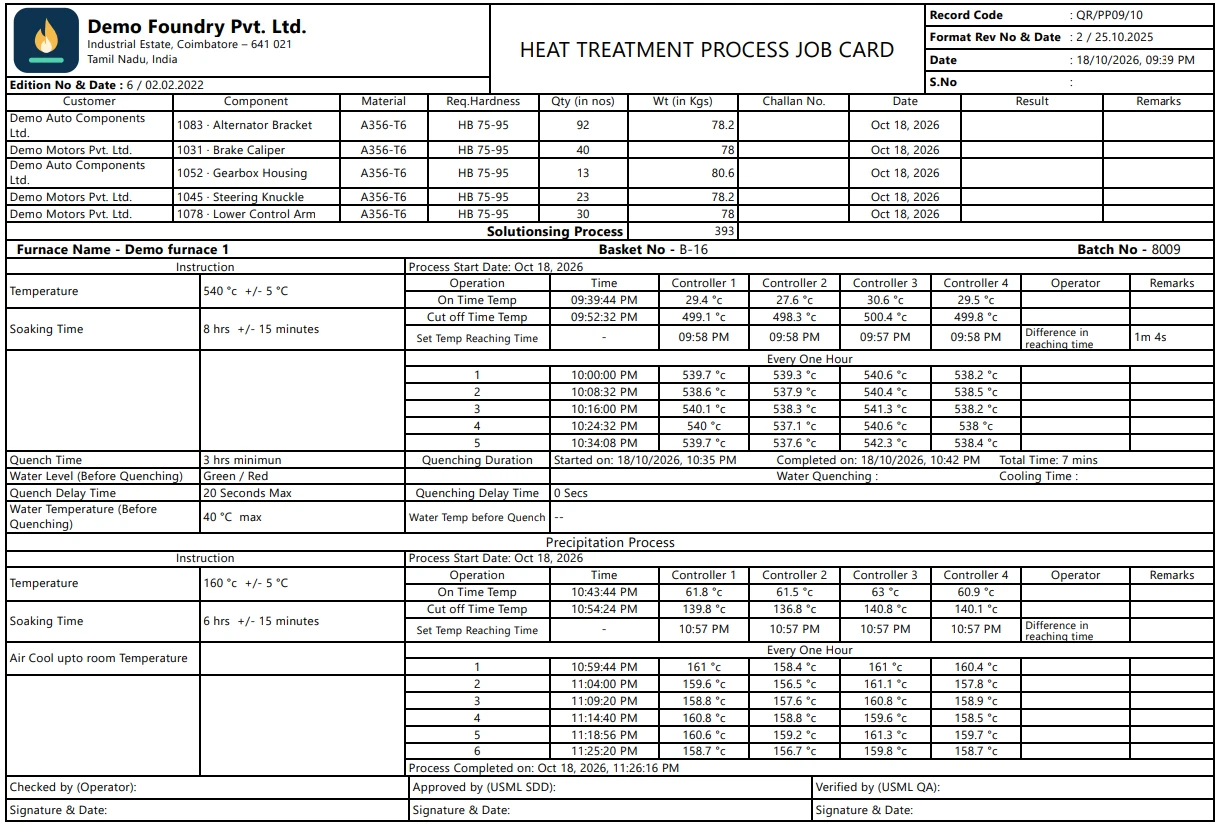
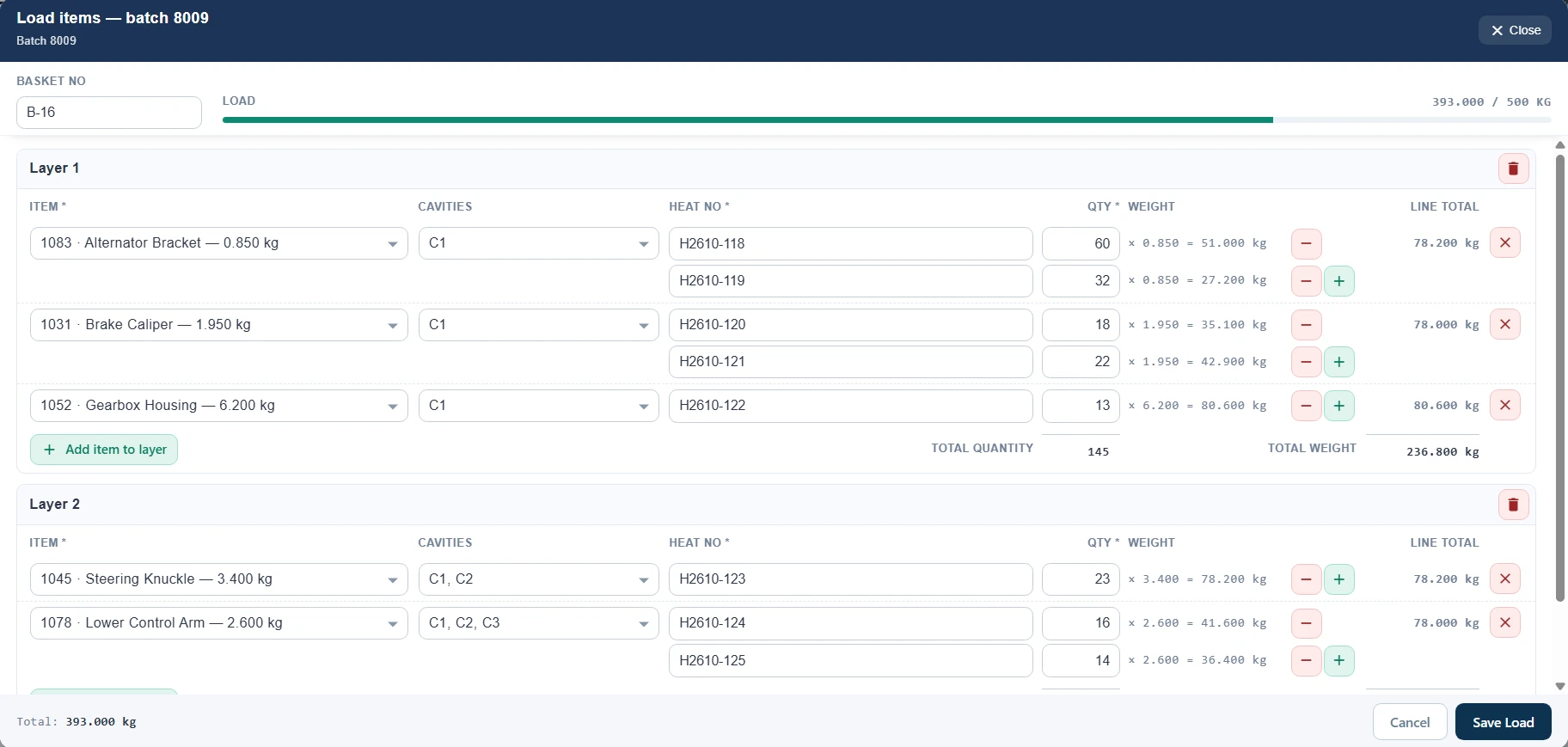
The heat treatment process job card for batch 8009: five components for two customers, 393 pieces in basket B-16, then the solutionising and precipitation records — On time and cut-off readings on four controllers, set-temperature reaching times 1 min 4 s apart, readings at intervals through each soak, and the quench from 10:35 to 10:42 PM.

Job card Optional

Readings across each soak at even intervals, set-temperature reaching times, the quench record, and the load layer by layer on a second sheet.

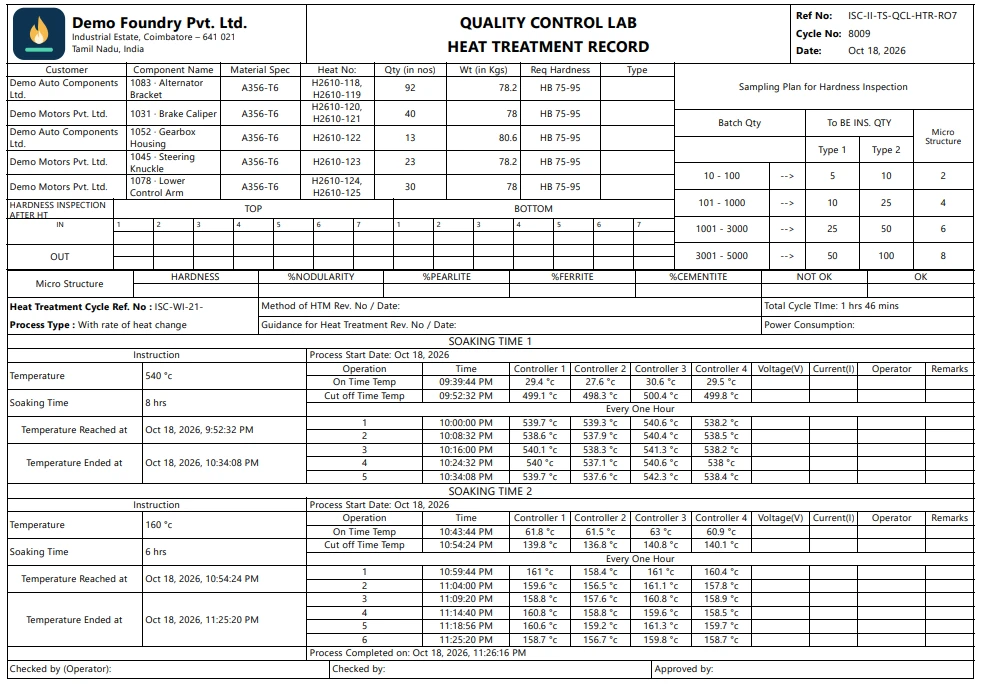
The quality-control lab's heat treatment record for cycle 8009: the five components with their heat numbers, quantities and weights, blank hardness and micro-structure grids for the lab, the sampling plan, and a readings table for each soak — 540 °C and 160 °C — on four controllers.

Heat treatment record Optional

The quality lab's form: a readings table per soaking step, with hardness and micro-structure left for the lab to fill in.

Your customer's format? We'll build it.

The job card and the HT record began as two plants' own paper forms. If your customers or your QA sign a different sheet, send it to us — we are happy to build customer-specific reports, filled from the same logged readings and printed under your name and logo. Talk to us about your format →

  • Printed from the real screen — the server renders the report page itself, so the PDF matches what a signed-in user sees.
  • Each plant chooses its reports — the chart for everyone, the job card and HT record switched on in Company settings.
  • The operator is whoever set the recipe, recorded at the moment it was assigned.
  • Interval readings computed, not typed — each soak cut into equal parts, the coolest raising reading as On time, each thermocouple's first reading within 5 °C of setpoint.
Batches & logs

Every run, every reading, findable

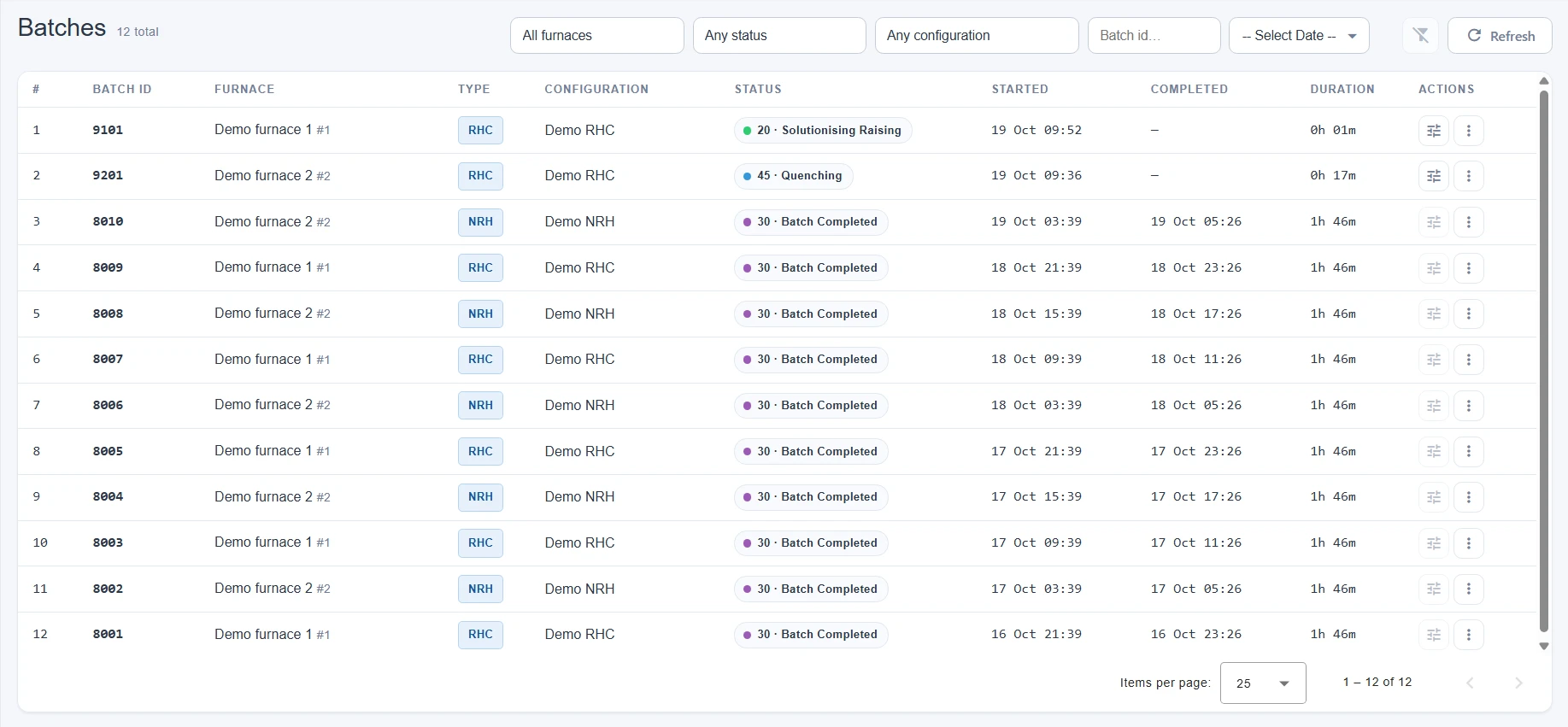
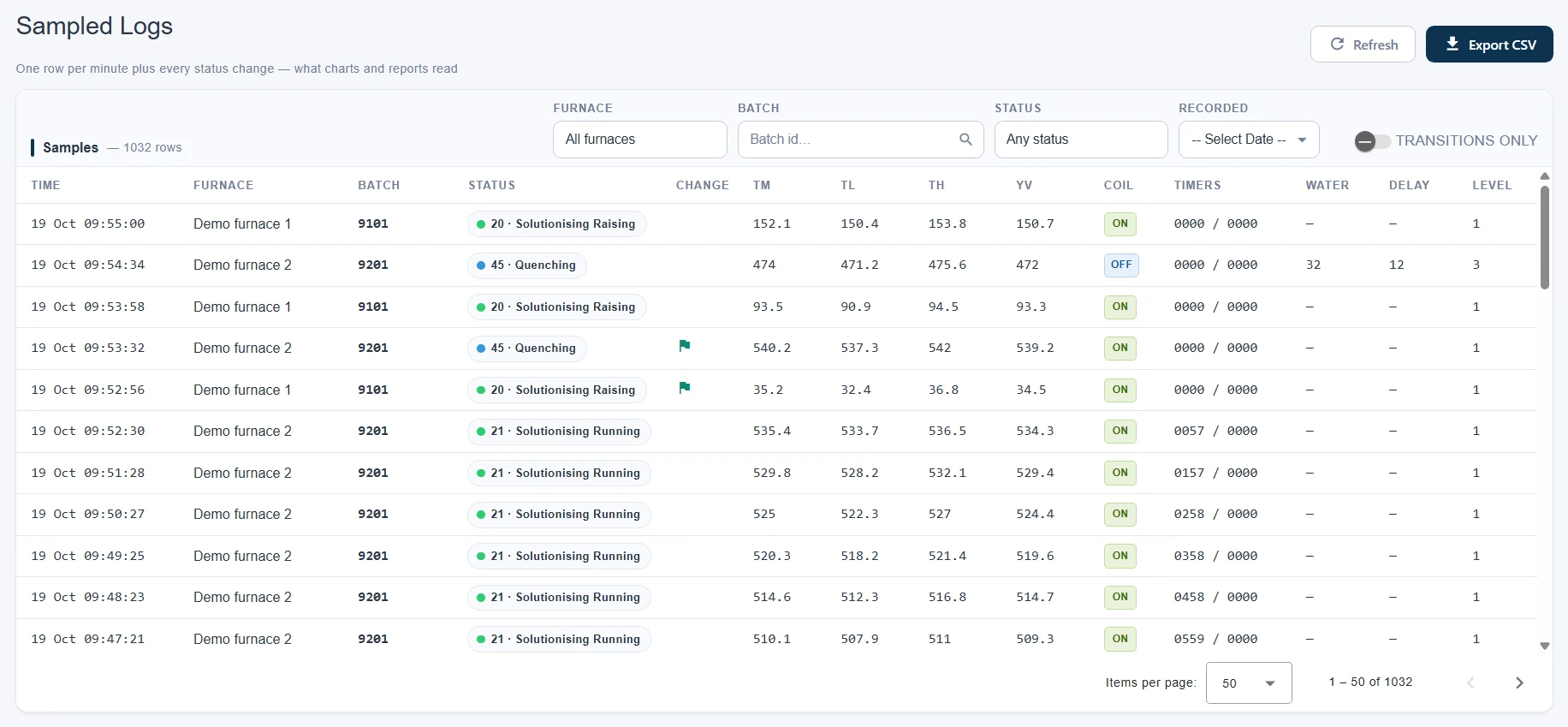
Batches exist because a board reported them — nobody can invent one. Filter them by furnace, status, recipe, id or date; open what was loaded; and read every logged poll or the per-minute samples, exported as they appear.

Phones & step alerts

The furnace in your pocket — and a tap before the soak ends

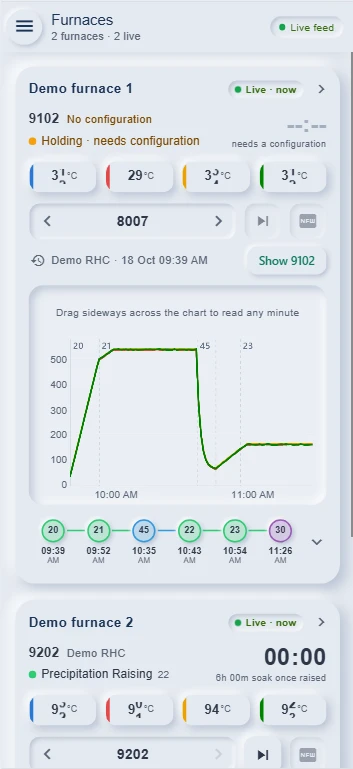
On a phone the dashboard is rebuilt, not shrunk: one card per furnace with the chart and the steps in thumb reach, a batch's recipe set in two taps, and a notification that reaches the quench crew before the timer runs out — in the browser or the Android app.

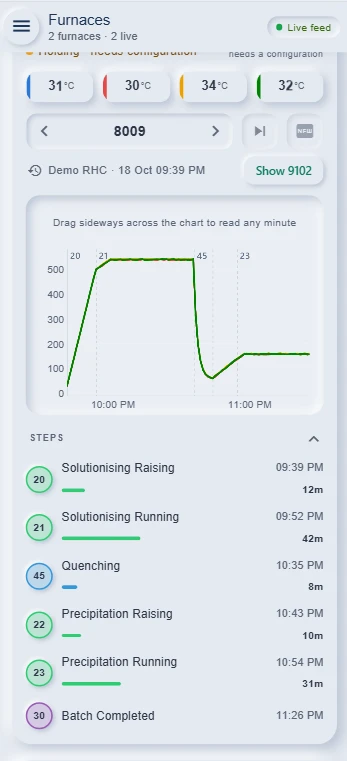
The phone's Furnaces list: Demo furnace 1, live, running batch 9101 on Demo RHC at 23 · Precipitation Running with 05:03 of a 6 h soak left and four thermocouples at 141–145 °C, while its chart shows batch 8009 picked from history — Show 9101 returns to the live one — with the step flow from 09:39 to 11:26 PM underneath.

Every furnace, one scrollLive temperatures, soak time and the chart, per card.

A phone card with its steps opened under the chart: 20 Solutionising Raising from 09:39 PM for 12 min, 21 Solutionising Running from 09:52 PM for 42 min, 45 Quenching from 10:35 PM for 8 min, 22 Precipitation Raising from 10:43 PM for 10 min, 23 Precipitation Running from 10:54 PM for 31 min, and 30 Batch Completed at 11:26 PM — each with a bar for how long it took.

The steps, unfoldedStart times and durations, tapped open under the card.

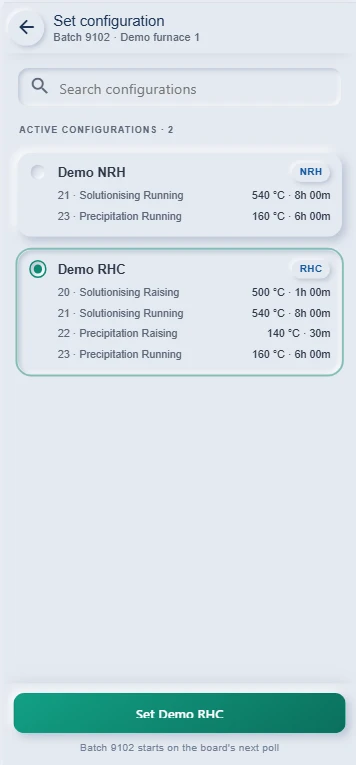
Set configuration on a phone for batch 9102 on Demo furnace 1: a search box and the 2 active configurations with their setpoints — Demo NRH (540 °C for 8 h, 160 °C for 6 h) and Demo RHC, selected (500 °C for 1 h, 540 °C for 8 h, 140 °C for 30 min, 160 °C for 6 h) — and a Set Demo RHC button: batch 9102 starts on the board's next poll.

The recipe, from the floorPick it beside the furnace; the board starts on its next poll.

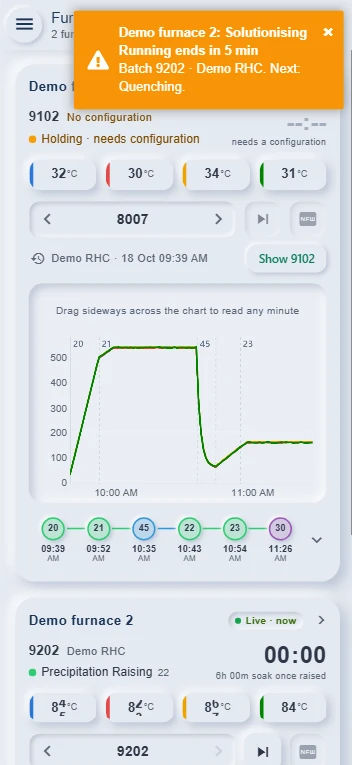
A step alert arriving on the phone's Furnaces screen, in an orange banner across the top: Demo furnace 2: Solutionising Running ends in 5 min — Batch 9202 · Demo RHC. Next: Quenching. Beneath it, Demo furnace 1 holding batch 9102 while its chart shows batch 8007, and Demo furnace 2 at 22 · Precipitation Raising.

Told before it endsOn the open screen, and as a notification on the phone.

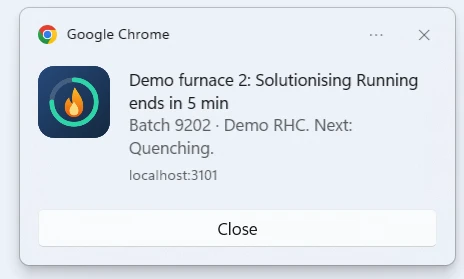
A Windows notification from Google Chrome with the Heat Treatment flame icon: Demo furnace 2: Solutionising Running ends in 5 min — Batch 9202 · Demo RHC. Next: Quenching. — from localhost:3101, with a Close button.
And on the deskComputers that turned step alerts on get the same words as a notification from the browser, over whatever window is in front.

Before a step ends, or when it does

Per status: warn N minutes before its timer runs out, tell the shift when it finishes, or both. A step the board does not time is counted from the recipe instead.

The Android app

The same screens in an app that asks which server once, then opens straight to the furnaces — with alerts that arrive even when it is closed.

Once per batch and step

Every alert is recorded before it is sent, so restarts and racing polls never send it twice — and the board's reply never waits for one.

Log corrections

When the logging went wrong — fixed, flagged, and reversible

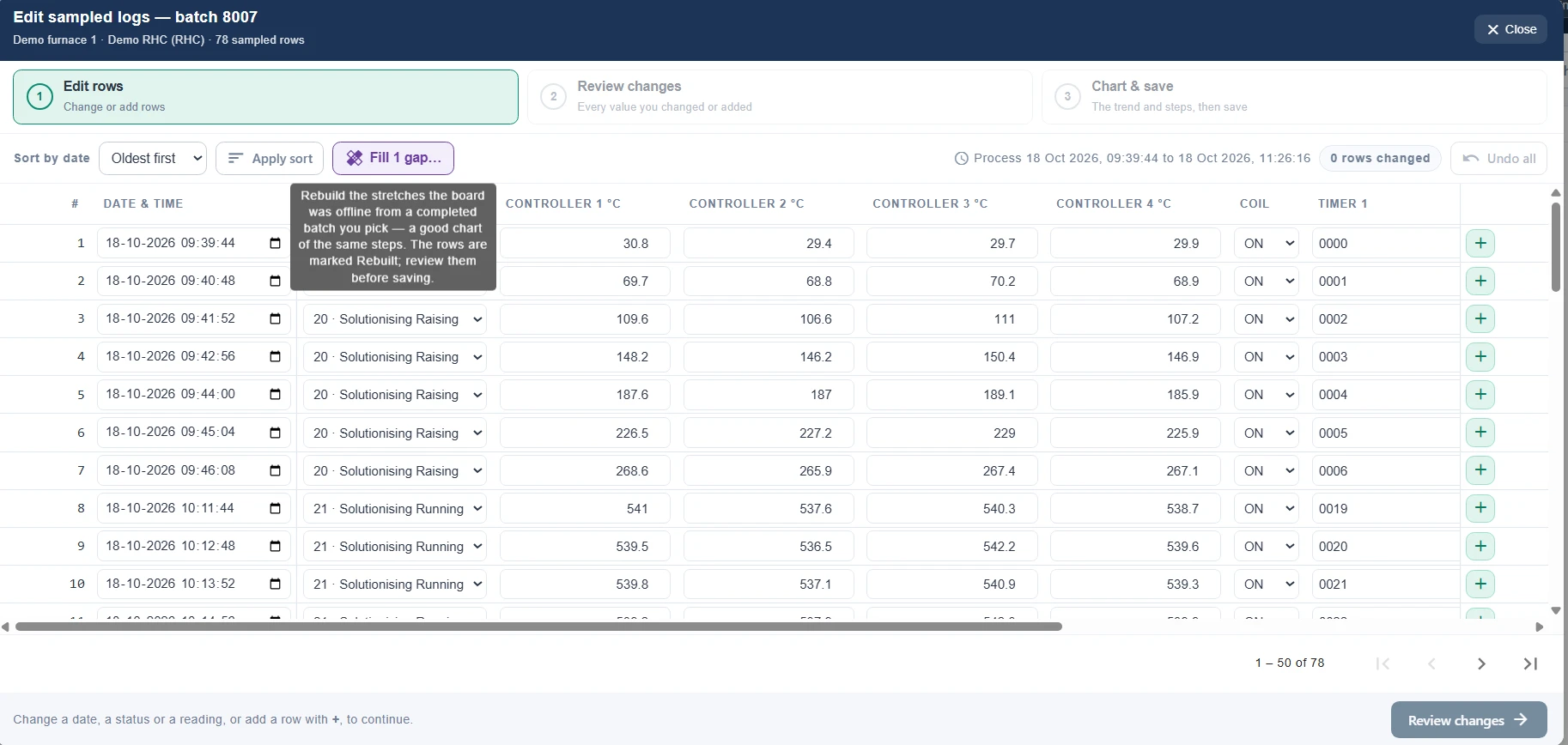
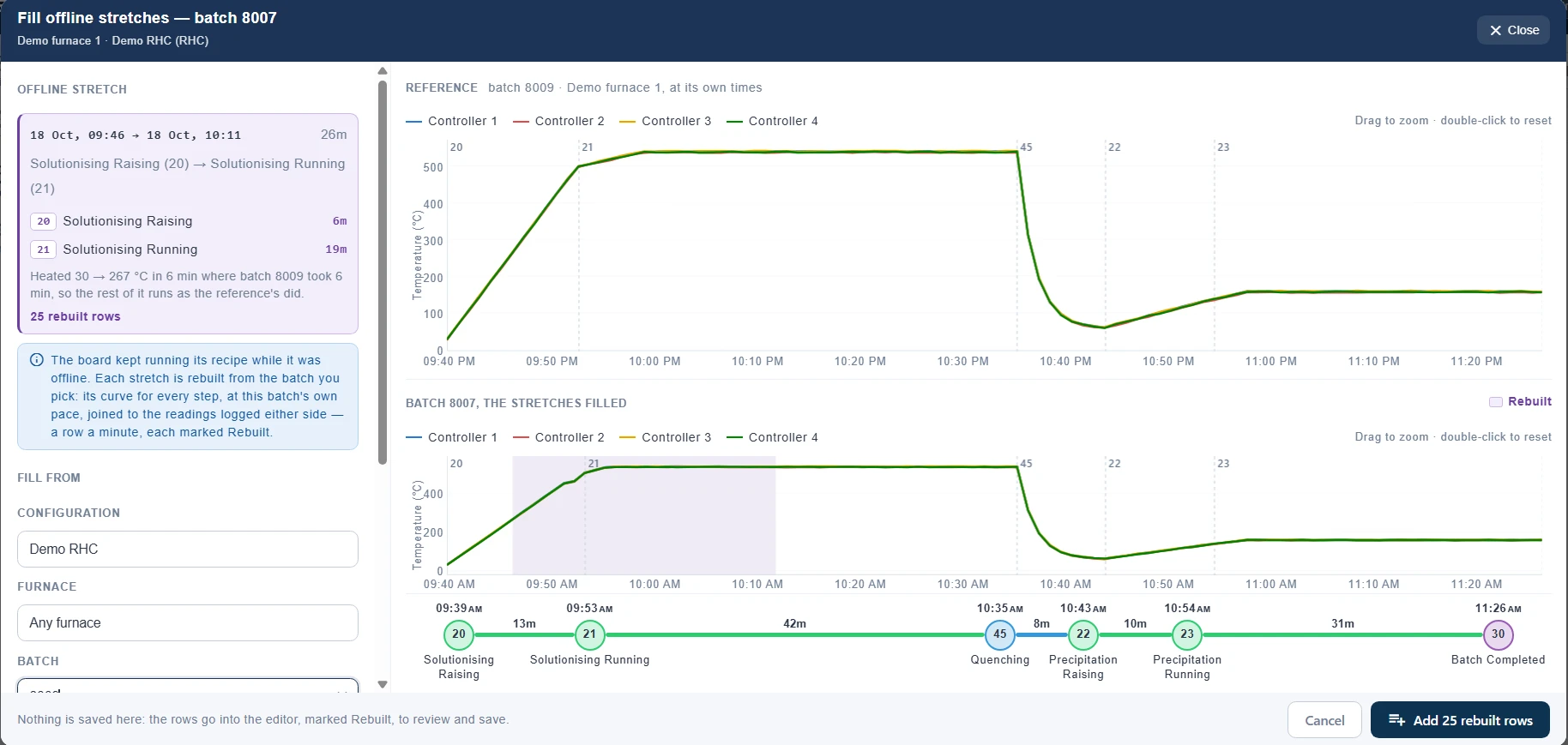
A board drops off the network mid-soak; a batch id never got reported; a reading is plainly wrong. Each of these has its own tool, every change is attributed, and one click always puts back the logs exactly as the board recorded them.

A run that left no record

A board counts its batch id up by one each run, so a skipped id is a run nobody can see. Missing Processes lists them per furnace with the batches either side, and a gap can be fed from a completed run.

A batch whose logging failed outright

Replace logs copies a completed run of the same recipe onto its own start time, once you have checked the picked run's chart and steps. The batch's own rows are set aside, never deleted.

  • The originals are never lost — the first change sets the board's own rows aside, and Use original logs restores those very rows.
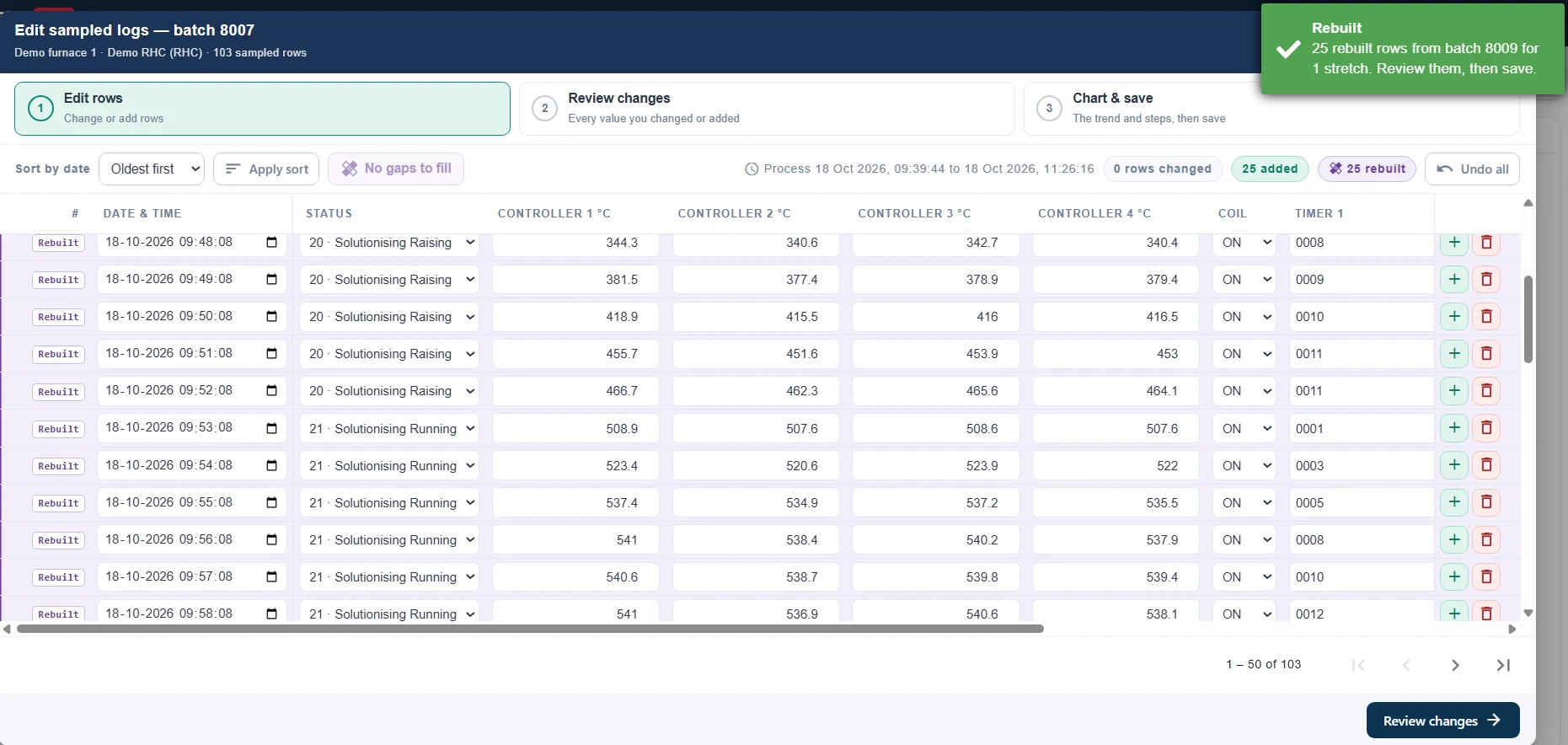
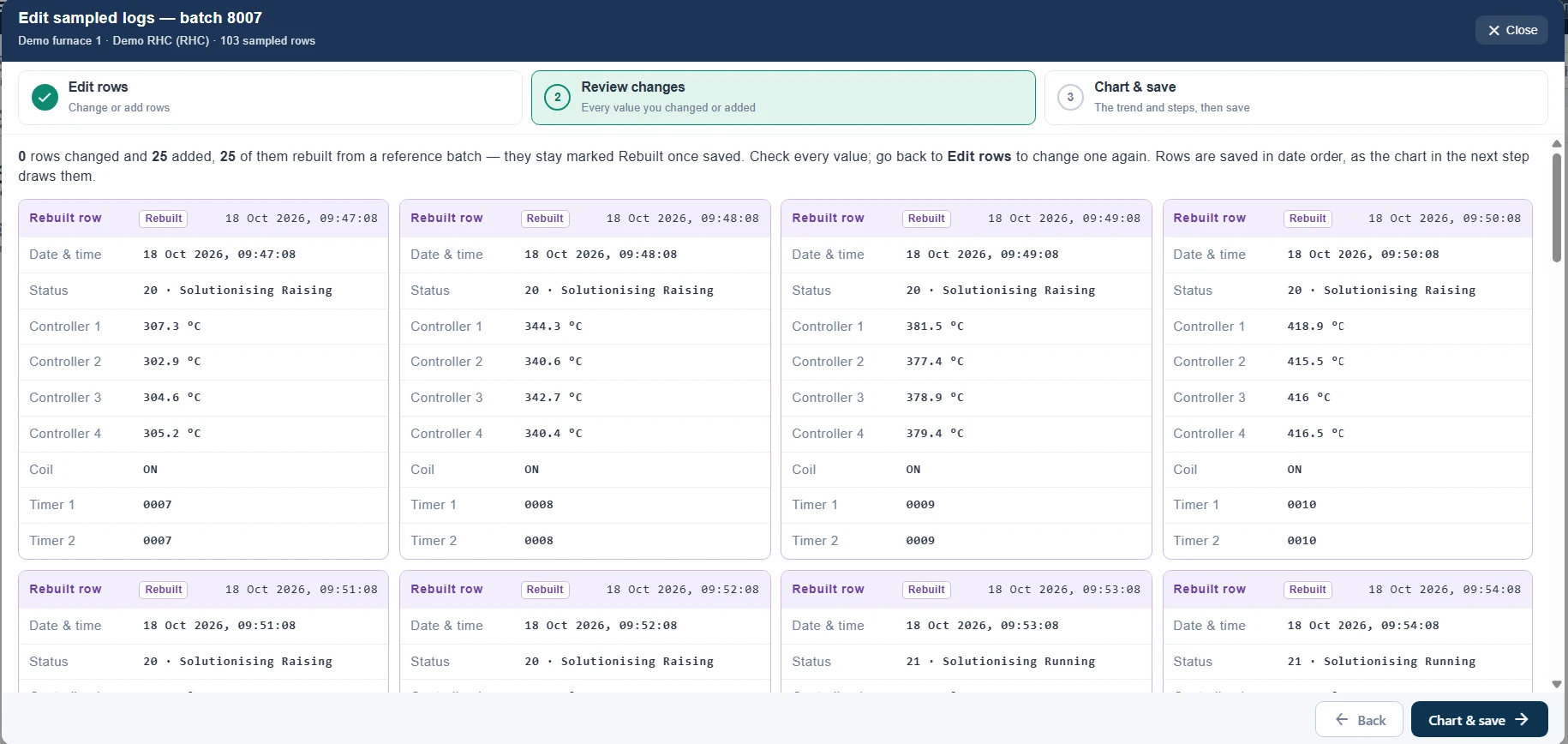
  • Rebuilt rows stay rebuilt — flagged on the log screens and in every export, even after a later hand edit.
  • Nothing lands in the future, and nothing is written over a batch that is still running.
  • Who, when and what — every replacement, edit and fill is a record with its counts.
At a glance

The short version

Furnace boardsPolling over HTTP in the controller's own reply frame, or MQTT through the plant's broker. Always answered; a fault is a safe hold frame.
Frame layoutController profiles: ordered fields with width and padding, setpoints keyed by step, a live sample. The board's replies are a master too.
ThermocouplesOne or more per furnace, named; readings outside the furnace's range discarded.
Process flowsStatuses, flows and recipes as data. RHC and NRH shipped; any plant's flow configurable, including its quench code.
LoggingEvery poll kept verbatim with its reply; one sample a minute plus every step change for charts and reports; the latest reading per furnace for the dashboard.
Live dashboardAll furnaces, pushed per poll: temperatures, soak timer, water and coil, the trend, the step flow, handshakes, reports.
PhonesA phone build of the dashboard in any browser, and an Android app with its own server picker.
Step alertsBefore a step ends and when it finishes, per status; browser push and Android notifications, once per batch and step.
ReportsTemperature chart, job card with the load, heat treatment record — A4 PDF under the company's name and logo. Customer-specific formats built on request.
CorrectionsFill offline stretches from a reference batch, edit or add readings, feed a missing batch id, replace a batch's logs — all flagged, attributed and reversible.
ExportsExcel and CSV exports of batches and logs; a full database dump.
Access controlPer-role permissions per screen, split into view, add, edit, delete and export.
DeploymentA Windows installer: one server PC with its own database, clients on every other desk, everything on the plant network. 30-day trial; licensed per server PC.

Watch a batch run on your own furnace

Install the 30-day trial on a PC on your plant network, point one furnace's controller at it, and watch the next batch log, chart and print itself. We will walk through it with you.

64-bit Windows 10 or 11 · version 1.1.0 · 180 MB
One PC on the plant network, no internet needed on site.
If SmartScreen warns, choose More info, then Run anyway.